Twelve demos that follow practice types, not one generic clinic
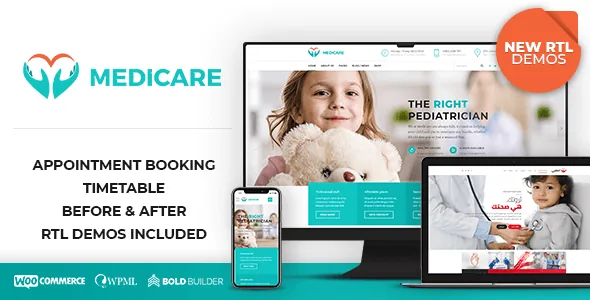
BoldThemes does not present Medicare as a single medical layout with colour variants. The vendor's demo list runs through named practice types: clinic, doctor/cardiology, surgery, dental services, optometrist, medical laboratory, general hospital, cosmetic surgery, pediatric clinic, single-page veterinary practice, psychiatrist, and physiatrist or chiropractic. Three RTL demos sit alongside that English set.
The single-page veterinary demo is the informative entry. Most of the roster implies a multi-page site with service pages, a team section and an appointment or contact route; the veterinary build is described as one page, which points at a small practice that wants the entire pitch in a single scroll. If your project resembles that practice, the demo shows what the theme's elements look like compressed onto one URL rather than spread across a menu.
The rest of the demos divide by specialty because the content differs more than the styling does. A dental or cosmetic surgery practice sells transformation, so it leans on before/after pairs and testimonial weight. A laboratory publishes test menus and turnaround times. A hospital carries department structure and visiting hours. The demo set is the vendor's answer to those differences, and choosing a demo is really choosing which content pattern you can adapt.
The elements that do clinical work
Medicare's element library reads like a list of what a practice website publishes. The vendor names a before/after images element, a timetable schedule, working hours, a price list, a service element, counters with and without icons, a Google Maps element, a video element and a slider.
Some of these map directly onto a specialty. The vendor's summary states plainly that before/after images suit dental clinics, cosmetic surgery and similar practices — the audience for that control is anyone whose service is best shown as a comparison rather than described. A timetable schedule and a working hours element answer separate questions: the schedule is for sessions, clinics or practitioners running to a grid, while working hours is the simpler opening-times block for a reception page or footer.
A price list and a service element cover the menu side of a practice site, and the Maps element places a clinic on a map without an extra plugin. What the vendor description does not publish is how any of these are configured — whether the timetable is maintained as theme content or through the bundled Timetable and Event Schedule plugin, and how a price list item is structured. Treat the demos as the place to see the output and the documentation as the place to check the setup.
Cost Calculator and price list: quoting treatment costs
Among the bundled plugins is BoldThemes' Cost Calculator, which the vendor links to a separate marketplace listing and describes as included with the theme. The relevant pairing is with the price list element: one shows what a practice charges, the other lets a visitor assemble a set of choices into an estimate.
For a clinic, the difference matters to how much work the website absorbs. A price list is a reference page. A calculator can have a visitor select options and see a total before contacting reception — useful where treatment costs vary by combination, such as cosmetic procedures or dental work plans.
Be careful about what the evidence actually settles. The vendor calls it customizable and included for free; the description does not explain the form fields, whether a submission reaches the practice by email, or how the calculator interacts with the booking feature mentioned in the summary. Those are the questions to answer before you promise a client a self-service estimator.
What Bold Builder's page-level controls change
Medicare's editor is Bold Builder, a drag-and-drop backend builder by the same developer, also listed as included. It is not a block-editor or Elementor theme, and the marketplace attribute for Gutenberg optimisation is marked No — which simply means the vendor does not declare a block-editor-optimised build, not that WordPress's editor is unavailable to you.
The controls that shape day-to-day editing are less about drag and drop than about scoping. The vendor lists an override option that changes settings for an individual page rather than site-wide, so a single landing page can use its own layout while the rest of the site keeps the global configuration. It also lists time-limited content appearance, which lets a block or section sit on a schedule, and hide/appear rules tied to screen resolution.
There is also clipboard functionality described as copy and paste from one page to another, or from one website to another. For a group running several practice sites, that turns a promotional section into something you build once and paste where it is needed. None of this is described as a front-end editor, so plan on working inside the WordPress admin.
Global settings, headers and the shop declaration
Theme options run through the native WordPress Customizer, according to the vendor, which keeps the site-wide controls in a place WordPress users already know. Headers come in multiple styles with a sticky option, and the mega menu can hold promotional content — a large dropdown that shows a service highlight or a campaign beside the links, rather than only a list of pages.
Medicare is marked Widget Ready and the backend editor list includes left or right sidebar placement plus a custom footer. It is also listed as child theme ready and translation ready, with WPML named among supported plugins alongside WooCommerce, W3 Total Cache and Yoast.
The WooCommerce declaration covers versions 6.x through 9.x in the attributes recorded on 3 November 2026. For a practice that sells something — skincare products, supplements, gift vouchers — the shop support means the storefront can live in the same install as the appointment content. It does not mean a shop is configured or styled out of the package; that is your build. The same restraint applies to the WPML and Yoast listings: they mean the theme declares support, not that a multilingual or SEO setup is finished.
Demo import and the images you cannot keep
The package list includes Bold Themes WordPress Importer, described as a one-click demo import tool. Importing a demo gives you its pages, content and settings as a working starting point instead of a blank install — the practical value being that the clinic, dental or cosmetic surgery layouts arrive assembled. The vendor notes that one demo is explicitly one page, so on that import you get a single long layout to edit.
One licence note belongs in your plan before you fall for a demo: the vendor states that images on the theme demo sites are not licensed for third-party use on production sites, and that you must license them separately if you intend to use them.
That is a real cost line for a healthcare project, where the photography carries the credibility. Replacement images also change the design's balance, so budget time to swap media and re-check the before/after pairs, hero sections and team blocks against your own files rather than assuming the demo proportions hold.
Where the evidence stops
The vendor summary lists medical appointment booking among the theme's features, and the elements list includes a timetable schedule, but the description does not explain how a booking request reaches the practice, whether it writes to a calendar, or whether it relies on a contact form. Contact Form 7 is bundled, which covers enquiry forms; that is not the same as a confirmed booking system. If appointments are central to your build, this is the first thing to verify against the documentation and a demo you can log into.
The marketplace listing recorded version 2.2.1 as the latest at the time of observation, with the vendor's WordPress compatibility spanning 6.0.x to 7.0.x. Those figures move, and they are declarations from the listing rather than results from running the theme on a particular host.
The demo roster is the clearest guide to fit: clinic and general hospital builds for multi-department sites, single-practitioner demos for a doctor, dentist, optometrist or psychiatrist, the one-page veterinary layout for a small practice, and three RTL demos for a right-to-left audience. If your practice type is on that list, the theme's elements already assume your content. If it is not, you are buying a healthcare-shaped framework and adapting it.
Questions & answers
Is Medicare built on Elementor or the block editor?
Neither. The vendor's editor is Bold Builder, a backend drag-and-drop builder by the same developer and listed among the included plugins. The marketplace attribute for Gutenberg optimisation reads No, which means the vendor does not declare a block-editor-optimised build; it does not mean the WordPress block editor is unusable.
Does Medicare include a working appointment booking system?
The vendor summary lists medical appointment booking as a feature, but the description does not explain the mechanics — whether requests write to a schedule, notify a practitioner, or run through a bundled form. Contact Form 7 is included for enquiry forms, and a timetable schedule element exists. Confirm the booking flow in the documentation before relying on it.
Can I use the demo photos on my own clinic site?
No, not under the theme licence. The vendor states that images on the demo sites are not licensed for third-party use on production sites and must be licensed separately. Plan for your own photography or licensed stock, and re-check layouts — particularly before/after pairs — once your images replace the placeholders.
How many RTL demos come with the theme?
The vendor lists three new RTL demos alongside the twelve English practice demos. The description does not detail which practice types those RTL demos represent, so check the live demo site if right-to-left layout is a requirement.