Brands as a filterable taxonomy, not a decorative badge
Most electronics stores sell the same category of object across a dozen manufacturers, and shoppers arrive already knowing which one they want. MadrasThemes built for that behaviour. The vendor's description says the theme adds a Brands custom taxonomy so products can be assigned to brands, and that WooCommerce's layered filter has been extended to work with it. In practice that means a headphone listing can be narrowed by manufacturer in the same sidebar that already narrows by price and attribute, rather than forcing you to build a separate brand landing page for every label you carry.
The vendor also lists additional widgets for filtering by brand, so the brand control is available as a widget rather than only as a hard-coded shop element. If your catalog is genuinely single-brand, this is a feature you will simply leave empty; if it spans several, it is the reason to look at this theme before its visual style.
Those claims come from the marketplace description. They describe what the theme is designed to provide, not a guarantee about how the filter behaves with your plugin mix.
Custom product labels sit alongside the sale badge
WooCommerce gives you one default flag: On Sale. MediaCenter adds a labelling system the vendor describes as letting you tag products to various custom labels in addition to that default. A "New Arrival", "Clearance" or "Editor's Pick" tag printed on the product tile is a merchandising decision made per product rather than a site-wide setting, which suits a catalog where stock rotates on different schedules.
Keep the distinction between the three structures clear when you plan content: brands group products by maker, categories group them by type, and labels are a promotional overlay that can change next week without moving anything in the catalog tree. Labels are the cheapest thing to experiment with, and the one most likely to be abused until a shop page looks like a sticker album. Decide a short vocabulary before you start tagging.
Choosing a shop layout: column count and sidebar
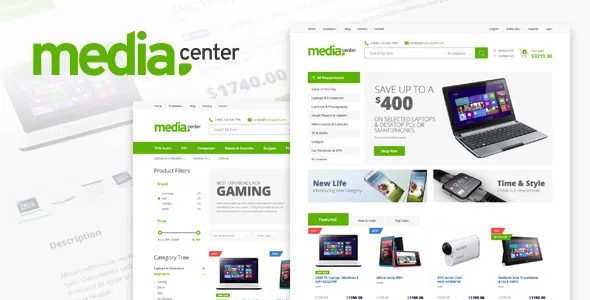
The vendor's demo list is unusually specific about listing layouts. Sidebar layouts are named for the number of products in a row — three, four, or two — and full-width layouts for six, five, four or three. Taken with the separate claim that products can be displayed in six different ways, the choice is not just "sidebar or no sidebar" but how much catalog a visitor sees before scrolling.
That is a real trade-off for electronics. Dense grids suit accessories, cables and components where shoppers compare thumbnails quickly. Fewer, larger tiles suit televisions and laptops where a photo carries most of the information and the price tag needs room. Because the vendor ships importable dummy data and pre-built demo pages, you can import the layouts and compare them with your own photography rather than judging them from the vendor's sample images.
The demo also lists product types you can style against: simple single products, variable products, external affiliate links, out-of-stock items and on-sale items. An out-of-stock state is easy to forget until it appears on a live listing.
Wishlist and comparison depend on a named plugin
The vendor says the theme provides wishlist functionality so visitors can save products to come back to, and product comparison with the help of the YITH WooCommerce Compare plugin. The comparison feature is therefore not purely theme code; it is an integration with a third-party plugin that has its own settings, its own update cycle and its own table of products customers can line up side by side.
That is normal for WooCommerce theme shops, but plan for it. Comparison is exactly the feature shoppers on an electronics store expect — a spec table across three candidate laptops is the reason someone stays on your site instead of opening a search engine. Follow the vendor's documentation for how the plugin is configured and which fields the comparison table draws from, and test it with your own attribute set before launch. The changelog shows the YITH Compare plugin being updated in the latest listed release, so the pairing is maintained rather than abandoned.
The wishlist, by contrast, is described as a theme feature and the demo list includes a dedicated Wishlist page alongside Product Comparison, Login/Register, Track your Order, Cart Summary, Checkout and My Account.
WPBakery for pages, Revolution Slider for banners
Storefronts built on this tier of theme usually configure the shop from the Customizer and build the marketing pages in a builder, and MediaCenter follows that split. The vendor ships a customised version of WPBakery Page Builder (the line formerly sold as Visual Composer) alongside Slider Revolution, and lists theme options as the place where broader appearance decisions happen: two header styles, two menu styles, a responsive megamenu, six preset colours, logo and favicon upload, and fields for custom CSS and custom JavaScript.
The builder matters most for category landing pages and campaign pages — a back-to-school section with a hero, a featured product grid and a brand strip. The vendor's list of builder elements includes WooCommerce shortcodes for recent, featured, best-selling, sale and top-rated products, products by category and specific products, which means those sections can be assembled from live data instead of hand-picked images.
Two smaller things worth knowing. Translation is handled with supplied .po and .mo files and the theme is described as WPML-ready, and the vendor lists Google Web Fonts and Font Awesome icons as integrated. Font and icon breadth is a nice-to-have, not a reason to choose a theme.
Declared compatibility and the details that shape a decision
As observed on the marketplace listing in November 2026, the compatibility fields declare WooCommerce 9.x, 8.x and 7.x, WordPress 6.8.x back to 5.9.x, WPBakery Page Builder and Ecwid, with Firefox, Safari, Opera, Chrome and Edge named as browsers. The files list names PHP, CSS, JavaScript and Ecwid CSS files. These are vendor declarations made at a point in time, not the result of running the theme against your PHP version and plugin set.
Three details are worth flagging before you commit. Gutenberg Optimized is recorded as No; that attribute describes whether block-editor layouts are styled as a priority, not whether the block editor exists in WordPress, so treat WPBakery and the theme options panel as the surfaces this theme was designed around. The vendor states that layered PSD assets are included in the offer but not in the download package, available instead by raising a ticket — useful if a designer wants the source artwork, not something to build a workflow on. And the marketplace records a demonstrably older build cadence than the latest version line suggests: check the changelog for what the most recent release actually changed before you plan an update on a live store.
Ecwid appearing in the compatibility and file lists is notable for a WooCommerce theme, and the vendor's description does not explain how the two store platforms coexist on one install. If you run Ecwid deliberately, confirm the arrangement in the documentation rather than assuming the theme replaces WooCommerce with it.
Whether the merchandising fits your catalog
The durable value here is the catalog plumbing: brands as a filterable taxonomy, labels that live outside the category tree, listing layouts tuned for dense and sparse products, and comparison pages that acknowledge how people buy electronics. The visual design can be replaced; those structures are what you would have to rebuild on a theme that treats a shop as a page with products on it.
What you cannot confirm from the listing is how the filter, comparison and wishlist behave on your stack, and how much of the demo's presentation depends on imagery you would need to license yourself. Import the demo on staging, load a representative slice of your catalog — including an out-of-stock item and a variable product — and walk the listing filters as a customer would.
Questions & answers
Does the theme support the block editor?
The marketplace records Gutenberg Optimized as No. That field describes whether the theme styles block-editor layouts as a priority, not whether the block editor is unavailable. The vendor's described workflow is WPBakery Page Builder plus a theme options panel, so plan your pages around those surfaces.
Is product comparison built into the theme?
The vendor describes product comparison as provided with the help of the YITH WooCommerce Compare plugin. Expect to configure that plugin, and to test its comparison table against your own product attributes before launch.
Can a store filter products by brand?
Yes, according to the vendor. The description states a Brands custom taxonomy is added for products and that WooCommerce's layered filter has been extended to work with it, with additional widgets for filtering by brand.
Do the layered PSD source files come with the theme?
The vendor states the layered PSD assets are part of the offer but not included in the download package, and are available by raising a support ticket. Treat them as optional artwork rather than a file you can rely on having.