The client area is the part most hosting themes leave alone
A hosting company runs two surfaces. One is the marketing site that sells packages; the other is the client area where customers log in, pay invoices and manage domains. Most WordPress themes only address the first. MaxHost's vendor description puts its weight on the second: it ships separate WHMCS templates, matched to named WHMCS releases, that you install on your WHMCS installation rather than inside WordPress.
The vendor lists those templates as compatible with WHMCS 9.0.x and with 8.13.x, 8.12.x, 8.11.x, 8.10.x, 8.9.x and 8.8.x, with a longer compatibility table running back to 8.0x. That version matching is the practical detail. A WHMCS template is a set of template files tied to a particular release, so you check your WHMCS version first and then use the matching folder, rather than installing one template and hoping it fits.
The second claim in the same section is the vendor's own wording rather than a verified fact: MaxHost says you do not need the WHMCS Bridge plugin, and that a WHMCS licence is all you require besides the theme. Whether that holds on your install depends on how your WHMCS is deployed, so confirm it in the documentation before you plan around it.
What the portal templates dress
According to the marketplace description, the WHMCS templates cover buying and selling hosting packages, domains, SSL certificates, website security services, SEO tools, Weebly website builders and billing functionality. Read that as a statement about the client-area screens the templates style, not as extra commerce features MaxHost adds to WordPress.
This is where the two-surface idea becomes concrete. Package pages, cart and checkout on the WordPress side can be built in whichever builder you prefer. The customer's recurring relationship — invoices, renewals, upgrades — stays in WHMCS, and the template decides whether that area looks like part of the same brand or like a default install.
A host selling through WordPress alone still gets a working theme, but the WHMCS templates go unused. The vendor also names the GoDaddy Reseller Store plugin at 2.2.6, which is the alternative route for companies selling through a reseller programme instead of their own billing platform.
Elementor or WPBakery, and the Elementor Pro question
The vendor says you can build with either Elementor or WPBakery Page Builder, both drag-and-drop, both with a live preview before changes go live. That is a genuine fork, because the choice determines who can edit the site after launch and what the demo pages owe their layout to. The feature list notes the preview pages are ready for one-click installation using WPBakery, so the shipped demo content follows that builder.
A separate answer in the description addresses plugin cost: the vendor says you do not need Elementor Pro, because its custom widgets work with the free version of Elementor. If that holds, the theme's own widget set is the piece that would otherwise push you toward a Pro licence.
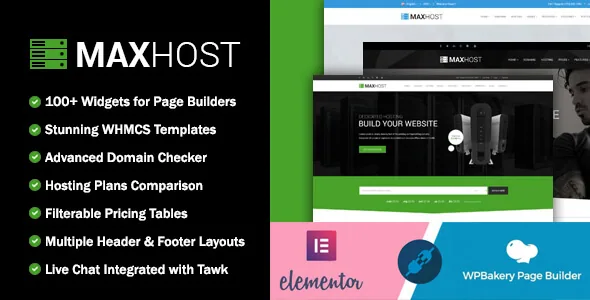
The surrounding component counts support the same picture. The feature list claims 60+ custom shortcodes and 60+ custom widgets for page builders, alongside Revolution Slider, a mega menu and multiple header and footer styles. Those are layout pieces to arrange; they set how much of a page you assemble from prebuilt elements rather than writing yourself.
Shop, newsletter and the declared pieces around them
WooCommerce is described as 100% ready, and the compatibility list is unusually long — the vendor lists WooCommerce 11.x and 10.7.x through the 5.0x range in the description, while the marketplace compatibility attributes name the 6.x, 7.x, 8.x and 9.x series. A list that wide suggests a theme that has stayed in maintenance rather than one tested combination, so match your actual WooCommerce version against it instead of reading the range as a guarantee.
Around the store, the named integrations are Aweber for newsletter subscriptions, WPML for multilingual sites and Revolution Slider for banners. The changelog gives a small piece of evidence for Aweber: version 9.7.5 records a fix for a subscriber issue, which suggests the integration is maintained rather than listed and forgotten. WPML appears in both the compatibility attributes and the feature list, which matters if you plan translated marketing pages beside a single-language billing portal.
Theme-level controls sit under other features: multiple home, header, footer, contact and portfolio styles, unlimited colour options, portfolio layouts, smooth scroll and parallax effects, widget-ready sidebars and high-resolution assets. These are presentation decisions made once in theme options rather than page-by-page work, and the 11.0.0 changelog notes the settings screen runs on the Redux 4.5.x options framework — useful if you inherit a site and need to find where a header or colour choice was set.
Reading the version record without guessing
As observed on the marketplace on 4 November 2026, the vendor's last update is dated 24 August 2026 and the latest marketplace version is 11.1.6. The changelog attached to that date is headed v11.6.0 and records three changes: a visual-level typography feature, WordPress 7.1.x compatibility and WooCommerce 11.x compatibility. Those two version labels do not line up, so treat the label you meet in your own download as the one to check rather than assuming a single sequence.
Earlier entries are more straightforward. Version 11.0.0 notes PHP 8.4 compatibility, the Redux 4.5.x options framework, a WHMCS 9.0.x-compatible template, WordPress 6.9.x and WooCommerce 10.7.x. Version 11.1.0 fixed a TGM plugin activation issue, and 10.2.0 added the WHMCS 8.13.1 template. The pattern across releases is steady maintenance of the WHMCS template set alongside WordPress and WooCommerce version bumps.
The declared compatibility is not identical everywhere it appears. The compatibility attribute lists WordPress 6.0.x through 7.0.x, while the description text claims 7.1.x down to 6.3.x. Neither is a record of testing against your plugin stack, your PHP build or your host. The browser list still carries Internet Explorer 11, which dates the list rather than describing what a current build needs.
Questions & answers
Does MaxHost require the paid WHMCS Bridge plugin?
The vendor says it does not, and that a WHMCS licence is all you need, with setup steps in the documentation supplied with the purchase files. That is the vendor's claim rather than a tested result, so confirm it against your WHMCS deployment before budgeting around it.
Can I use MaxHost without WHMCS at all?
Yes. The WHMCS templates are separate files installed on your WHMCS installation, so a WordPress-only hosting or corporate site with a WooCommerce shop does not depend on them. That part of the package simply goes unused.
Do the Elementor widgets need Elementor Pro?
The vendor states that its custom Elementor widgets work with the free version of Elementor and that Elementor Pro is not required. WPBakery Page Builder is offered as the alternative, and the shipped demo pages are set up for WPBakery one-click import.