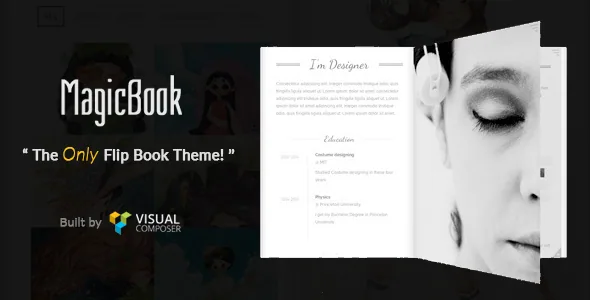
A book as the site's structure, not a homepage gimmick
The vendor calls MagicBook "a flipbook look like framework for the cool information shown," which is a more useful description than the demo copy around it. The book is the container your content lives in, so the planning unit changes: you decide what belongs on the cover, what sits on each spread, and where a chapter ends. The vendor lists unlimited pages, and the marketplace layout attribute records two columns, which matches the two-page spread the format implies.
That suits material a visitor can leaf through and finish — a portfolio, a vCard or résumé, an artwork series, a restaurant menu, an exhibition or cooperation profile, all named by the vendor. It is a poorer fit for a blog or news site where people arrive through search and want scannable lists.
Navigation follows the same logic. Instead of a header menu, the vendor places a "cool 3D menu" in a side panel, with settings added over time for the menu font, the close action and the menu button text. The marketplace marks the theme Widget Ready as No, so plan on configuring that panel through theme options rather than by dropping widgets into it.
Addressing a spread directly, and setting the turn direction
Two changelog entries matter more than their one-line length suggests. "Added directly open the book page by URL hash" means a particular spread can be linked to, so an inbound link does not have to land visitors on the cover and leave them turning pages to find one project. A separate entry records a fix to a #hash URL pointing at the wrong page, so the behaviour exists and has been maintained.
"Added a new option to change the page flipping direction" is the other one. Page-turn direction is a setting rather than a fixed animation, which is the kind of choice a book-shaped theme needs if the reading order should feel right for the content.
The changelog also names a custom flip-over link feature and an email-style class for opening the menu from your own link — an `open-menu` class on an anchor — so the panel can be triggered by a button you place yourself. The exact hash syntax is not spelled out in the supplied description; treat it as a documentation question.
The mobile controls were rebuilt repeatedly
A desktop flip book shows two halves and has a pointer. A phone has neither, which is why the vendor's changelog reads as a long series of mobile corrections rather than a single responsive pass.
Version 1.2 added an arrow symbol to the book page for mobile and fixed a submenu that did not work there. Version 1.2.2 fixed an arrow button that did not respond on small screens, a mobile menu close button that failed when returning to the current page, and the book failing to show its first page when reopened. Version 1.2.4 fixed the flip button on mobile. Earlier notes cover the next arrow not turning pages and the page not scrolling to the top after a turn.
Those notes are a useful checklist of what to watch on a phone: that the arrows and the flip button actually turn pages, that closing the menu leaves you somewhere sensible, and that reopening the book starts at the first page. That is reading the vendor's record, not a test of the theme on your device — nothing in the supplied material says how it behaves on current iOS or Android browsers.
Editing happens in WPBakery rows
The vendor lists "Easy Customizable with Page Builder (WPBakery Page Builder Included)," and the marketplace compatible-with field names WPBakery Page Builder. Pages are therefore composed as rows and columns, with a MagicBook add-on supplying the flip-book elements on top. Gutenberg Optimized is marked No; the stated path is the builder.
The changelog tracks the add-on alongside the builder, and adds element-level options over time: font size and colour for the separate text and text block elements, a cover picture option on a single image element, and a full-width slider for portfolio posts. Blog and portfolio blocks are named in the changelog too, including fixes to their category options.
Visual changes otherwise run through settings rather than a design file. The changelog refers to a theme options panel, Customizer entries for body and menu fonts, a global footer text option and a "Read me" button text field. The marketplace file list contains PHP, CSS and JavaScript with no layered design files, so restyling means those options plus CSS.
The demo XML carries the page order, not the pictures
One-click demo import was added in the changelog, and the vendor lists demo files as XML. For a theme where page order is the design, that import is genuinely useful: it gives you the sequence of spreads to work from.
It does not give you the imagery. The vendor states that all images used in the demo are not included in the theme and are licensed under Creative Commons, credited to their creators in the readme file. You will be swapping your own pictures into the same arrangement.
Earlier entries also mention a child theme example and a separate MagicBook add-on. Take those as statements about the product; the marketplace file list for the theme itself names PHP, CSS and JavaScript.
The version baseline is the decision to make first
The marketplace listing, observed on 5 November 2026, declares WordPress 6.0.x back through 5.6.x and records version 1.2.7. The vendor record was last updated on 13 July 2022, and the most recent dated changelog entries are 1.2.6 in December 2021 and 1.2.5 in December 2020.
Those dates do not contradict one another, but they bound what the evidence supports: nothing in the supplied material describes how the theme runs on WordPress releases after 6.0.x. For a theme whose whole front end is a JavaScript-driven 3D book, that is what to verify on a staging copy with your actual WordPress and PHP versions before you build content into it.
The changelog also shows past security work — a WPBakery update for an XSS issue, updated Redux Framework and TGM Plugin Activation classes, a prettyPhoto XSS fix. That is a record of earlier attention, not a claim about the release you install.
If your workflow depends on block templates or widgetised sidebars, MagicBook asks you to change both habits, and it is worth deciding that before you start rather than after.
Questions & answers
Can a link open a specific page spread?
The changelog records adding the ability to open a book page directly by URL hash, and a later fix for a hash URL that pointed at the wrong page. So an inbound link can target a spread instead of the cover. The supplied description does not document the hash format.
Are the demo photographs part of the theme?
No. The vendor states the demo images are not included and are Creative Commons works credited in the readme file. The XML demo content gives you the page and spread arrangement only.
Can I use widgets for the side menu?
The marketplace marks Widget Ready as No, and the menu is a styled 3D panel with its own font, close-action and button-text options. Navigation is configured through those settings rather than WordPress widgets.


