Two portfolio layers, not one gallery
Kraft's vendor feature list separates "Various Portfolio Listings" from "Various Portfolio Project Pages" as two lines. That split is the theme's central idea: the index where a visitor scans your work, and the page where one piece is shown properly, get their own set of choices.
Most portfolio themes spend their options on a single grid. Kraft's claim is that you can decide the density of the browse view and the composition of the project view independently. The vendor does not say that edits to one propagate to the other, and nothing in the listing implies it. Treat the two as separate screens you configure separately, and use the demo to see how many combinations are actually on offer.
What a listing style controls on the index page
The practical decision at the index level is how much work a visitor sees before clicking anything. Listing styles usually differ in column count, thumbnail scale and how much caption or metadata sits under each item. The marketplace attributes give one boundary: the layout is declared responsive and the columns attribute is listed as "4+", so the widest advertised arrangement runs past three across. How each supplied listing maps to that number is not stated.
Two other declared features matter more than they sound on an image-heavy site. "Image Lazyloading" is named among the theme's features, and High Resolution is listed as Yes, meaning uploads can stay sharp on modern screens. Lazyloading is the vendor's stated behaviour, not a measured result; how it interacts with your particular image sizes and caching is something to watch on a staging copy, where you can see whether the first screen of thumbnails fills in as quickly as you want.
Lightbox image, gallery and video as three jobs
The vendor lists three lightbox behaviours rather than one. Read them as different viewing tasks: a single still opens large, a set of images pages through one viewer, and a video plays over the page instead of sending the visitor to another URL.
For project pages this means you do not have to choose between stills and motion when you structure a case study. A photography series and a film clip can sit on the same page and both open on demand. What the feature line does not describe is the mobile rendering or whether a video lightbox shows a poster frame you control, so check both on a phone before you promise a client that video lives inside the page.
Slider Revolution has its own job
Slider Revolution appears as a separate item in the feature list, apart from the portfolio listings and the lightbox set. That separation is worth keeping in your head while you plan: a slider plugin manages hero sequences and scheduled slides, while the browsing and project viewing behaviour belongs to the theme.
A slider gives you a second place for motion, such as a rotating sequence of stills above the portfolio index, but it will not replace the gallery layer. Whether the plugin ships inside the download is not something the description settles. Confirm it in your plugin list after setup, and read the plugin's own update path rather than assuming the theme handles it.
Elementor and WPBakery: decide the canvas first
Kraft declares compatibility with both Elementor and WPBakery Page Builder, and the vendor names each as its own feature. This is a real fork rather than a longer feature list, because the two builders store page content in different formats. A page built in Elementor is edited in Elementor; a page built in WPBakery is edited in WPBakery, and moving existing content between them is manual work.
So pick one before you build anything you intend to keep. If you plan to start from the theme's supplied layouts, that choice is largely made for you by whichever builder those layouts use. The marketplace attribute for Gutenberg Optimized is "No", which describes where the vendor put its design effort; it is not evidence that the block editor stops working. If you write posts in the block editor, expect your portfolio views to come from the builder.
Packaging and compatibility, as declared
The ThemeForest file list names PHP, CSS and JS files, so the package is theme code rather than a plugin bundle or a design asset pack. Documentation is described as well documented, which carries more weight for a theme that supports two builders, since the instructions have to cover both paths. Widget Ready is declared Yes, so widget areas sit alongside the builder layouts.
Declared WordPress support, observed on 4 November 2026, spans 6.0.x through 7.0.x, with compatible browsers listed as IE11, Firefox, Safari, Opera and Chrome. These are listing declarations made by the vendor, not the result of an install test here, and the wide browser range suggests the matrix was written broadly rather than narrowed recently. Your own combination of core version, builder and caching plugins is what to verify on staging.
The demo images are not yours
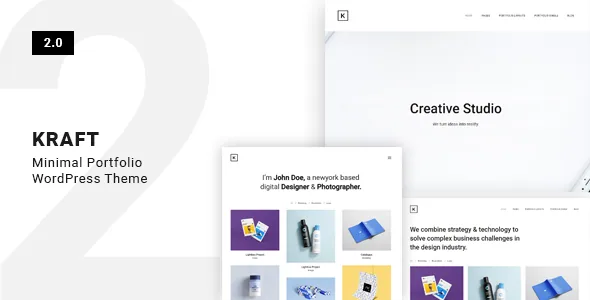
The vendor's own note states that images used in the theme are for demo purposes and belong to their respective owners. On a portfolio site this is not boilerplate: the preview is almost entirely photography, and the layout's effect depends on the pictures being good.
Plan to fill the listings and project pages with your own work or licensed images before the site goes anywhere public. The preview pictures demonstrate scale and crop behaviour; they are not part of what you receive.
Questions & answers
Do I have to pick Elementor or WPBakery before building?
In practice, yes. Kraft declares compatibility with both, but each builder stores page content in its own format, so a page made in one is edited in that one. If you want to start from the theme's supplied layouts, use whichever builder those layouts use, and stay with one builder across the site.
Can one project page hold both photos and a video?
The vendor lists lightbox image, lightbox gallery and lightbox video as separate behaviours, so a project page can present stills and motion without sending visitors elsewhere. How they combine on a specific project layout, and how they behave on mobile, is something to confirm in the demo.
Can I reuse the photography from the Kraft preview?
No. The vendor states the images are for demo purposes and belong to their respective owners. Supply your own photography or licensed images before launch.