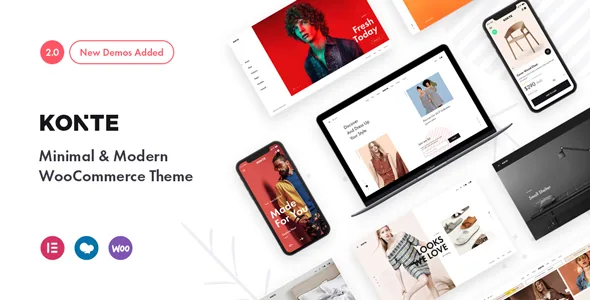
The header and footer builders are the layer above demos
Konte's own feature list puts a header builder with 10 predefined header layouts, sticky header options and a footer builder near the top of what the theme does. That ordering is worth taking seriously. In a shop, the header carries the logo, the menu, the search field and the mini cart on every page you build, so the header and footer configuration is the decision that outlasts whichever homepage layout you start from.
The vendor names two sticky behaviours rather than one: normal sticky and smart sticky. Normal sticky keeps the header in place as a visitor scrolls; smart sticky in the vendor's framing is the variant that reacts to scroll direction. The distinction matters on long category pages and product grids, where a persistent header keeps the cart and navigation reachable but a permanently pinned bar can eat vertical space. Try both against your own navigation depth before you settle on one.
Mega menus and multiple column styles for menus are also listed, which suggests the header builder is expected to carry a sizeable menu tree. If your catalogue has many top-level departments, plan the menu structure before the demos, because a header layout that suits five links will not suit twenty.
Three separate layout counts for three separate jobs
The listing quotes 14 predefined homepage layouts, 3 shop layouts and 7 single product layouts. These are not interchangeable numbers and they do not compete with each other. The homepage layouts give you different ways to open the storefront, usually a mix of hero treatment, featured product rows and category blocks. The shop layouts govern how a product archive is arranged when a visitor is browsing. The single product layouts govern the page where the buying decision happens.
That means picking a homepage does not settle the other two. A project could reasonably take a home layout aimed at a fashion lookbook, then a shop layout that prioritises a dense product grid, then a product page that gives imagery and the variation selector the most room. Konte also lists custom content layouts — sidebar-content, full content and content-sidebar — plus blog formats covering standard, image, gallery, video, audio, quote and link, which matter if the store is paired with an editorial section.
There is a limit to what the counts tell you. The vendor does not describe how each individual homepage differs, so the demo site remains the place to compare specific layouts rather than the feature list.
Wishlist, compare and swatches come from named plugins
Three of Konte's more useful storefront behaviours are declared as plugin features rather than theme code: product variation swatches, a product wishlist and product comparison, each attributed to a WCBoost plugin by name in both the feature list and the credits. Read that as an integration statement. It tells you the capability exists in the vendor's intended stack; it does not tell you how much of it works if you swap in a different wishlist or swatch plugin.
For a clothing or accessories shop, the swatch plugin is the one with the most daily impact, because it is what lets a shopper pick a colour or size without opening a dropdown. Wishlist and compare sit at the shortlist stage, where visitors collect candidates before deciding. If those two are central to how your customers shop, check how the WCBoost plugins are bundled and updated before you build around them.
Quick view and the advanced listing elements belong to the same layer of the theme. The listing names recent, featured, sale and best-seller product elements, which are the building blocks for homepage and category sections rather than new shop behaviour. Catalog mode, meanwhile, is described as available "by plugins" — so it is a stack decision, not a theme switch.
What the latest changelog says about the product page
The 2.5.2 changelog is a useful read because it shows where the theme's recent fixes landed. One entry addresses related products and upsells appearing above the product content when an Elementor Pro single product template is used. That is a specific, recognisable conflict between the theme's product layout and a builder template taking over the single product page.
Two smaller entries round out the release: bundled plugins were updated to their latest versions, and a warning about an undefined array key in the product size guide settings was fixed. The 2.5.1 and 2.5.0 notes before it record WooCommerce template refresh work. Taken together, these point to a theme that is being maintained against WooCommerce template changes and against Elementor Pro's product template path — not evidence of a redesign, and not a promise about update cadence in future.
The practical takeaway is narrower than it sounds. If you intend to build the single product page in Elementor Pro rather than with one of Konte's seven layouts, that changelog entry is the one to watch, and it is the scenario to verify on staging with your own plugin versions.
Two builders are claimed, and only one is bundled
Konte's description says the theme is powered by Elementor and WPBakery Page Builder, and the feature list says WPBakery Page Builder is included alongside Revolution Slider. The compatibility attributes, read on 3 November 2026, list Elementor and Elementor Pro among compatible plugins. So the two builder relationships are not described in the same terms: WPBakery and the slider are packaged, Elementor is compatibility.
That should shape which demo you pick. A homepage layout built for WPBakery expects WPBakery's elements; if you intend to compose with Elementor instead, confirm that the specific layout you want is available in that form before committing to it. The same caution applies to the slider: Revolution Slider is included, and the vendor describes slider support with smooth transition effects and multi-column menus, but it is still a second editing surface separate from the page builder.
The theme is built on Bootstrap, and the listing says Bootstrap components are compatible. For teams that already write Bootstrap markup, that is a familiar base; for everyone else it is mostly an implementation detail behind the theme options panel and unlimited colour schemes.
Package contents and the declared compatibility ranges
The ThemeForest file list is broader than a typical theme download: Layered PSD, PSD, PHP, HTML, CSS, Sass and SCSS files, and JS. For an agency or an in-house team with a designer, the layered PSD and Sass sources are the interesting part, since they let you adjust the design source rather than reverse-engineering compiled CSS.
Declared compatibility spans a long list: WordPress 4.9.x through 7.0.x in the attributes, WooCommerce 5.x through 10.x, WPML, Contact Form 7, WPForms, Jetpack, Facebook, Elementor and Elementor Pro. The vendor's header text also claims readiness for WordPress 7.1.x and WooCommerce 11.1.x. These are declarations from the listing, not results tested on your PHP version with your plugin set, and the version ranges should be treated as a starting point for staging checks.
The listing marks Gutenberg Optimized as yes, which is a separate signal from the builder pairing: it suggests the block editor is not being worked around. Konte ships demo content and documentation described as step by step, so the practical question is less whether content can be imported than whether the demo you import matches the builder you plan to use.
Questions & answers
Can I use Elementor instead of WPBakery with Konte?
The vendor lists Elementor and Elementor Pro as compatible and says the theme is powered by both builders, but only WPBakery Page Builder and Revolution Slider are described as included. Treat Elementor as a supported integration rather than a bundled dependency, and confirm the specific homepage or product layout you want exists in your chosen builder.
Do wishlist, compare and variation swatches work without the WCBoost plugins?
The vendor attributes all three to WCBoost plugins by name, so they are described as plugin features rather than theme code. Whether a substitute plugin behaves the same way is not covered by the listing.
What does smart sticky do differently from normal sticky?
The vendor lists both as supported options without detailing the behaviour. The usual distinction is that smart sticky reacts to scroll direction instead of staying pinned constantly, which changes how much vertical space the header takes on long product and category pages. Verify the effect on the demo before deciding.
Are the 14 homepage layouts all built for the same builder?
The listing gives the count without breaking it down by builder, and it describes the theme as powered by both Elementor and WPBakery. Check the individual layout in the demo or documentation before you commit to one.


