Nine portfolio styles, six blog layouts: the inventory is the product
Most children's-education themes sell a cheerful homepage and leave the rest to plugin defaults. The vendor description for Kids World spends its space naming layouts instead, and that is the most useful thing to know before choosing it.
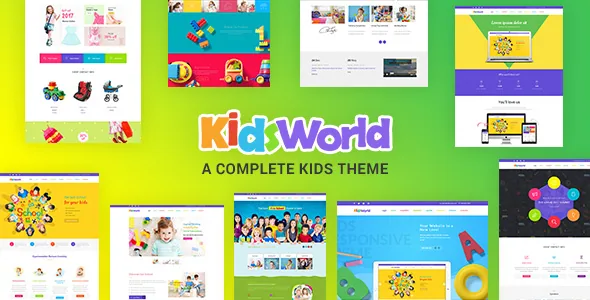
Portfolios come in nine named treatments: title overlay, title and icons overlay, presentation, modern title, minimal icons, icons only, girly, classic and art. The section layouts around them offer full-width or two-to-four-column grids, with left sidebar, right sidebar, gallery and single-page variants. Six blog layouts are named too — default, date and author left, date left, medium, medium highlight, medium skin highlight — alongside both-sidebar and no-sidebar options.
For a preschool or daycare this inventory is practical rather than decorative. A gallery of classroom projects, a staff or programme overview and a news feed each need a different presentation, and you can match the layout to the content without writing a template. The trade is that you choose from the named set; if you want a portfolio arrangement the vendor did not include, you are back in the editor building it yourself.
Two FAQ page templates for the questions the office actually answers
The vendor provides an FAQ single page and a second "faq 1" page layout, and ties them to the kind of enquiries a childcare or school office receives about its services.
That is a small feature with a large operational payoff. Admissions questions, fee schedules, opening hours and illness policy are the same answers every term, and they are usually buried in email replies. Having a dedicated layout means those answers live on their own pages with the theme's typography and spacing instead of in a generic text block.
One caution: the vendor describes documentation for the FAQ section, not a question-and-answer management system. The pages are layouts you fill, so who keeps them current is a decision you make, not something the theme automates.
Colour control that reaches individual elements
Kids World ships a colour picker, and the vendor is specific about what it covers: icon boxes, contact information, the blog, event lists and image captions. That is a narrower and more useful scope than a single global accent colour.
A school site often needs a brand colour that appears in the header and main calls to action, plus a distinct treatment for event dates or contact blocks so they read as a different kind of information. Element-level pickers let a non-designer administrator do that through the theme's own settings rather than by writing CSS rules that pile up over time.
The vendor frames this as a matter of seconds, which is marketing shorthand. What the evidence supports is that the control exists for those elements; how far it reaches into every corner of the design is something to check on a staging install.
What Events Calendar, WooCommerce and bbPress do in a school context
The marketplace attributes declare compatibility with The Events Calendar and Events Calendar Pro, WooCommerce across versions 5 through 10, bbPress 2.5 and 2.6, and WPML. The vendor description adds MailChimp and Contact Form 7 for newsletters and enquiry forms.
Read those as three different jobs. Events Calendar handles term dates, open days and parent evenings — recurring, dated information that belongs in a calendar rather than a blog post. WooCommerce covers a uniform shop, fundraising merchandise or paid resources. bbPress gives you a discussion space without adopting a full social network plugin.
These are declarations by the vendor and marketplace, not results of testing on your stack, and the version branches listed are the ranges the vendor says it supports. If a payment plugin, a calendar add-on or a language stack matters to your launch, confirm it on a staging copy before the site goes live.
The demo images are not in the package
One vendor footnote deserves attention before you plan any content work: the photographs used in the demo are not included, and the vendor notes they are copyrighted and can be licensed separately.
For a children's theme this matters more than usual. The demo's appeal comes largely from photography of children, and that imagery cannot be reused without rights — which, for a school, also means consent and safeguarding questions that go well beyond the licence. Budget for your own photography or properly licensed stock, and treat the demo images strictly as a preview of how the layouts behave.
The marketplace file list is PHP, CSS and JavaScript files. The vendor separately claims bundled premium plugins, but that claim describes the vendor's package; do not assume bundled licences or specific plugin builds are present in any copy you obtain elsewhere, and check what the theme actually asks you to install.
Version 3.8 listed, a 3.9 entry in the changelog
The marketplace entry carries version 3.8, while the vendor changelog includes a 3.9 entry dated 10 September 2025 that lists a security fix and latest-WordPress compatibility. The vendor's last recorded update attribute is 30 September 2025.
That gap is worth understanding rather than alarming over. Marketplace version numbers and changelog headings do not always move in step, and a listing number is not a guarantee about the files in any particular archive. The practical move is to check the theme version shown in your own WordPress dashboard after installing and compare it with the changelog entry you intended to get.
There is also a naming split to keep straight: the product is sold as Kids Heaven, while the WordPress theme metadata calls it Kids World and the demo URL carries the same name. Referencing either name in support discussions is normally fine, but version and file questions should always quote the number you can see.
Questions & answers
Does Kids World work with the block editor?
The marketplace marks Gutenberg Optimized as Yes, and the changelog records Gutenberg support for custom post types in the 1.9 and 2.0 releases. The page-building route the vendor describes, however, is Visual Composer. If you plan to compose pages mainly with blocks, verify how the theme's own templates behave with that workflow rather than assuming the attribute settles it.
Can I sell products with this theme?
The vendor describes WooCommerce as the route for selling, and the marketplace declares WooCommerce compatibility across the 5.x through 10.x branches. That covers uniform shops, fundraising items or paid resources. Actual product pages, cart and checkout behaviour depend on WooCommerce and your payment setup, so test the shop with a real product before launch.
Are the demo photos included with the theme?
No. The vendor states that the images used in the demo are not included and are copyrighted, with an option to license them separately. You supply your own photography or licensed stock. For a school or daycare, that also means arranging consent for any images of children.