The board is a plugin, and that decides most things
Coffeecream's description is unusually direct about where the job board lives: it is based on the free WP Job Manager plugin. The theme supplies the presentation and the layout options; the listings, the submission flow and the employer dashboard come from the plugin layer.
That distinction matters before you compare designs. What the vendor describes is a set of shortcodes that output individual jobs in various formats, lists of jobs, a job submission form, and an employer dashboard where logged-in users view, edit and delete their own listings. If you have run WP Job Manager before, that is the surface you will recognise, and the theme's job is to style it and add options around it rather than replace it.
Practically, it means your configuration work is partly plugin work. Job types, categories and locations are data structures you maintain, and the theme inherits them. Budget for learning WP Job Manager's settings alongside the theme, not instead of them.
Following one listing from submission to published page
The vendor describes a frontend submission path for employers: a form for job details including description and location, plus fields for company information. Employers can preview the listing, and the vendor says that preview matches the appearance of a live job listing, so the employer sees roughly what candidates will see before committing. From the preview they either submit for approval or keep editing.
On the admin side, the description says jobs are listed with useful job and company information and actions such as edit, mark filled and delete, with search and filter above the list. Anyone used to WordPress will find the shape familiar.
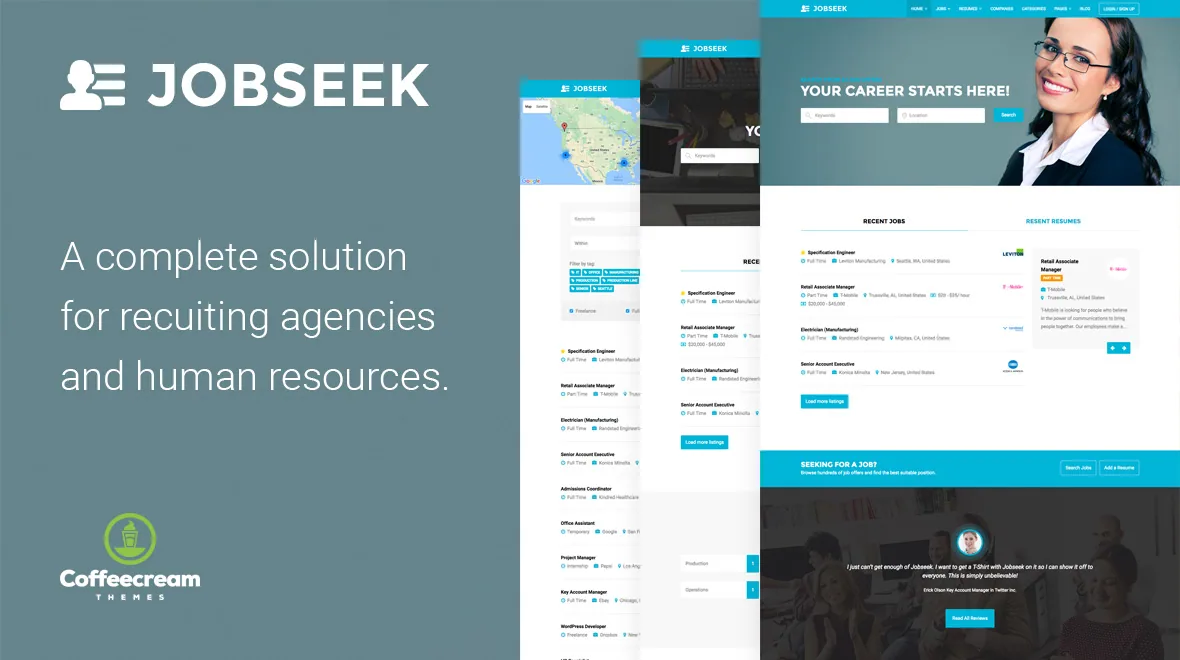
The public single job page carries the description, metadata and a company box that can show a tagline, a Twitter link and a website. The location can link out to a Google map. Application contact is deliberately gated: an apply button sits beneath the listing and reveals either an email address or a website URL when pressed. That is a small decision with a real effect — it gives you a click signal to measure and keeps contact details out of the raw page text, though it does not stop anyone determined to reach the employer.
Search filters and the RSS detail worth noticing
The jobs shortcode outputs listings in list format, preceded by a search and filter form. The vendor describes that form as AJAX powered, with results appearing instantly, and lists the facets as category, job type, keywords and location.
Four facets is a modest filter set, and for most boards that is the right size — enough to narrow a result list, few enough that a candidate does not have to think about how to search. If you need salary bands, remote-only flags or date-posted ranges, none of those appear in the description, so treat them as additions to solve outside the theme.
The detail that stands out is the RSS link attached to each search. A candidate who filters to a category, type and location can subscribe to a feed that keeps sending new jobs matching those criteria. For a board with steady posting volume, that is a retention mechanism built at no cost: the search becomes a standing subscription rather than a one-off visit. It assumes your audience still uses feed readers, which is a narrower assumption in 2026 than when the feature was described, but it costs nothing to leave in place.
Resumes, bookmarks, and where the free footprint ends
The vendor's opening summary says recruiters and companies manage job offers and company profiles while candidates do the same with their resumes. The resume side, though, is where the description gets thinner and the paid add-on list starts to matter.
What is described concretely is bookmarking: logged-in candidates and employers can bookmark jobs and resumes along with an added note. The note is the useful part — a saved job with a candidate's own remark about why it was worth keeping is more useful than a bare saved list.
Resume submission is named in the general summary, but the features the vendor later lists as optional paid add-ons include Resume Manager and Resume Manager Geolocation, and those are stated as not included in the theme package. So the honest reading is that a fuller resume experience — candidate resume handling, location filtering on resumes — may sit behind add-ons you buy separately. If a candidate resume database is central to your plan rather than a nice-to-have, confirm exactly what works without those add-ons before you build the workflow around it.
Paid listings and the plugin accounting
Charging employers runs through WooCommerce. The vendor describes paid listing functionality powered by WooCommerce, with custom job packages that can be purchased or redeemed during job submission, and states that the WooCommerce plugin is required for it. WC Paid Listings appears among the optional paid add-ons, so the exact split between what the theme handles and what the add-on handles is another thing to pin down on a staging install rather than assume.
The packaged plugin list is stated in two parts, and the difference is worth reading carefully because it is where budgets surprise people. The vendor names Job Tags, Visual Composer (WPBakery) with frontend and backend editors, Slider Revolution, Front-end Membership Modules, CMB2, Contact Form 7, Jetpack, MailChimp for WordPress Lite, Testimonials by WooThemes and WooCommerce as included. The required ones among these are described as free.
Separately, the vendor lists optional paid add-ons that are explicitly not in the theme package, quoted at $125 for a core bundle of 13 official add-ons, $35 for Job Manager Geolocation and $22 for Resume Manager Geolocation. Applications, Bookmarks, Job Alerts, Application Deadline, Simple Paid Listings, Apply with Facebook and Apply with Xing fall in that optional group. The description says these are what you would need to replicate the demo's full functionality — a claim about the demo, not a statement that the theme is unusable without them.
Editing surface and the version signals to check
Pages are assembled with WPBakery Page Builder, which the marketplace attributes also list under compatible tools. Gutenberg Optimized is marked No, which says the theme was not built around the block editor; it does not remove the block editor from WordPress, but it does mean you should expect the builder to be where layout work happens.
The compatibility record, observed on 4 November 2026, lists WordPress 6.4.x, WooCommerce 8.x.x, WPBakery Page Builder, a responsive layout, widget-ready areas, high-resolution output and PHP, CSS and JS files. Those are vendor declarations rather than test results against your stack.
One discrepancy is worth flagging as a question rather than a fault. The marketplace attribute records version 2.33 with a vendor update date of 20 May 2022. The vendor's own changelog text goes further, with entries into 2023 and a 2.38 entry describing a salary and hourly rate fix and updated WPBakery and Slider Revolution builds. Which number describes the copy you receive is something to confirm from the package itself; a changelog entry for a fix also tells you a bug existed in the version before it, which is a reason to check the version rather than skip the check.
Questions & answers
Does Jobseek work without WP Job Manager?
No. The vendor states that job board functionality is based on the free WP Job Manager plugin, and the shortcodes, submission form and employer dashboard it describes belong to that plugin layer. Installing contact form and slider plugins will not substitute for it.
Can candidates upload resumes without buying extra add-ons?
The description names resume submission in its summary and lists bookmarks for jobs and resumes, but Resume Manager and Resume Manager Geolocation appear among the optional paid add-ons that the vendor says are not included. Test the unpurchased footprint on a staging site before you commit to a resume-driven workflow.
What do the optional add-ons cost according to the marketplace listing?
The vendor quotes $125 for a core bundle of 13 official add-ons, $35 for Job Manager Geolocation and $22 for Resume Manager Geolocation, and states these are not part of the theme package. Treat those as the vendor's figures from its description rather than a current quote.


