The page builder is the layout engine, not the block editor
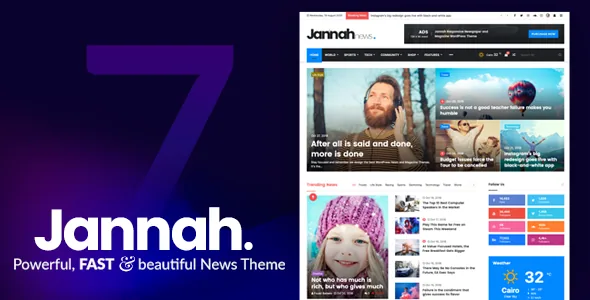
Jannah ships its own drag-and-drop page builder inside the theme. The marketplace description frames it as building layouts "in blocks" from the WordPress dashboard, with Ajax Filters and Pagination available to add to a page. For a news site, that combination addresses a specific problem: a homepage and a category archive that hold hundreds of posts and a reader who wants to narrow by author, tag or format.
Ajax filters matter because the vendor describes the filtering and paging without a full page reload. Whether a given filter set performs acceptably on your archive depth is something to judge on your own content; the vendor's wording is a feature claim, not a benchmark.
The distinction worth holding onto is that the block editor appears in the vendor's compatibility list with Gutenberg Optimized marked yes, while the layout builder is a separate in-theme tool. In other words, posts can be written in the block editor; the page structures around them are assembled in Jannah's own builder.
Demos arrive as whole sites, not skins
TieLabs describes each of the 20+ demos as "a fully functional website with Pages, Menu structures and Demo Content", imported with a one-click import rather than applied as a colour scheme. The stated styles span Automotive, Hotels, Pets, School, News, Sports, Video and Fashion.
That changes the shape of a launch. You start with a working site skeleton — page set and menu tree included — and replace content, instead of assembling a homepage block by block before the first article goes live. The more news-like a demo already is, the less layout rework you do; the vertical-niche demos are mostly useful for their section rhythm rather than their subject matter.
Demo count is a moving target. The vendor says more are always in development, so treat 20+ as the vendor's figure at the time of writing rather than a fixed inventory.
BuddyPress and bbPress decide the community layer
Two community integrations are listed separately and do different jobs. BuddyPress, in versions 9.x and 10.x per the compatibility list, gives you member profiles, activity and notifications; Jannah styles it to match the theme and lets you place notification counts in the menu. bbPress, listed at 2.5.x and 2.6.x, gives you threaded discussion forums with the one-click install the vendor describes.
For an editorial site this is a real decision, not a checkbox. A publishing operation that wants comments, reader accounts and profile pages is a different product from one that wants a forum board beside its articles. Both add their own moderation load, and neither is required for a news theme to publish — the demo content you import may or may not assume them, so check before importing into a live site.
If you do not need either, Jannah still works as a magazine and blog theme; the community layer is an option in the description rather than the theme's purpose.
Reader-side tools on article pages
Several described features target the reading experience rather than the homepage. Select & Share lets a reader highlight text and get a sharing pop-up with the networks you have enabled. Jump-To Contents adds anchors inside long-form posts so readers can move between sections. GIF images are described as supported natively, without an extension.
The push notification feature is the one to weigh most carefully. Web push requires a reader to opt in, and delivery depends on browser support and on how the theme's implementation is wired up on your domain — the vendor presents it as built in, and the practical setup steps belong with the documentation rather than an article. Treat it as something to verify in a staging install before promising readers a notification channel.
Ad slots and the font library
The monetisation story is concrete: the vendor describes predefined advertising spaces sized to the most common ad block sizes, intended for pasting AdSense or other ad code, plus WooCommerce support for sites that also sell. Whether those positions match your ad partner's required formats is worth checking against the demo before you commit to a layout, since a slot that does not fit a 300x600 or a leaderboard is a slot you rebuild.
The typography claim is looser. The description says over 800 Google Fonts and 150+ FontFace.me fonts are included "under the hood", with nothing to install. Those counts come from the vendor and are not something this article can verify; the useful takeaway is that font selection happens in the theme's options panel instead of through a font plugin.
What the marketplace listing says about the build
The item's file list names PHP, CSS, Sass and JS files — source stylesheets included, which is relevant if you plan to override styling rather than only use the options panel. Layout is listed as responsive with two columns, the demo URL is published, and compatibility is stated across a long span of WordPress versions plus WPML, WooCommerce, Jetpack, Contact Form 7, Gravity Forms and WPForms.
Those are vendor and marketplace claims as recorded in the listing on 3 November 2026, not results from testing here. Compatibility with a plugin version means the vendor lists it; it does not guarantee that every demo, extension or child theme combination behaves. The safest plan is to confirm the versions you actually run against the documentation before importing demo content into a production site.
One further note on scope: Gutenberg Optimized being marked yes tells you the theme does not fight the block editor. It does not mean block-editor templates replace Jannah's own builder for page composition.
Questions & answers
Do I have to use Jannah's page builder for every page?
The builder is described as the tool for composing block layouts such as homepages and archives. The vendor's compatibility list includes the Block Editor, and the item is marked Gutenberg Optimized, so standard post editing and block-based content are supported. How far you rely on the builder versus default templates is your choice; the builder is where the Ajax filters and pagination live.
Is BuddyPress required for Jannah to work?
No. BuddyPress and bbPress are separate integrations listed at specific version ranges in the compatibility data. They add member profiles, activity and forums respectively. A news or magazine site that only needs articles and comments does not need either enabled.
Can I use Jannah to sell products as well as publish?
The vendor describes WooCommerce optimisation and the compatibility list names WooCommerce 5.x through 8.x. The theme is built around editorial layouts, so store pages are an addition to the publishing setup rather than its centre. Confirm the WooCommerce version you run against the documentation.
What kind of files does the package contain?
The marketplace file list names PHP, CSS, Sass and JS files. That means theme templates and source stylesheets you can extend, not design files such as layered PSDs. Font and demo content are described as delivered through the theme itself.