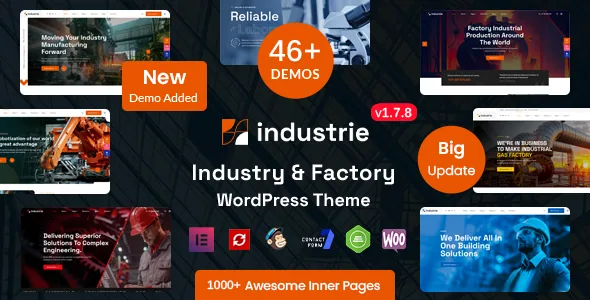
Every niche comes twice: multipage and onepage as separate demos
RSTheme's feature list states the demo count with a breakdown rather than a round number: "46+ Pre-made Complete Demos (23 Multipage Demos + 23 Onepage Demos)." The same pattern repeats in the demo links, where each subject appears as an industry demo and then as its onepage counterpart.
That pairing is the most useful thing to understand before you install anything, because the two formats answer different briefs. A multipage build gives a manufacturer somewhere to put a service page, a project archive, a company history, engineer profiles and a contact route as separate destinations. A onepage build compresses the same pitch into a single scrolling document.
For a fabricator or contractor, the onepage version suits a campaign landing or a company whose story fits one continuous scroll. The multipage version suits a site that has to rank individual service and project pages, or where visitors arrive looking for a specific product line. Reading a demo from each column side by side tells you more about the theme than the headline count does.
The vendor also lists a child theme as included, which is the sensible base if you intend to touch template files rather than work entirely in Elementor.
What the niche list actually covers
The demos are not one skin recoloured twenty ways. The vendor names each subject: industry, construction, architecture, metallurgy, laboratory and science research, renewable and solar energy, oil and gas, industrial factory, industrial robotics, industrial manufacturing, steel engineering, automation engineering, textile, agriculture and HVAC.
That matters for terminology and imagery as much as for layout. An oil and gas site talks about upstream and downstream; a laboratory site needs research framing and equipment; a textile demo carries different visual weight from a steel engineering one. Adapting a generic business theme to any of those means writing that vocabulary yourself and sourcing photography that reads as credible inside the sector.
There is also a dedicated RTL demo, in both formats. If you publish in Arabic, Hebrew or another right-to-left language, that gives you a starting point rather than a mirrored build assembled after the fact. The marketplace attributes separately list WPML as compatible, so the multilingual path is a claim about the listing rather than something the demo structure itself demonstrates.
The vendor describes further demos as coming, so treat the current set as the set that exists, not as a fixed final number.
The 55+ RS widgets are what the pages are made of
The demos are built from the theme's own Elementor addon set. The vendor puts the count at "55+ Industrie Premium addons Included" and names each widget individually.
The ones that carry industrial content do a specific job rather than a generic one. RS Portfolio Grid, RS Portfolio Filter and RS Portfolio Slider cover a project archive in three presentations — a fixed grid, a filterable index where visitors narrow by category, and a slider for a hero placement. RS Project Information exists to display project specifications, which is the sort of structured block a plant, contractor or engineering firm needs on a case-study page.
On the services side there are three widgets: RS Services Grid, RS Services Slider and RS Services List. RS Work Process illustrates sequential steps, useful when a buyer needs to understand how an enquiry becomes a delivered job. RS Counter animates statistics, RS Team Grid arranges staff, and RS Hotspot Showcase attaches labels to points on an image — a natural fit for showing parts of machinery or a facility diagram.
Smaller pieces fill the gaps: RS Testimonial Slider, RS Logo Showcase, RS Pricing Table, RS Accordion, RS Advance Tab, RS Newsletter, RS Breadcrumb, RS Latest Blog Grid and RS Latest Blog Slider, plus Contact Form 7 integration for forms.
Practically, this means editing a demo page is a matter of opening Elementor and configuring the RS widget that sits in each section. The widgets also give you a way to build pages the demos never included, using the same visual language.
Colour lives in the Elementor Kit, and the header and footer are Elementor too
The vendor is explicit about where colour is changed: "Color Option: We used Elementor Kit. So you can change color from elementor." There is no separate theme options colour wheel to hunt for — global colours sit in the Elementor Kit, and edits there propagate through the widgets that reference them.
The header and footer follow the same logic. The listing advertises an "Elementor Header & Footer Builder" so that headers and footers are created and managed through Elementor rather than a theme panel with fixed header variants. For a site that has to stay visually consistent, that reduces the number of editing surfaces to learn: body content, masthead, footer and global palette all resolve inside one builder.
Beyond that, the vendor lists all Google Fonts as included and custom font upload as an option, which is the route for a brand typeface. Deeper changes still need files, and the child theme is the place to make them. Note also that "Gutenberg Optimized" is recorded as No on the listing — that describes how the theme was built, not a claim that the block editor is unavailable, but it does tell you the intended editing model is Elementor.
Bootstrap 5, Underscores, and what the package declares
Two framework details shape how much custom CSS a developer will end up writing. The attributes list the framework as Underscores, the Automattic starter theme, and the compatibility list names Bootstrap 5.x. A theme built on that combination hands you a familiar grid and utility classes, so a developer extending it is working with known conventions rather than a proprietary layout system.
The declared file types are PHP, CSS, SCSS and JS. SCSS sources are the practical one for a team that maintains a compiled stylesheet, since you can edit variables and rebuild rather than override output.
Compatibility claims on the listing cover WooCommerce 5.x through 10.x, Contact Form 7, Gravity Forms, Elementor, Elementor Pro, WPML and Bootstrap 5.x. Declared WordPress versions run from 5.2.x to 7.0.x, and the marketplace entry records version 1.7.8 with a vendor update date of 22 October 2026. Those were read from the listing on 4 November 2026; they are declarations about support, not the result of running the theme against your own plugin set. A staged install with your plugins active is the only way to know.
Browsers listed are Chrome, Firefox, Safari, Opera and Edge, the layout is marked responsive with 4+ columns, and documentation is marked well documented.
Where the demo stops and your work begins
One-click demo import is a vendor claim about their own importer, and the vendor adds that all images and icons are included with the import. Whether a given demo arrives complete depends on that process finishing cleanly on your server, so the count of 46+ demos is a measure of choice, not a guarantee that any one of them is publication-ready.
The honest evaluation is to import the demo closest to your sector and edit it the way your team actually works: change the palette in the Elementor Kit, reconfigure an RS Services Grid, swap a portfolio filter's categories, replace the header in the Elementor builder. If that round of edits feels controlled, the theme fits. If you end up fighting widget settings, the demo gallery was never the deciding factor anyway.
If your plan is to publish in a language the vendor's demos do not cover, or to lean on WooCommerce for a product catalogue, check those paths in a staging copy early. The listing supports both as compatibility claims, but supported and turnkey are different things.
Questions & answers
Does the theme include both a multipage and a onepage version of each demo?
Yes, according to the vendor's feature list, which breaks 46+ demos into 23 multipage and 23 onepage builds. They are separate demos, so you choose the format that fits your project rather than toggling one demo between modes.
Do I need to know CSS to change the site colours?
No. The vendor says colour is handled through the Elementor Kit, so global colours are edited inside Elementor. CSS or SCSS work is only needed for changes beyond what the Kit and widgets expose, and the included child theme is the place for that.
Is the theme compatible with the block editor?
The listing records Gutenberg Optimized as No, which describes how the theme was built rather than removing the block editor. The authoring workflow the vendor describes is Elementor, with header, footer and colour all managed there.
Which industries do the demos target?
The vendor names industry, construction, architecture, metallurgy, laboratory and research, renewable and solar energy, oil and gas, factory, robotics, manufacturing, steel and automation engineering, textile, agriculture and HVAC, plus an RTL demo.


