Registration is the theme's real subject
The vendor's feature list for imEvent spends its detail on what happens after someone says yes: registration kept inside the WordPress admin, a separate list for paid PayPal sign-ups and for free ones, extra fields you can add to the register form from the admin, and export of those registrations to a CSV file, choosing a single field such as email or several fields at once.
That is a self-hosted attendee record rather than a handoff to a ticketing service. If you run a small conference, a meetup or a ticketed seasonal night and want the list sitting next to the schedule and speaker pages instead of in a third-party dashboard, this is the part to judge the theme on.
The changelog shows the layer being maintained rather than announced once. Version 2.6 added the CSV export. Version 2.9.8 sent an automatic email to the attendee on successful registration, version 2.9.9 added the email template pattern in the backend, and version 3.2.0 fixed a PayPal problem in the register form and reworked the export path.
PayPal and Eventbrite are payment routes, not a booking sync
PayPal support is listed, Eventbrite is named as a way to pay, and the register form itself is described as sitting in the slider as well as on a page. Read those as separate checkout options attached to the theme's own registration flow.
Nothing in the description says imEvent imports or mirrors Eventbrite listings, so if you already sell through Eventbrite and want the two systems to stay in step, treat that as unproven and plan around it.
The donate shortcode is the simpler case: a block for a fundraiser or a free community event where attendees are invited to give. WooCommerce is declared in the compatible-with attributes and the changelog records adding WooCommerce for booking events in version 2.9.6, though the vendor's pitch never centres on a shop.
The schedule is a set of pages, not just a grid
Version 3.2.0 is the release that explains how the programme is presented: schedule items display in three styles named Hexagon, Square and Circle, with the content pulled either from the excerpt or from the full content authored in WPBakery. The same release restyled the schedule and speaker views for both archive and detail pages.
Sharing follows the same logic. Version 3.1.1 added share links for Twitter, Google Plus and Facebook on schedule articles, which matters when speakers promote their own slot.
The practical question for a multi-day event is whether the agenda reads as an information grid or as separate entries each speaker can link to. The theme supports both, and the details of a schedule or speaker page stay under your control through the builder.
Countdown, slideshow and the front page
The countdown is set to the hour and minute of the event rather than to a date alone, per version 3.1.1. The same release let a slideshow element hold several backgrounds and gave it a configurable height.
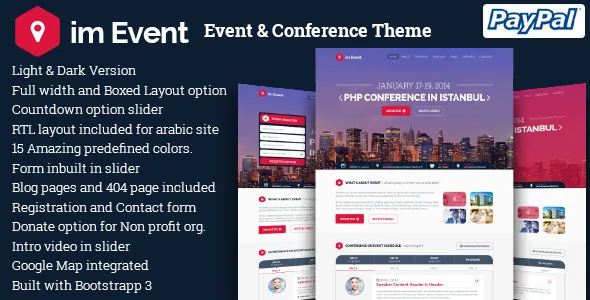
The vendor also describes an introduction video and a form inside the slider, plus an integrated Google map for venue wayfinding. For a seasonal or themed event, those are the pieces that carry the first screen: a clock ticking toward the start time, a background that changes per slide, and a registration form or trailer before any scrolling.
The vendor statement about a bundled background MP3 track with three variants describes what the author says ships with the theme. It is not something to assume about any particular copy you obtain.
Where you edit, and how the page is dressed
Pages are assembled in WPBakery Page Builder, which appears both in the compatible-with list and in a changelog trail of plugin updates; the vendor describes drag-and-drop editing on the front end and the back end. One-click demo content is listed, added in version 3.1.1. Theme options run on the Redux Framework, and a child theme is supported.
Gutenberg Optimized is declared as No. That states where the vendor's own layout work lives, not whether the block editor is unusable on your install. If your team has standardised on blocks, test the theme against your own content before committing.
The skin is configurable per page: Light and Dark versions, Wide and Boxed versions, with version 2.9.6 recording a per-page setting for layout and dark/light. The description claims 15 colour options, alongside responsive layouts, high-resolution assets and widget-ready sidebars.
RTL, translation and the declared WordPress range
LTR and RTL are both supported, with Arabic named specifically, and .po/.mo files ship for translation, while WPML appears in the marketplace's compatible-with list. Those answer different questions: RTL changes direction and alignment, WPML handles multilingual content.
The marketplace attributes observed on 4 November 2026 declare WordPress 5.0.x through 6.8.x and WooCommerce 5.x.x through 9.x.x, alongside Contact Form 7 and WPBakery. The package is listed with PHP, HTML, CSS and JS files and documentation described as well documented.
The vendor also says a WPBakery licence and a free HTML version come with the WordPress theme. Treat that as a statement about the author's bundle, not a fact about any copy you obtain. The same caution applies to the declared WordPress and plugin ranges: they are listing declarations, not the result of running the theme against your own stack.
Questions & answers
Can imEvent handle free and paid attendees in one site?
According to the vendor description, yes: PayPal registrations and free registrations are managed as separate lists in the admin, and both are covered by the CSV export added in version 2.6.
Does imEvent sync my existing Eventbrite listings?
The listing only names Eventbrite as a way to pay. Importing or syncing Eventbrite events is not described, so confirm it with the author before relying on it.
How is schedule content authored?
Through WPBakery Page Builder, per the version 3.2.0 changelog, which lets each schedule item show either its excerpt or its full builder content and display in the Hexagon, Square or Circle style.


