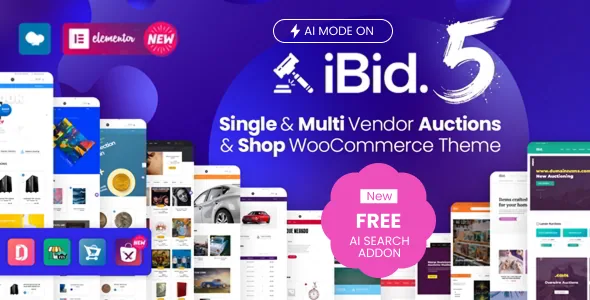
A lot is a set of bidding rules, not just a product
Most WooCommerce shop themes stop at price and stock. ModelTheme's description for iBid documents a longer form on the product itself: item condition marked New or Used, auction type set to Normal or Reverse, proxy bidding on or off, a start price, a bid increment, a reserve price, and a Buy it now price that the vendor equates with the regular WooCommerce price.
Two timing controls sit alongside those: auction start and end dates. Add the optional relist behaviour and you get the part that matters for running a continuous marketplace — automatic relist on or off, relist if the auction fails after a set number of hours, relist if the winner does not pay after a set number of hours, and the relist duration in hours.
This is the theme's real centre of gravity. Bid increment and reserve price decide how bidding behaves for buyers; relist hours decide how much admin work a quiet category creates. Nothing in these settings is a layout choice, and no page builder is involved in them.
The auction engine belongs to WooCommerce Simple Auctions
The vendor names the mechanism directly: auction functionality comes "by WooCommerce Simple Auctions." Read that as a dependency to plan around rather than a theme-internal feature. The bidding mechanics live with that plugin, and iBid's contribution is the storefront and the settings exposed around it.
The same applies to the marketplace layer. Dokan Lite and Dokan Pro come first in the vendor's compatibility list, followed by WCFM Marketplace Lite and WCFM Ultimate, WC Vendors Marketplace (free and Pro), and MultiVendorX (free and Pro). Which one you install changes how vendor dashboards behave, and iBid's screenshots in the source description reference Dokan on one side and WCFM on the other.
Worth noting: the listing records Gutenberg Optimized as No. That says nothing about whether the block editor exists on your site — it only flags that this theme was not built around block-first page construction.
Three selling modes, one switch apart
The architecture question for iBid is who is allowed to create auctions. The vendor answers it with three configurations.
Multi-vendor is the default assumption: a marketplace plugin is active and sellers add their own lots. Single-vendor is the same theme with that plugin disabled — the vendor says the multi-vendor functionality turns off "with one click only," leaving the site admin or store manager as the person who publishes products and auctions. A plain shop is the third mode: with the auctions plugin off, the vendor states that any auction feature disappears.
The vendor also treats mixing as a content decision rather than a global setting, saying you can "mix the auctions and the products or simply list them separately in different pages." That is more flexible than a single marketplace toggle, because a site can run a fixed-price catalogue and a timed sale section side by side and still let vendors list in both.
Vendors need somewhere to create a lot
Auction settings only help if the seller can reach them. The vendor's own FAQ places that capability at version 1.1.1 of the theme (November 2019), from which point auction options appear on product edit inside the Dokan dashboard, on the front end. Older copies required the WordPress admin side instead: Products → Edit Product.
That distinction matters if you are evaluating an older copy of the theme from any source, because the front-end workflow simply is not there yet. The current marketplace version recorded at the time of writing is 5.2.0, but that number describes the vendor's release, not the state of any particular copy you might install.
Two vendor-side details round this out. The listing names compatibility with Dokan Product Duplicator and Dokan WPML, which suggests vendor dashboards that handle duplicated listings and translated vendor content. Separately, the vendor states that a Maps addon is bundled and integrated on every purchase, switchable from the Theme Panel.
Twenty-five demos, organised by what is being auctioned
The demo library is unusually category-driven. The vendor lists 25 setups — electronics, automotive in two styles, antiques and collectibles, coins, art, real estate and land, books and comics, heavy machinery, domain names, handmade goods, tours and vacations, sports memorabilia, cattle, organic food, militaria, laboratory and medical equipment, self storage, and an NFT marketplace.
Three of them are less about goods than about money and time. Fundraising auctions are described as a crowdfunding-style platform for charity causes and disaster relief. Freelancer Mode uses reverse auctions for services. A no-auctions shop demo sits in the list as proof the theme works without the bidding layer at all.
The one-click importer is what turns any of these into a starting point. Treat each demo as a category template — the product grids, category banners and auction styling move together — rather than a design to reproduce exactly.
Addons carry the revenue models
Some of the marketplace economics sit outside the theme. ModelTheme describes an MT Auction Lots addon that extends auction functionality into lots, either with shared timing or through time slots, which is the setup you would want for a multi-item sale closing at one moment.
MT Auction Subscriptions and Credits is the other piece, and it is aimed at both sides of the market: customers buy credit packages in order to bid, and vendors buy subscription packages in order to list products. If your plan involves charging for access rather than taking a commission per sale, that addon is where the mechanism lives.
These are separate plugins the vendor points to in the description. They are not described as part of the theme's own feature set, so budget them as addons rather than assuming they ship by default.
The editing surface and the dated compatibility claims
Day-to-day page work runs through Elementor or Elementor Pro, with WPBakery Page Builder also listed as compatible. Settings collect in a Redux Framework panel with sections for shop, headers, footer, styling, sidebars, blog, 404 page, social media and demo import — so header variants and colour skins are switched there rather than in the page editor.
Multi-language support is described as translatable with Loco Translate, WPML or Polylang, with RTL handling provided through ModelTheme's separate RTL Compatibility plugin. Multi-currency is flagged as dependent on Multi Currency for WooCommerce.
The marketplace attributes observed on 4 November 2026 declare WordPress 6.2.x through 7.0.x and WooCommerce 7.x through 10.x, plus WPML, a responsive layout at 4+ columns, and package files given as PHP, CSS and JS. Those are vendor and marketplace declarations, not records of anyone testing iBid against your plugin stack, your PHP version or your Dokan configuration.
Questions & answers
Can iBid run as a normal WooCommerce shop without auctions?
Yes, according to the vendor. With the auctions plugin disabled, the description says the auction features disappear and the theme behaves as a regular WooCommerce store. The demo list also includes a shop demo with no auctions.
Where do vendors create an auction listing?
On theme version 1.1.1 and later, auction options appear when a product is edited in the Dokan vendor dashboard on the front end. In older copies, the vendor says auctions were set up from the WordPress admin under Products → Edit Product.
Does iBid require a multi-vendor plugin?
No. The vendor describes turning off multi-vendor functionality by disabling the marketplace plugin, which leaves the admin or store manager as the only account publishing products and auctions. Dokan, WCFM, WC Vendors and MultiVendorX are all listed as supported if you do want vendors.


