Motion is configured in a builder, not written by hand
Most multipurpose themes treat animation as a handful of entrance effects. Helo's marketplace description splits it into two separate entries: "Advanced and Smooth GSAP Animations" and a "Next Generation Animation Builder" that the vendor calls the theme's standout feature. GSAP is the JavaScript library usually driven by a developer writing tweens by hand; here the vendor presents it as something you assemble through a panel.
That changes what you can hand over. If motion lives in a builder, a client site keeps its animations without anyone editing template files, and timing can be adjusted without touching the Elementor layout. It also adds a third place to look when a page behaves oddly: the Elementor structure, the builder sequence and the front-end script can each affect what a visitor sees.
The feature list also names smooth scrolling and pinned elements. Pinning holds a block in place while the page moves past it, which is the technique behind staged section reveals. Both are decisions worth making deliberately per project, since scroll effects change how a page responds to the wheel and to touch.
Which builder owns which part of the site
Elementor handles page content. The vendor places several other parts of a site in themed panels of their own, and knowing the split prevents the usual mistake of hunting for a header setting inside a page layout.
A header and footer builder covers the persistent frame. A custom mega menu builder covers wide navigation with columns and grouped links. A custom post type builder defines content types without adding a plugin for each one, and an archive page builder controls the templates that list those posts — the part most Elementor builds leave to theme defaults. Popup builders handle overlays, and a theme options panel sits above everything, described as letting you "adjust everything with ease."
That set is the practical argument for an agency producing sites repeatedly: header, footer and archive design become a defined starting structure instead of a rebuild. On a single site with one editor, it means more places to learn.
Seventy addons and the lock-in they create
The description credits Helo with "over 70 intuitive premium Elementor addons" — the vendor's own elements added to Elementor's widget list. The demo pages rely on them for layouts Elementor alone would need custom code to produce.
Two consequences matter before you commit. Pages built from those elements depend on the theme's code, so switching themes later means rebuilding layouts rather than moving content. And a page assembled from many addons carries more markup and styles than one built from a few, so how you compose a page affects its weight. The marketplace file list includes Sass and SCSS sources alongside PHP, CSS and JS, which matters if you plan to change styling at source.
Fifty-five demos, read by category
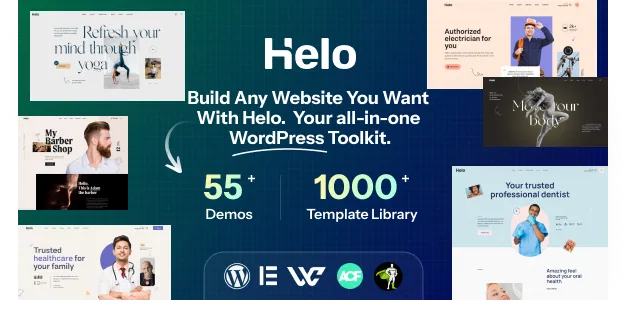
The vendor lists 55-plus demos with dark and light versions, 1000-plus sections and 300-plus pages. The count says little on its own; the categories behind it say more.
The demo names run from Digital Agency, Creative Agency, Branding Agency and Startup Agency through Law Firm, Dentist, Hospital, Gym, Barber and Yoga Trainer, to Solar System, Cleaning Service, Laundry, Car Repairing and a CV/Resume. That spread is what the multipurpose claim rests on — the same builder set tested against a consultancy with service pages, a clinic, a trades business and a one-person résumé site.
The CV/Resume demo is the outlier worth noting if you build personal sites next to business ones. The section count is the more portable figure: prebuilt sections are the blocks you reassemble, which shortens page assembly compared with starting blank.
The declared stack: Underscores, Elementor, Bootstrap 5.x
The theme is built on Underscores, WordPress's own starter theme, so the base follows core conventions. Elementor appears in the compatibility attribute together with Elementor Pro, naming both editing paths. Contact Form 7 and WPForms cover forms, while The Events Calendar and its Pro version cover event listings. Bootstrap 5.x is listed too, so the front-end grid follows that framework.
Gutenberg Optimized is marked No. Read it as a statement about where the vendor's tooling lives — Elementor and the theme's own panels — rather than a claim that the block editor stops working for ordinary posts.
The software version attribute spans WordPress 6.0.x through 6.7.x. These are vendor declarations recorded on 4 November 2026, not results from testing against your host, PHP build or plugin stack.
What the vendor does not describe
Two questions decide a project faster than any feature count, and the listing leaves both open. The vendor does not say whether every demo works on free Elementor or whether some depend on Pro-only widgets, and it does not describe a per-page switch that disables the animation layer. If you need a motion-free site or a Pro-free build, those are worth confirming with the vendor before you commit.
Everything here comes from the vendor's description and the marketplace attributes. Animation performance on real content, the weight the addon library adds to a page, and how the builders interact with your existing plugins are questions a build on your own environment answers — not this page.
Questions & answers
Does Helo require Elementor Pro?
Elementor is listed alongside Elementor Pro in the compatibility attribute, so both versions are named. The vendor does not state that Pro is mandatory, and the listing does not say which demos rely on Pro-only widgets.
Can I turn the GSAP animation off entirely?
The animation builder is presented as a theme feature, and the listing does not describe a global switch that removes motion from every page. Confirm with the vendor if a motion-free build is a hard requirement.