Eight named concepts, and what picking one gets you
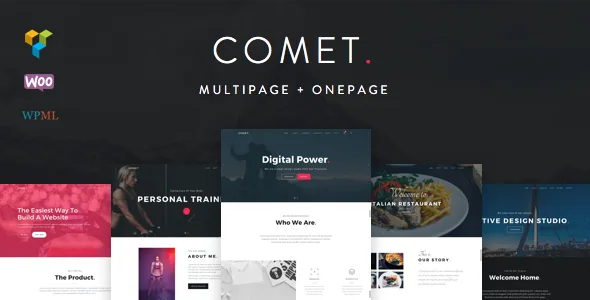
The vendor's feature list opens with a specific inventory: eight concepts named Agency, Restaurant, Architecture, Resume, Landing Page, Photography, Fitness and Model Agency. Alongside that sit 17+ home versions. Read together, those two numbers describe something narrower than "multi-purpose" usually implies. The concepts are starting compositions — a page order, a section rhythm, a tone — not separate products or bundled businesses. Choosing Restaurant means starting from a menu-led layout; it does not give you reservations, ordering or any restaurant logic.
That distinction matters when you compare it with what you are actually building. A photography studio and a fitness brand both need a portfolio or a schedule, but they need different things above the fold, and the eight concepts exist to shorten that first decision. Pick the closest concept, then use the extra home versions to vary the opening page without abandoning the rest of the site's structure.
One page or many, and which navbar you put on top
Among the vendor's features are two choices that a visitor feels immediately rather than noticing in a settings panel. The first is "One Page & Multi-page design": a single scrolling page, or a conventional site with separate inner pages. A one-page build suits a landing pitch or a resume; a multi-page build suits a restaurant with a menu page or a studio with per-project pages. Comet supports both, so this is a decision you make rather than a limitation you accept.
The second is the light and dark navbar pair. That sounds cosmetic, but it decides whether the header sits quietly over a bright hero or asserts itself against dark imagery — and it interacts with the parallax and video background tools in ways you will notice most on interior pages. The vendor also lists a mega menu, which is the piece a multi-page build usually needs once sections move into submenus.
Visual Composer holds the page; the demo import gives you a draft
Pages are built with Visual Composer, listed as included with prebuilt Visual Composer templates. The marketplace's compatible-with field names several Visual Composer releases from 4.11.2.1 through 5.1.x, and the changelog tracks the plugin alongside the theme, ending with an update to version 5.7 in the 1.2.2 entry. Comet's editing surface, in other words, is the builder's drag-and-drop grid with Comet's templates dropped in as a starting point.
The vendor's one-click import loads demo content and settings, which is the fastest way to see how a concept is assembled before you replace anything. Treat it as a draft: import the concept closest to your project, then swap sections rather than building an empty page from the element list.
Colour handling is unusually ordered for a theme of this age. The vendor describes changing colours with one click and updating the included LESS file, so the palette lives in a compiled stylesheet source rather than being hunted through templates. A child theme is included, which is where any customisation you want to survive a theme update belongs. Note that no layered design files appear in the marketplace file list — PHP, CSS and JavaScript only — so visual work happens in the options, the builder and CSS.
Motion, sliders and the portfolio layouts
Comet carries a specific set of motion tools rather than one generic slider: a Ken Burns slider, an animated canvas background, parallax sections, and YouTube and HTML5 video backgrounds. Each changes what a page can open with — a slow zoom on a still image, a moving texture behind content, depth between sections, or moving footage behind a headline.
The video backgrounds have a documented detail worth knowing. The 1.1.5 changelog entry records fixing HTML5 video backgrounds on iOS and adding a fallback image for mobile devices. That is the vendor's own account of a known constraint: background video on phones needs a still frame to fall back on, and the theme ships with that behaviour built in rather than leaving you to discover it.
For portfolios, the vendor lists boxed and wide layouts with filters, plus a modal photo gallery. Boxed and wide changes the relationship between the grid and the screen edge; filters let a visitor narrow a body of work without leaving the page. The 1.1.1 entry records adding non-Latin character support to portfolio filters, which decides whether a non-English category name renders correctly in the filter bar. Blog side, the vendor lists 10+ page styles — plenty for a publication-leaning build, though the count alone does not tell you which ones fit an editorial tone.
The shop is WooCommerce, styled by Comet
WooCommerce support is described with a Comet-designed shop and an Ajax shopping cart. The theme does not supply store logic: cart, checkout, tax, shipping and payment gateways come from WooCommerce itself, and Comet's contribution is how those screens look and how the cart behaves when a product is added. The changelog shows the vendor maintained that layer, with repeated WooCommerce template updates and a 1.1.8 entry adding full WooCommerce 3.0.7 compatibility.
The marketplace's compatible-with field declares WooCommerce 3.0.x and 3.1.x — the versions current in the era of the last theme release. If your store runs a much later WooCommerce, the useful question is not whether the theme "supports shops" but whether its template overrides still match what WooCommerce renders; the vendor's own 1.2.2 note about fixed portfolio and blog ordering for WordPress 5.1 shows the kind of breakage these overrides can produce downstream.
WPML support and localisation are listed, with a .po file included and, per the changelog, translation strings added to the WPML configuration file over several releases. That covers strings and layouts. It does not translate your product copy, category names or customer emails — those still need translating whichever workflow you use.
What the 2019 stopping point means for a decision
The marketplace record's most recent dated changelog entry is version 1.2.2 on 8 May 2019, and the vendor's last update is the same date. The declared software range stops at WordPress 4.9.x and WooCommerce 3.1.x across the listed versions. The marketplace version is 1.2.2. Gutenberg Optimized is marked No, which says how the theme is graded for the block editor — not that the block editor is unavailable — and the documented editing path remains Visual Composer.
What you can conclude from this is bounded. The theme was actively maintained through the WordPress 5.1 era; nothing in the supplied material records compatibility testing beyond that, so promises about current WordPress or PHP behaviour, performance, or security would be guesses. What you can do is prepare for a version-sensitive install: keep a staging copy, expect the bundled builder to be a 5.7-era release, and check that your shop or multilingual path stays on the template versions the theme was written against.
Comet makes sense if you want one of the eight concepts as a head start, you are comfortable working in Visual Composer and CSS, and the release date is an accepted part of the project rather than a surprise. It makes less sense if you need a theme whose declared support matches the WordPress and WooCommerce versions you are running today.
Questions & answers
Can I use the block editor instead of Visual Composer with Comet?
The marketplace marks Gutenberg Optimized as No, and Visual Composer is the editing path the vendor documents, with prebuilt templates and 5.7 tracked in the changelog. Standard WordPress content types will still exist, but the layouts Comet's concepts demonstrate are built in the builder, so expect to work there for the page designs you came for.
Is each of the eight concepts a separate theme?
No. They are concept starting points within one theme, alongside 17+ home versions, imported as demo content rather than installed separately. That is why the import is a draft to replace section by section rather than a finished site.
What does the one-click colour control actually change?
The vendor describes changing colours in one click and updating the included LESS file, so the palette is driven from a stylesheet source rather than edited template by template. Custom CSS added to the included child theme is the safer place for changes you want to keep when you carry out a theme-side update.