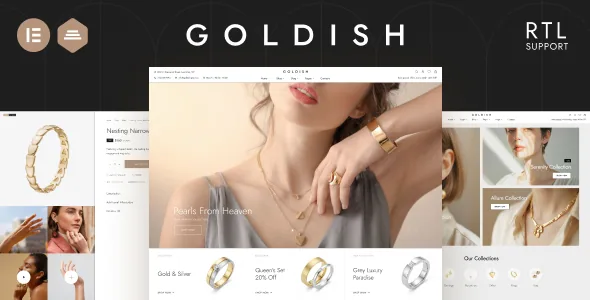
The product page is where this theme has been worked on
The marketplace description frames Goldish as an elegant, minimalist WooCommerce theme for jewellery shops, fashion stores, watch shops and handmade crafts — a pitch that could belong to dozens of listings. The changelog is where it gets specific. Release after release touches the single product view.
Version 3.0 added fullwidth and expanded tab layouts plus a features list on the product page. Version 3.3 added a choice between inline and table layouts for the Additional Information tab. Version 3.18 made the summary section's blocks sortable and individually disableable. Version 3.24 added a custom product tab and a custom product section, both built from an HTML block. That is the pattern: the part of a jewellery shop that gets iterated on is the page where someone decides whether to buy.
Rearranging the summary and choosing a tab layout
The summary holds the title, price, short description and add-to-cart controls. Because version 3.18 made those blocks sortable and switchable, a shop that needs only a price, a variant picker and one reassurance line can remove the rest instead of styling around elements it does not want.
The tab area offers three documented layouts — default, fullwidth and expanded — and the Additional Information tab can render as a table or inline. Dimensions, metal and stone specifications usually read better in a table; a care paragraph reads better as prose.
The custom tab and custom product section accept an HTML block, which is the practical home for sizing guidance, hallmarking explanations or a note that does not belong in the short description. The same content can be reused elsewhere through the shortcode [ip-html-block id="12345"].
Swatches, badges and filters for a jewellery catalogue
Bi-colour swatches arrived in version 3.28, which suits a line sold as two-tone metal rather than one flat colour. Version 3.38 added an inline layout for the sidebar filter on colour or image attributes, so the filter reads as a row of chips, and a product category sidebar widget whose subcategories collapse and expand — useful when the catalogue branches into rings, earrings, bracelets and necklaces.
Product badges are set per product, per version 3.35, so labels like "new arrival" or "limited edition" do not have to borrow WooCommerce's sale flag. Variable products can show discount percentages (version 3.24), which puts a variation-level reduction in view rather than leaving it to the product page.
The vendor's key feature list also names QuickView, Wishlist, Ajax live search and product video. Version 3.35 extended search to categories, tags and brand names, and version 3.20 let you place the video among the gallery thumbnails.
Add to cart on a phone
Mobile purchase behaviour gets its own thread in the changelog, and most of it is a decision rather than a default. Version 3.36 added sticky bottom buttons, including a sticky Add to Cart. Version 2.21 added a popup cart on mobile, version 3.24 made that popup optionally open right after a product is added, and version 3.14 added an auto cart update option. Version 3.38 added a Buy Now button.
For a shop that often sells one item per order, these toggles shape whether a purchase feels quick or fiddly on a small screen. Turn them on deliberately; each changes what a shopper sees after clicking Add to Cart.
Brands live in the theme
Version 3.45 added the ability to migrate WooCommerce brands to the theme's own brand taxonomy, so a catalogue built on the WooCommerce brand taxonomy can move across. Earlier releases show the same theme-side handling of merchandising details: a brand display option on the cart page (version 2.11), a brands link in breadcrumbs (version 2.21), and brand matching in live search (version 3.35).
The description also lists WPC Frequently Bought Together as compatible, a natural pairing for gift-oriented merchandising.
Elementor for layout, with commerce controls in the theme
The vendor describes building pages from prepared blocks edited in Elementor, and the marketplace compatibility list, observed on 4 November 2026, records Elementor. The same attributes mark Gutenberg Optimized as No. That is not a claim that the block editor is unavailable; it says the vendor has not declared block-editor optimisation, and that the theme's page-building story runs through Elementor. If your team works in blocks by preference, settle this before buying.
Note where the shop behaviour sits. Swatches, badges, filter layouts, the sticky mobile bar, the cart popup and brand migration are theme features, not page-builder content. Version 3.51 fixed an HTML block styling conflict caused by a newer Elementor release, and version 2.4 corrected variation photo switching in the "Goldish" and "Modern" layouts — reminders that both halves need to be kept current together.
Translation routes and the shipped starting point
The description names WPML, TranslatePress and Polylang compatibility. The changelog dates TranslatePress and Polylang to 2023 and adds WPML Advanced Translation Editor support in version 3.38; RTL is listed as supported. Which one you pick depends on how your team already manages translated strings and product data.
Alongside the theme, the description lists seven home pages, three headers, a multi-column mega menu, one-click demo import, a child theme and 850+ Google Fonts, with a system-font option added in version 3.35. The child theme matters for a shop that will accumulate custom CSS and PHP over time.
Two details deserve precision. Version 3.25 records an "Inspiration AI Photos Pack and Midjourney Prompts" as part of that release — a vendor statement about the release, and worth confirming in your own copy rather than assuming it appears in a demo import. And the compatibility declarations observed on 4 November 2026 span WooCommerce 5.x.x through 10.x.x and WordPress 5.5.x through 7.1.x, with Firefox, Safari, Opera, Chrome and Edge listed. Those are listing declarations, not results on your PHP version, caching layer or plugin stack.
Questions & answers
Does Goldish work with the block editor?
The marketplace attributes mark Gutenberg Optimized as No, while Elementor appears in the compatibility list and the vendor describes pages as prepared blocks edited in Elementor. No source says the block editor is unavailable; it says the theme's declared page-building workflow is Elementor.
Can I show two-tone metal options on a product?
The changelog records bi-colour swatches added in version 3.28, and version 3.38 added an inline layout for the sidebar filter on colour or image attributes. Together they cover a two-tone variant picker and a compact visual filter on the catalogue.
Which translation plugins are supported?
The description lists WPML, TranslatePress and Polylang, and version 3.38 added WPML Advanced Translation Editor support. RTL is also declared. Choose based on how your team manages translated product data, since the plugins handle that differently.


