One video field, three sources, very different consequences
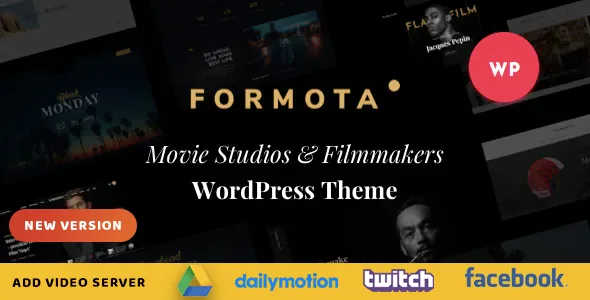
A filmmaker's site is mostly a set of moving images, and the decision that shapes the whole catalogue is where those images live. HaruTheme's description gives that decision its own feature: a film and video field where you pick the source from YouTube, Vimeo, or a file you host yourself.
Self-hosting gives you control. A private client screener, an unreleased trailer or a festival cut can sit behind the same templates as public work, and no third-party player branding shows up around it. The cost is bandwidth and storage on your own hosting, plus the encoding work of producing web-friendly files. Embeds take that weight away and give you Vimeo's or YouTube's player controls and privacy settings, at the price of depending on those platforms staying reachable and on their embed rules.
Because the source is chosen per item rather than once for the site, a studio can mix approaches: embeds for public trailers, self-hosted files for commissioned work that never goes public. That is the practical difference between this and a theme that assumes every clip is an embed.
Thumbnails decide how a grid of projects reads
The vendor description includes a section headed "Video Thumbnail Type Examples", which signals that the thumbnail is treated as its own element rather than a leftover featured image. For a studio, that matters more than the player itself. A visitor scanning a grid of films sees the thumbnail first; the still, the crop and the overlay are what make one project stand out from the next ten.
The description does not enumerate the thumbnail treatments, so the demo is the place to judge them. Load a few of your own images at the aspect ratios your work actually uses — scope, 16:9, vertical social cuts — and see whether the presets hold. This is also a still-image question: the theme is listed as retina ready, which affects how sharp those stills look on high-density screens. High-resolution source images are worth preparing from the start.
Pages are built in WPBakery, motion in Slider Revolution
Formota's layout work happens in two bundled third-party tools. The vendor lists WPBakery Page Builder as the drag-and-drop builder and Slider Revolution as the slider tool, and both appear repeatedly in the changelog as versions are bumped alongside WooCommerce compatibility.
The marketplace attribute marks Gutenberg Optimized as No. Read that narrowly: it says the theme isn't described as tuned for block-editor templates. It doesn't mean the block editor is switched off, but a team planning to design pages with core blocks and block patterns should expect to spend its time inside WPBakery instead.
Slider Revolution carries the hero. On a studio site that usually means a reel or a sequence of film stills with layered text — the kind of motion the slider is built for. It also means a homepage that is heavier than a static image, so it's worth deciding early whether your opening should be a full moving banner or a single strong frame.
The preset counts are build choices, not decoration
The vendor counts 12+ homepages, 6+ header styles, 4+ footer styles and 4+ blog page styles, with one-click demo installation to seed them. Treat these as a starting kit rather than a menu of designs to admire.
The realistic value is speed in the first week: you install a demo close to your intended structure, replace content, and adjust. Twelve homepages cover a lot of presentation ground — a studio reel first, a portfolio grid first, a single film featured, a service-led agency page. The header and footer variants let the chrome shift between a work-heavy page and a contact page without redesigning navigation.
The constraint appears later. Presets are opinionated, and the further your brand sits from the supplied designs, the more time goes into overriding them in WPBakery and the theme options rather than composing fresh. If your visual identity is already set in detail, budget for that work.
Chrome that pushes a visitor toward the reel
Three site-wide features in the vendor list point in the same direction: a customizable mega menu built in, a sticky header, and a newsletter popup.
The mega menu carries structure. A studio with features, shorts, commercials and a shop needs a top-level item that opens into columns, and a mega menu handles that without a second navigation system.
Sticky navigation keeps the menu present through the long scrolling that a film grid invites. The newsletter popup is the one worth a decision rather than a switch: a popup interrupts someone who came to watch a trailer. It's useful for a studio building a mailing list around a release, and a distraction everywhere else. Contact Form 7 appears in the vendor's feature list for enquiry forms, which is the standard route for booking and commission requests.
Branding tools in the same list — easy colour customisation and 600+ Google Fonts — set the typography and palette above the page level, so a rebrand doesn't mean touching every layout.
Shop and translation are declared compatibility, not bundled features
The marketplace attributes observed on 4 November 2026 list WooCommerce versions 6.x through 10.x, WPML and WPBakery Page Builder under compatible plugins. The changelog supports the WooCommerce claim with regular compatibility entries, including a revision dated August 2026 that pairs WordPress 7.0.x with WooCommerce 10.9.x.
For a film studio, WooCommerce usually means merchandise, posters, or a paid screening. The theme supports that; it doesn't supply the products, shipping rules or payment settings. The same boundary applies to WPML, which is listed as compatible rather than included. A bilingual studio with subtitle-tracked pages would need to buy and configure the plugin separately.
Those attributes are vendor declarations for your own stack to confirm. Nothing here was installed or run against a live site for this article, so the version ranges tell you what the vendor states, not what has been tested with your plugin mix.
What the update history says about keeping the site for years
The changelog runs long and steady, and the pattern is consistent: releases update WPBakery, Revolution Slider and WooCommerce compatibility, then fix small CSS issues. New layout types don't appear in the recent entries. That is a maintenance rhythm rather than a feature rhythm — the theme is kept working with the tools it depends on, not continually expanded.
For a studio site you plan to run for several years, that's the relevant signal. Because the theme passes so much of its behaviour through two licensed plugins, those updates are what keep a site from breaking after a WordPress or WooCommerce release. It also means your dependency set is larger than the theme alone.
The honest friction points are the ones already named: page design in WPBakery rather than the block editor, and self-hosted video carrying your own bandwidth bill. If neither bothers you, the per-item video source field is the reason this theme suits a film catalogue better than a general creative theme with a video block bolted on.
Questions & answers
Can I mix YouTube, Vimeo and self-hosted videos on the same site?
The vendor describes choosing the source per video or film item from YouTube, Vimeo or a self-hosted file. That wording points to an item-level choice rather than one site-wide setting, so a catalogue can combine public trailer embeds with private self-hosted files. Confirm the exact field behaviour on the demo before you commit.
Does Gutenberg Optimized being "No" mean the block editor doesn't work?
No. The attribute says the theme isn't described as tuned for block-editor templates. Page layout in Formota is built with the bundled WPBakery Page Builder, so that is where your design work will go.
Is WPML included with the theme?
WPML is listed as a compatible plugin, not as something shipped with the theme. A multilingual site needs the plugin purchased and configured separately.
What does the shop cover for a film studio?
WooCommerce compatibility across versions 6.x to 10.x is declared, which suits merchandise, posters or ticketed screenings. The theme provides the styling and layout layer; products, shipping, tax and payments are WooCommerce's job.