A shop first: the four WooCommerce features the vendor actually names
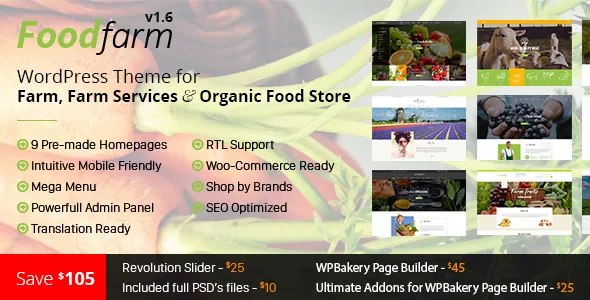
FoodFarm's marketplace description lists four selling features in a row: product comparison, wishlist, shop-by-brand browsing and an Ajax filter for the shop. Those four describe a retail workflow, not a brochure site with a cart bolted on.
Compare products matters for exactly the kind of catalogue this theme targets. A shopper weighing two bags of feed, two grades of seed or two cuts of meat needs the specifications side by side, and the theme is described as supplying that view. Wishlist handles the slower purchase — a seasonal item a customer wants to keep and return to. Shop by brand is the browsing path for buyers who arrive loyal to a supplier rather than a category. The Ajax filter narrows a grid without reloading the page, which keeps a long produce or feed listing usable.
All four are in the vendor's feature summary, so treat them as claimed theme behaviour rather than something measured here. The vendor also states that these WooCommerce extras come from companion plugins rather than hand-written theme code, which is worth knowing before you plan your plugin stack.
Recipes, galleries and knowledge pages sit outside the cart
The feature list spends almost as much room on editorial layouts as on selling. It names multiple predefined layouts for blog pages, knowledge pages, "we doing" pages, gallery pages and recipe pages, plus separate layouts for about and contact pages.
That combination says the theme expects a farm business to publish beyond product listings: a recipe section for the produce it sells, a gallery for the fields or the market stall, a knowledge area for growing advice or delivery information. If your site only ever needs a shop page and a contact form, you are paying for content templates you will not use.
Layout choice extends to individual posts and pages. The vendor describes settings for one column, two columns with the sidebar on the left or right, and three columns, so the same theme can present a long recipe article in a single column and a photo-led page in a grid.
What the three bundled plugins do, and what the file list actually says
The vendor's headline claim is that the theme is built around WPBakery Page Builder, Ultimate Addons for WPBakery Page Builder and Slider Revolution, with the description quoting savings of $34, $18 and $19 respectively for those plugins. In practice that means page composition happens on a drag-and-drop canvas, extra content elements come from the Ultimate Addons set, and the hero area is a slider you configure rather than code.
Those are statements about the product from its author. The marketplace's file list for the ThemeForest package is narrower: PHP, CSS and JavaScript files. Plugin licences are a separate matter from theme files, and how a bundle is delivered inside a given copy is not something the listing settles. Check what your own package contains before you plan around a bundled licence.
One further capability in the same layer is the admin panel. The vendor describes it as the place to configure the site without coding, including unlimited colour and Google Font settings, a sticky menu option and mega menu support. That panel, not the builder, is where typography and brand colour are set.
The changelog reads as a WooCommerce maintenance habit
FoodFarm's version history is long, and the most frequent entry type is a WooCommerce sync. Version 2.1.7, dated 1 July 2026, is "Update out of date file Woocommerce." The same note appears at 2.1.4, 2.1.3, 2.1.2, 2.1.0, 2.0.9 and 2.0.4, and the 2.0.6 to 2.0.8 releases between April and November 2024 are all WooCommerce updates as well.
For a shop, that pattern is the point. WooCommerce template files drift between releases, and a theme that keeps its overrides current avoids the broken cart or stale product layout that shows up when a store updates the plugin on its own schedule. It does not guarantee compatibility with any particular future release, but it does show the author treats WooCommerce matching as routine work rather than a one-off.
The other structural change worth noting is 2.1.5, which removed a required knowledgebase plugin and moved the code into the theme. If you were planning around a separate knowledgebase plugin because of an older description, the current arrangement is different.
Declared platform range, and the parts it does not cover
The marketplace's compatibility fields, observed on 5 November 2026, list WordPress 5.7.x through 7.0.x and WooCommerce 5.x through 9.x, with Gutenberg Optimized marked Yes. Elementor does not appear, which fits a product built around WPBakery. These are declarations from the vendor listing rather than the results of running the theme on a specific server, so an install on your own PHP and plugin versions is still the step that settles it.
The integration list is longer than the compatibility field and includes WPML, Polylang, qTranslate X, Dokan Multivendor Marketplace, WC Marketplace, WooCommerce Multilingual, YITH WooCommerce Wishlist, Ajax Search and Badge Management, plus bbPress and BuddyPress. Each is a vendor statement that the theme has been built to work alongside that plugin, not a statement that the plugin is bundled or that every feature behaves identically when it is active.
One consequence is easy to miss: the selling features described earlier partly depend on which of these plugins you install. The theme is listed as compatible with YITH Wishlist and a product filter plugin, so your wishlist and filtering behaviour may come from those rather than from the theme alone.
Single farm shop or multi-vendor marketplace
FoodFarm's listing sits under the food retail category, and its own description is framed for a farm, farm services and an organic food store — one business selling its own produce. The plugin compatibility list meanwhile includes Dokan and WC Marketplace, which turn a WooCommerce shop into a multi-vendor storefront where other sellers list their own goods.
Those two readings imply different builds. A single farm shop keeps the theme's category, brand and recipe structure and needs one product catalogue. A marketplace build puts vendor dashboards, commissions and per-seller shipping into the mix, and the theme's role reduces to the storefront styling around them. The vendor lists compatibility with those plugins but does not describe vendor-facing templates, so if a marketplace is the plan, that layout is the part to confirm before committing.
Questions & answers
Does FoodFarm include the WooCommerce compare, wishlist and filter features, or do I need extra plugins?
The vendor presents all four selling features as part of what the theme provides, and the compatibility list names YITH WooCommerce Wishlist, YITH Ajax Search, a product filter and badge management plugin. Where each function actually comes from is not spelled out, so confirm which plugins your build requires before you plan the shop.
Can I use FoodFarm with the block editor instead of WPBakery?
The marketplace marks Gutenberg Optimized as Yes, and the vendor describes page building on WPBakery. Nothing in the supplied material says whether the demo layouts are also available as block patterns, so the practical answer depends on how much of the theme's designed structure you need.
Which WordPress and WooCommerce versions does FoodFarm declare?
As observed on 5 November 2026, the compatibility fields list WordPress 5.7.x through 7.0.x and WooCommerce 5.x through 9.x. These are vendor and marketplace declarations; they are not a record of testing on your server or with your plugin set.