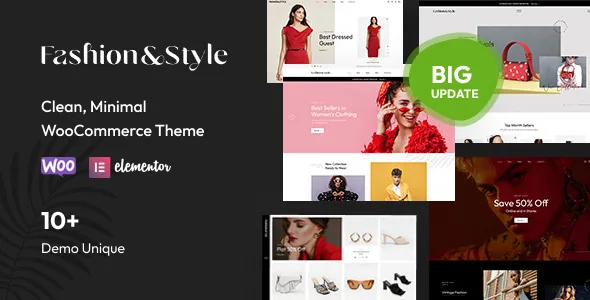
Point of View Product: clothing shown on a model
Most WooCommerce themes are separated by their builder or by a demo palette. Fashion, sold by Opal_WP and listed on ThemeForest as item 8603547, puts a narrower idea near its centre: Point of View Product. The vendor's wording is that "you can visually increase products on the model. 1 click to view the product items on the models saves time for choosing clothings."
Read that as a shopper-side interaction rather than a template tweak. A clothing or accessories store can show an outfit on a person and let a visitor move from the look to the individual items in one click, instead of opening a gallery and matching pieces by eye. Swimwear, eyewear and jewellery catalogues benefit wherever a product reads better worn than laid flat.
The listing does not explain how the outfit-to-product links are authored, whether Point of View needs its own dedicated image set, or whether it applies to every product type. Settle those questions on the demo before you plan photography around the feature, because it depends entirely on the images you supply.
Countdown deals and grouped products as product-page tools
Two more merchandising items sit beside Point of View in the vendor feature list, and both concern the product page rather than the homepage.
The Deals Countdown Timer is described as showing "hot deals and countdown timers for special products with sale prices." A sale state paired with a visible deadline suits flash discounts or seasonal drops where the urgency is genuine. The description does not say whether the countdown is set per product, per category or per campaign, so check that against how you actually schedule promotions.
Grouped products work differently. The vendor says the theme supports grouped products "for cross-selling products. You can add the related products on the product description," so someone reading a main item also sees companion pieces and can add them without leaving the page. Grouped products are a native WooCommerce product type, which makes this partly a question of how the theme's product layouts render that type. Test with an actual grouped product rather than a simple one.
Shop and product layout choices
The vendor names the shop layouts concretely: "grid/list, sidebar with 3 columns, 4 columns, full width layouts." Product pages get their own set, described as "04+ product layouts and styles."
That matrix matters more for apparel than for a small catalogue. A store with many variants and long size guides usually wants a sidebar layout where filters stay visible; a lookbook-driven store leans toward full width with fewer interruptions. The marketplace attributes also list a four-plus column layout with widget-ready areas, which lines up with the sidebar and grid claims.
What the listing does not tell you is how the layouts are switched: globally in the Customizer, per category, or per page in Elementor, or whether the product layout is chosen per product. The demo pages are the reference, so confirm the switch you need.
Elementor is the page layer, built into the theme in 2019
Fashion's page layer is Elementor, named both in the feature list and in the marketplace compatibility attributes, with 10+ fashion homepage samples the vendor says are all built with it. A one-click demo import is described for reproducing a homepage quickly.
The changelog gives useful context: a March 2019 entry reads "Build theme again with Elementor Builder." The Elementor foundation is not a late add-on to an older page system; it is what the front end was rebuilt around. Practically, the homepages you import are Elementor documents, and edits belong in Elementor rather than in shortcodes.
The marketplace attributes mark Gutenberg Optimized as "No." That is a statement about block-editor optimisation, not proof that the block editor is unavailable. If your workflow is built on block patterns, understand that this theme's design work happens elsewhere.
What the Customizer controls, and where Adobe Fonts may change
Elementor composes pages; the WordPress Customizer handles the frame around them. The vendor lists controls covering main options, side area, social links, post list, styling, layout, footer and header sections.
Three are practical for a shop. Site width switches between full width and boxed, which changes how a wide product grid reads on large screens. A sidebar generator lets you create additional sidebars, useful when category pages and editorial pages need different widget sets. Main and secondary site colours are set in the Customizer, so a palette change does not mean editing every Elementor page.
The vendor also notes that some demos use Adobe Fonts, and that those fonts are substituted with default fonts or Google Fonts when unavailable. If the typography in the preview carries the look you want, plan for that substitution.
Package contents and the declared compatibility range
The marketplace file list names PHP, CSS and JS files plus PSD, so layered design files are part of what the vendor ships. That only matters if someone on your side works in Photoshop. The listing also names Revolution Slider among the customization features, with updates provided, and describes support through the vendor's ticket system and documentation.
On compatibility, the vendor attribute record observed on 4 November 2026 lists Elementor and WooCommerce 5.x through 10.x alongside Chrome, Firefox, Safari and Opera. These are declarations on the marketplace listing, not results from testing against your PHP version, caching layer or plugin stack. Stage the theme with your real WooCommerce extensions before launch.
The vendor's demo also states that sample images are for preview only and must be replaced with your own licensed photography, which is a practical line item for a fashion catalogue where images do the selling.
Questions & answers
Does Point of View Product require special photography?
The vendor describes a one-click way to view products on a model but does not explain how outfit images are linked to product records. Plan for on-model shots and confirm the authoring process on the demo or in the documentation first.
Can the countdown timer be set for individual products?
The listing only says countdown timers appear for special products with sale prices. Whether the deadline is configured per product, per category or per campaign is not stated, so verify it against how you run promotions.
Is the block editor unusable because Gutenberg Optimized is marked No?
No. That attribute describes block-editor optimisation, not availability. The theme's designed pages are Elementor templates, which is where its layouts are edited.


