Four ways a shop listing can load, chosen inside the theme
The vendor's feature list gives the shop archive four pagination modes: infinite scroll, load more, AJAX and the standard numbered pagination. Alongside that sits a grid/list view toggle.
Those two settings decide how a visitor moves through your catalogue before they ever reach a product page. Infinite scroll keeps a feed going without a click, which suits a store that wants customers to keep scanning; numbered pagination gives them a sense of position and lets them jump back to a page they remember. Load more and AJAX land between the two — the page extends on request rather than automatically.
The grid/list toggle answers a different need. Shoppers comparing specifications often prefer a list row with more text visible; shoppers browsing imagery want the grid. Letting them choose treats both as legitimate.
None of this is unusual on its own. What is worth noting is that each mode is a theme setting rather than code you maintain in a child theme, so the decision can change as the catalogue grows.
Cart and mini-cart details that are already built in
The changelog shows where most of EmallShop's recent development effort has gone, and it is the cart. Version 2.3.0 added a free shipping bar in the mini cart and cart page, a product quantity input inside the mini cart, a sticky add-to-cart button that appears when scrolling, and a mobile bottom navbar. Version 2.4.0 added automatic cart updates when the quantity changes, a quantity field on the checkout page, and options to enable or disable the auto-update, to show or hide the product thumbnail on checkout, and to show or hide the quantity field there.
Those additions describe a particular kind of storefront: one where the cart is treated as a place shoppers adjust things, not just a summary. A free shipping bar gives a reason to add one more item. A quantity input in the mini cart means the correction happens without a trip to the cart page. A sticky add-to-cart keeps the primary button within reach on a long product description.
The presence of on/off options matters more than the features themselves. Auto-updating a cart on every quantity change is convenient for some stores and jarring for others, and the theme lets you settle that per site rather than patching the template.
Catalog mode and the tools that decide whether you sell at all
The feature list names WooCommerce Catalog Mode, which is the switch that turns a catalogue into a browsable showcase: products remain visible with prices or without a purchase path, and the store stops functioning as a checkout. It is the setting that makes the theme viable for a wholesaler, a lookbook or a range that is sold through distributors.
Three other entries shape the browsing experience around it. Live product search returns suggestions as a visitor types, rather than sending them to a results page. A product brand filter narrows the catalogue by manufacturer, which matters for a shop stocking many labels. Quick view with a lightbox opens a product in place on the listing page.
The vendor groups these under the shop section of the description rather than explaining how each one is configured. Treat the wording as the boundary of what is documented: catalog mode exists as a feature, but nothing in the description says whether it can be applied to part of a store while the rest keeps selling.
Three multivendor paths, and one plugin you need separately
The vendor states compatibility with Dokan Multivendor Marketplace, WC Vendors and WC Marketplace, and the 2.3.0 changelog records compatibility work against Dokan 3.4.1, Dokan Pro 3.5.1, WC Marketplace 3.8.10, and both the free and Pro versions of WC Vendors. Those are vendor claims about plugin pairing, not a description of a marketplace dashboard the theme provides — vendor registration, commission handling and payout logic sit in whichever marketplace plugin you install.
WPML is listed as compatible with an explicit note that the plugin is not included, so a multilingual store has to budget for that licence separately. RTL language support is listed as a theme feature and appears repeatedly in the changelog as its own fix line, which suggests it is maintained rather than announced once and abandoned.
If you need translation of product data across markets, the WPML note is the one to read before you assume a cost-free multilingual setup.
Fifteen-plus home layouts, and demo images that are not yours
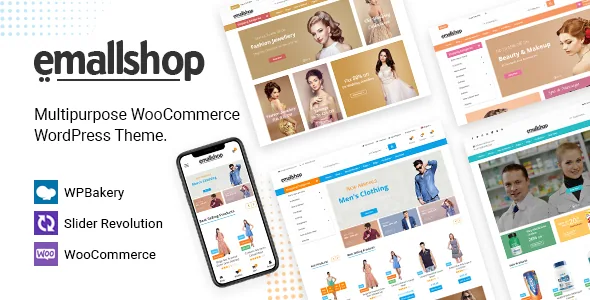
The theme ships more than fifteen prebuilt home pages, multiple header and footer styles, and boxed or full-width layout modes, with one-click demo import to load a starting point. The framework is Bootstrap, and the page builder is WPBakery, with Revolution Slider included in the package as a slider tool.
The vendor's own note about the demo is the practical detail here: images shown in the demo are not part of the download package and are replaced with placeholders in the demo data. So importing a demo gives you structure, spacing and section order — not the photography that makes those pages look finished. Budget for your own product and lifestyle imagery.
Because the layouts are builder-driven, adapting one means working in WPBakery rows and elements. A child theme is listed as supported, which is the sensible place for customisation that should survive a theme update.
Version posture and what the listing declares
Observed on 4 November 2026, the marketplace attributes record compatibility with WordPress 6.0.x through 7.0.x and WooCommerce 5.x through 10.x, along with WPBakery, WPML, Bootstrap 4.x and 5.x, and browsers including IE11, Firefox, Safari, Opera and Chrome. The package files are listed as PHP, CSS and JavaScript. These are declarations from the listing, not results of running the theme on a test site; the vendor's own changelog is more specific about what was tested against.
The changelog tells a longer story than the compatibility table. Releases have come at a steady rhythm, with entries for bundled WPBakery, Revolution Slider and Ultimate Addons updates, repeated CSS and RTL fixes, and a security fix in version 2.4.22 described as addressing issues reported by Patchstack. The most recent entry recorded at the time of writing adds WooCommerce 11.2.x compatibility.
Two things follow. A theme with a long-running update habit and a security fix in its history is one to keep patched rather than install once — but the changelog records bundled plugin updates, so the versions of WPBakery and Revolution Slider that ship inside the theme are the ones your site will have unless you manage them otherwise. Neither point is a judgement on how the theme performs; both are reasons to check what version you install and to stay current afterward.
Questions & answers
Can EmallShop run a shop without checkout, for example a wholesale catalogue?
WooCommerce Catalog Mode is listed as a theme feature, which supports using it for a browsable product showcase. The description does not say whether catalog mode can be limited to some products or categories while the rest of the store keeps selling, so a mixed store needs that confirmed before relying on it.
Do I need to buy WPML or a multivendor plugin separately?
WPML is listed as compatible with an explicit note that the plugin is not included. Dokan, WC Vendors and WC Marketplace are described as compatible additions rather than bundled code, and the theme does not supply marketplace functions of its own.
Are the demo photographs included when I import the demo content?
No. The vendor states that images at the demo are not included in the download package and are replaced with placeholders in the demo data, so you supply your own product and editorial imagery.