Dishes are records, not paragraphs
The centre of Elegantia is the Food Menu Item custom post type, which the vendor describes as carrying feature-rich metaboxes, plus a Food Menu Type taxonomy for sorting items into courses. The vendor's own examples are Salads, Desserts and Appetizers. That item then feeds a Food Menu template, a Featured Food Menu Items widget, a Food Menu Item Types widget, and the featured-items block on the home page.
One entry, several placements. Renaming a course or moving a dish to a different one updates every location that draws from the taxonomy. That is the difference between maintaining a menu and re-typing it into each page that shows it.
The vendor does not enumerate the metabox fields, so price formatting, dietary markers or allergen tags are unconfirmed. If those matter to how you present the menu, check the admin screens in the demo rather than assuming.
Events split three ways, and someone has to keep the dates moving
Three event templates are listed: All Events, Upcoming Events and Past Events, all drawing on an Event post type with its own detail page. An Upcoming Events widget puts the next dates in a sidebar, and the changelog records an early release ordering event listings by start date and drawing the start date in a circle.
The ordering is handled; the upkeep is not. Upcoming and past views stay accurate only while the event records are kept current, which is fine for a venue running a regular programme of tastings or live music and heavy for a restaurant with a single annual evening.
A three-way split also says something about visitor intent. Someone deciding whether to come wants the forward-looking list. Someone checking what they missed wants the archive. Keeping both means neither page has to serve both jobs.
Homepage sections live in Theme Options, not on the page
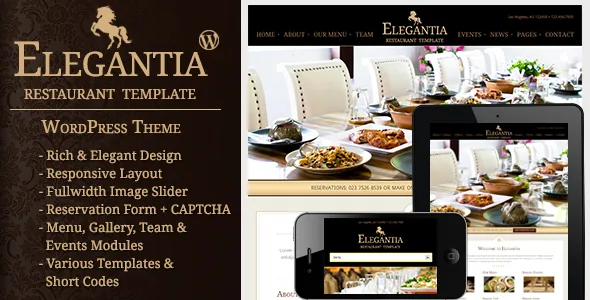
The home page is assembled from theme option fields: a fullwidth image slider, a "Special Three Columns Section", a featured food menu items block and a testimonial block, each managed from the options panel. The content area itself accepts the theme's shortcodes.
That arrangement is quick for a front page you set once, and awkward for one you revise often. Section content held in an options field does not follow the page through revisions and is not per-page by default. If the three columns change every month, budget for that work in the options panel each time.
A 2019 release added home templates with left and right sidebar support, so the options-driven layout is not the only home arrangement.
Reservation and contact stay separate, each with Ajax and captcha
Elegantia ships a Reservation template and a Contact template as distinct pages. Both are described as using Ajax-based forms with captcha support, so a submission reports back without a full reload.
Splitting the two is the useful part: booking a table is a specific request with a date and party size, while the contact page carries the map, opening hours and general enquiries. Merging them creates one long form that does neither job well.
Two setup details sit behind those claims. Captcha needs its own keys, and the changelog records a release that added Google Maps API key support for the contact map. How a submitted reservation reaches staff is not described anywhere in the supplied material, so confirm whether requests land in an inbox, the database or a bookings plugin before you depend on the form.
A gallery choice you make before sourcing images
The gallery module includes templates for two, three and four columns, grouped under a "Sortable Gallery Module" heading, with a Gallery Item Type taxonomy, a lightbox and a detail page for each item.
Column count is really a decision about images and text. Four columns suits a wide desktop view but shrinks each thumbnail; two gives a dish or room photograph room and requires more scrolling. Because every gallery item also has its own detail page, the amount of caption and description you intend to write per image should settle the column template, not the other way round.
The changelog notes next and previous arrows added to the lightbox in an early release, so visitors can move through images without closing the overlay.
Shortcodes and templates, with basic block support
No page builder appears in the vendor's feature list. Pages are built with the theme's shortcodes and its page templates: a Fullwidth template and a default template with left or right sidebar support. Homepage blocks come from Theme Options, as above.
The changelog mentions two plugin-related items rather than a dependency: a 2019 release added Gutenberg support "to cover basic Gutenberg blocks", and a 2023 release improved compatibility with WPBakery Visual Composer. Neither statement makes a builder or the block editor a requirement for every template.
Packaging supports customisation rather than locking it down. A child theme is included, an early release added it to the package, and the theme ships .po and .mo files so a translation starts from supplied strings. The demo content XML is the import file for the sample content.
Version statements come from two places
The marketplace software-version attribute, observed on 4 November 2026, lists WordPress 6.0.x through 7.0.x. The vendor's changelog for the current release says the theme was tested with WordPress 7.0 and PHP 8.x, and an earlier entry records testing up to PHP 8.4.
Those two sources were written at different times and are declarations, not results from your server. Caching, plugin mix and PHP configuration are yours to verify.
The changelog reads as a maintenance record rather than a redesign history: recent entries fix stretched images, responsive hamburger menu issues and Visual Composer compatibility, and the most recent adds a command palette search. The pattern says small, specific patches are how this theme stays current.
The files you actually receive
The marketplace file list names layered PSD and PSD sources alongside PHP, CSS and JavaScript, and the vendor states eight PSD files are included. Those are design sources, useful if a designer is adapting the visual language for a new brand and irrelevant if you are styling the live theme.
Widgets deserve a mention because they carry structured content, not decoration. Featured menu items, menu item types, recent posts with thumbnails and upcoming events are all provided as widgets, so sidebars and footers are where the theme expects a fair amount of its content to sit.
Questions & answers
Does Elegantia need a page builder to work?
Nothing in the vendor's feature list presents one as bundled. Pages are assembled from shortcodes and the Fullwidth or sidebar page templates, while homepage blocks are set in Theme Options. Improved WPBakery Visual Composer compatibility is recorded in the changelog, which means the theme works alongside it rather than requiring it.
Where do reservation requests go once submitted?
Not stated. The vendor describes the reservation form as Ajax-based with captcha support, but the supplied material does not say whether requests arrive by email, in the database or through a separate bookings plugin. Check that before taking live bookings.
Are the menu item fields enough for prices and dietary notes?
Unclear from the description, which says the Food Menu Item post type has feature-rich metaboxes without listing them. Price, dietary or allergen fields should be confirmed in the demo's admin screens if your menu depends on them.