The prerequisite that decides the purchase
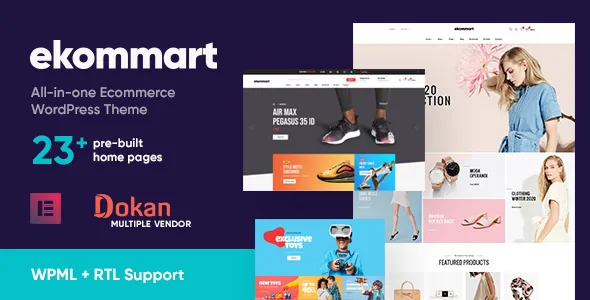
Ekommart's vendor description opens with a sentence many shop themes bury: the theme requires Elementor Pro to function fully and to look exactly like the demo, and Elementor Pro is not included in the download package for licensing reasons.
That is the first number to put against the theme's own price. Page content is built in Elementor, and the demo layouts are Elementor layouts, so a free-version-only setup will not reproduce what the listing shows. The header and footer builder is also described as an Elementor Pro feature. The vendor does allow an escape route: you can use a different plugin that offers similar header and footer building. That keeps the header and footer from being an absolute lock-in, but it does not remove the Pro requirement for demo fidelity.
If your budget has no room for an Elementor Pro licence, this theme is the wrong starting point regardless of how good the demo looks.
Marketplace selling runs through Dokan, not the theme
The vendor describes Ekommart as supporting Dokan Multi-vendor Marketplace, with vendors and customers getting a frontend dashboard for stock, sales, orders, discounts and coupons, plus store sales reports for vendors. Read that as compatibility and styling. The commission engine, payout rules and vendor onboarding live in Dokan, and the theme's job is rendering Dokan's storefront and product pages in its own design.
The release notes back this up in a mundane way: one entry updates the Dokan template to version 3.6.5, another adjusts Dokan CSS. Template maintenance is what keeps a marketplace plugin looking coherent inside a theme, and its presence suggests Dokan layouts are followed rather than left to the plugin's defaults.
So a single-vendor store can ignore Dokan entirely, while a multi-vendor build needs both Dokan and Dokan-compatible templates — the theme supplies only the second.
Breadth as the design argument: demos, product layouts and shopping tools
The vendor's core claim is range. It lists 23+ prebuilt homepages importable in one click, with three of them added later in the build's history, and names the sectors it has in mind: toys and kids, electronics, food and grocery, tools and parts, beauty and health, clothing, watches and jewellery, home and furniture, marketplace, and sports and outdoors. An importer that puts a finished homepage in place in one step is genuinely quicker than assembling one from widgets, though the placeholder images still need replacing.
The product page gets its own set of choices: the vendor lists 03+ product page layouts, plus quick view, compare and wishlist features attributed to WPC plugins, a product filter, Ajax live product search, a size chart and product zoom. Quick view and compare are the two that change browsing behaviour most — a shopper can inspect or line up items without leaving the category grid. Megamenu and header/footer layout variants round out the structural options.
One caution comes from the vendor itself. Any page-speed score on the listing is, in its words, for reference only and depends on the demo, theme and server configuration, and some theme features may reduce it. With 23+ demos of varying weight, the demo you import is part of the performance decision, not just a visual one.
Two control surfaces: Customizer for layout, Elementor for pages
Customisation is split, and knowing which side does what saves time. The vendor states the theme is configured through the WordPress Customizer and needs no separate theme options panel. That surface covers main options, side area, social links, post list, WooCommerce options, portfolio options, styling, layout settings, and header and footer sections.
Layout controls described there include full-width or boxed site width, content area and sidebar settings, and a sidebar generator for creating as many sidebars as you need. Styling covers a colour scheme and button shape and height, and the changelog records a bundled custom font called Gilroy added in version 3.0.1. Pages, meanwhile, are edited in Elementor.
One resource note sits in the vendor's disclaimer: some demos use Adobe Fonts, and if those fonts are unavailable they are substituted with default fonts or Google Fonts. If typography is central to the look you picked, check that demo's fonts before committing. The sample images are demo-only and must be replaced with your own licensed ones.
What the listing declares about versions and browsers
Attributes recorded from the marketplace on 3 November 2026 list compatibility with Elementor, WPML, WooCommerce 6.x.x through 10.x.x, and WordPress 5.0.x through 7.0.x, with Chrome, Firefox, Safari, Opera and Edge named as supported browsers. Files are listed as PHP, CSS and JS, the layout is marked responsive, the theme is widget ready, and documentation is described as well documented. Gutenberg Optimized is marked No; that reflects the vendor's Elementor-first editing model and does not establish that WordPress blocks are unavailable.
These are declarations, not tests run against your install. If your store runs on a WordPress or WooCommerce version at the edge of those ranges, confirm behaviour on staging before switching a live shop over.
Questions & answers
Do I need Elementor Pro to use Ekommart?
The vendor says Elementor Pro is required to function fully and to match the demo exactly, and that it is not included in the package. The vendor notes you may substitute another plugin for the header and footer builder, but that does not bring the Pro-based demo layouts with it.
Can I run a multi-vendor marketplace with this theme?
The vendor describes support for Dokan Multi-vendor Marketplace, including frontend vendor and customer dashboards for stock, sales, orders, discounts and coupons. The marketplace logic comes from Dokan; the theme provides the storefront design and keeps Dokan templates updated in its release notes.
Where do I change colours, sidebars and site width?
In the WordPress Customizer, according to the vendor. The theme is described as using Customizer options instead of a separate theme options panel, covering styling, layout, header, footer and WooCommerce settings, while page content is edited in Elementor.
Does the theme work with RTL languages?
The vendor lists RTL support alongside WPML compatibility, so translated or right-to-left storefronts are part of the stated feature set. WPML itself is a separate plugin and is not described as bundled.


