LearnPress is the hinge, and the vendor says you can skip it
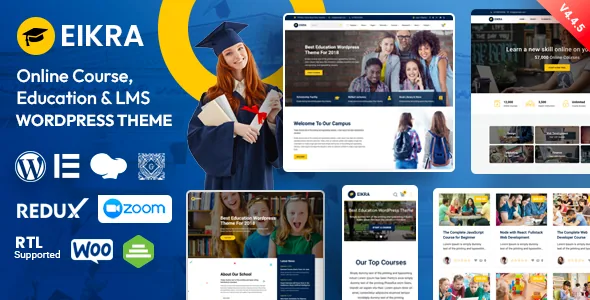
RadiusTheme's description names LearnPress as the plugin Eikra is built around, and lists what that plugin carries: curriculum, courses, lessons, quizzes and payment integration. That is a statement about LearnPress's capabilities, not something the theme provides on its own.
The interesting part is the vendor FAQ. Asked whether the theme can be used as a non-LMS site, the answer is yes: leave LearnPress uninstalled and the course and instructor custom post types stay enabled, so those content types can still be used without the learning-management layer running behind them.
So the first decision isn't about design. It's whether your school or training centre wants students progressing through lessons and quizzes inside WordPress, or whether you want a course catalogue and teacher directory that simply publishes information. Both routes are described by the author as supported. If you choose the LMS route, LearnPress's own settings govern enrolment and payment, and the theme supplies the presentation.
The layout counts are aimed at academic content, not generic pages
Read the feature list closely and the numbers cluster in a particular place. Eikra lists 3 Instructor Layouts, 3 Course Layouts, 2 Event Layouts, 3 Research Layouts and 2 Testimonial Layouts. The vendor also describes instructor profile pages with multiple layouts and feedback and reviews built around them.
That distribution tells you where the design work went. A school site usually needs a course archive that handles categories and filtering, a single course page that presents curriculum and rating, a staff directory where each person has a profile, and an events section that doesn't look like a blog. The counts above are variations on those specific pages, not a library of unrelated landing-page templates.
Whether a given variation is a whole page template or a reusable block configuration is not something the listing spells out, so treat the counts as a menu of options to inspect rather than a guarantee of how each one is wired. The visual result is best judged in the vendor's own demo preview before you commit to a structure.
Headers and one-page demos are the second structural lever
The vendor lists 7 inner header styles that combine into what it calls 20+ header variations, plus 7 multi-page home pages and 7 one-page home pages. The changelog shows those numbers growing over time: version 4.5.0 added Home 8 and Home 9 along with a fourth header style and a third footer style, and version 4.4 added two more headers and a footer.
This matters most for the one-page set. A single-page school site lives or dies on how the sections stack and how the navigation jumps between them, and the changelog records earlier work on that navigation directly (version 3.3 fixed one-page navigation JavaScript). Multi-page builds spread the same content across separate URLs instead.
The 20+ figure is a vendor claim about combinations, not 20 distinct designs. Seven base header styles rearranged into variations is a reasonable way to read it, and the useful test is whether the header you pick survives sticky behaviour with your menu depth.
Two page builders, and a real choice about who edits
Eikra lists both WPBakery Page Builder and Elementor. The vendor describes WPBakery, with a stated value, as included in the package, while Elementor appears as a compatible builder that the changelog says was added as a supported builder in version 4.0.
There is a practical consequence in the changelog rather than the feature list: version 4.4.4 added Elementor header and footer integration, and the same release mentions bug fixes covering course filter and backend loading for both builders. In other words, the theme has been maintained against two different editing surfaces.
Which you use depends on your team. If your staff already build pages in Elementor, the layouts they know carry over; if you want the builder bundled rather than installed separately, the WPBakery route is what the listing describes. Gutenberg Optimized is declared as Yes, and the changelog records a Gutenberg CSS fix and an optimisation pass in version 3.5, so the block editor is not locked out — but the theme's own demos are assembled with the builders above.
What the changelog says about living with LearnPress
A theme that leans on a third-party LMS inherits that plugin's release rhythm. Eikra's changelog is unusually candid about this. Version 4.4.16 fixed a broken curriculum tab and folded in a LearnPress compatibility fix. Version 4.4.10 corrected an archive page that wasn't showing all courses, and the same release fixed course pagination. Version 4.4.12 and 4.3.1 both address conflicts following LearnPress updates, and version 4.3 handled LearnPress 4 compatibility. The most recent entry shown, version 4.5.5, lists a LearnPress outdated fix among its changes.
Read that sequence as evidence of active upkeep rather than as a defect list. LearnPress changes, the theme adapts. The thing you should take from it is a maintenance expectation: budget time for theme and plugin updates together, and test the course archive and curriculum tab after an LMS update lands.
The changelog also traces PHP work — version 4.5.4 records a fix for PHP 8.4 compatibility, and version 4.4.14 records 8.0 and 8.2 work. Those are author statements, not results measured on your server.
WooCommerce, live classes and what the demos leave out
Two add-on layers sit beside the LMS. The vendor describes Eikra as WooCommerce ready and suggests the shop can take payments for course enrolments, subscriptions, resources or merchandise. Separately, the changelog records that version 3.9 added Zoom integration for live video classes. Both are described as capabilities of the theme paired with those services; neither implies that a store or a Zoom account is configured for you.
One packaging detail is worth knowing before you plan imagery. The vendor notes that premium images are not included and are used for demo purposes only, so the photography you see in the previews is not part of the theme files. Font Awesome and Flaticon supply the icon sets, and Roboto is named as the typeface.
The file list in the marketplace attributes records PHP, CSS and JavaScript files. A child theme is listed as included, which is the sensible place for customisations you want to keep through updates.
Who this fits
Eikra suits a school, college, university department or training provider that wants course and instructor content structured as WordPress post types on day one, and that is willing to run LearnPress or deliberately leave it off. The breadth of course, instructor and event layouts is the payoff for accepting that structure.
It is a poor match if your education site is really a brochure — a handful of pages about a single programme with no catalogue, no staff directory and no events. The layout library and the LMS hooks would go unused, and a simpler theme would give you less to work around.
If you plan to sell courses through WooCommerce rather than through LearnPress, check how the two interact on a staging copy first; the vendor presents them as adjacent, not as one integrated checkout path. And confirm the declared WordPress range against your own version — the marketplace attributes observed in November 2026 list compatibility from 4.9.x through 7.0.x, which is a listing declaration rather than a test result.
Questions & answers
Can Eikra be used without LearnPress?
Yes, according to the vendor's own FAQ. If you don't install LearnPress, the course and instructor custom post types remain enabled, so you get the theme's education layouts without the LMS layer. Course progression, quizzes and enrolments are LearnPress features, so they won't be present in that setup.
Does Eikra work with Elementor as well as WPBakery?
The feature list names both builders, and the changelog records Elementor being added as a supported builder in version 4.0 and header/footer integration arriving in 4.4.4. WPBakery is described by the vendor as bundled with the theme; Elementor is listed as a compatible builder.
Are the demo images included with the theme?
No. The vendor states that premium images are not included and are used for demo purposes only. You would need your own licensed imagery for the finished site.