Dishes as records, not blog entries
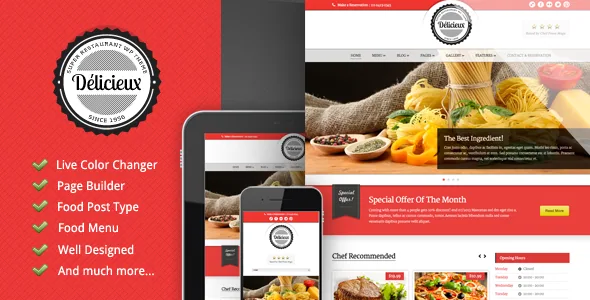
Three items near the top of GoodLayers' feature list decide how a Delicieux site is assembled: Food Post Type, Food Menu and Food Show Case. Read together, they describe dishes as their own kind of record with their own display treatments, not as ordinary posts filed under a menu category.
That changes the build order. You settle which items exist as food entries, how they group into a menu, and which subset gets promoted into a showcase before you style anything. The theme supplies the vocabulary; the descriptions and prices on those entries are yours to write.
The vendor's list stops at naming the three features. It does not say which fields a food entry carries, so confirm the data model in the theme's documentation or on a staging install before handing content entry to a client.
Two drag-and-drop tools that do different jobs
Page bodies are assembled with a drag-and-drop page builder, and sliders with a separate drag-and-drop slider manager. Splitting them keeps a homepage slider inside the slider tool while the rest of the page sits in the builder, so neither interface gets in the way of the other.
The feature list also includes built-in shortcodes, which place similar elements without the builder canvas. On a site where a client edits their own pages, the builder is usually the surface they meet; shortcodes matter more when you are writing templates or moving content between builds.
What the description does not say is how food entries reach a page. Because Food Menu and Food Show Case are listed as theme features rather than builder elements, check whether they surface as builder modules, shortcodes or their own admin screens.
Colour, type and backgrounds from the admin side
GoodLayers describes an extensive admin panel where almost every element's colour can be changed, with a Live Color Changer as a second route to the same settings. Font, logo and background each get an uploader, and the theme lists 450+ fonts.
The font uploader is the piece worth noting. The bundled set covers most briefs; an uploader covers the case where a restaurant's brand typeface is licensed and absent from that set. The logo and background uploaders simply mean those two layers are replaced from the admin rather than through code.
Other options are counted rather than described: 6 footer layouts, 8 blog styles, and thumbnail choices of static image, slider or video. Six footers tells you the footer is a selectable arrangement, and video thumbnails let a short loop of the room or a plated dish carry a homepage where a still frame would not. The description does not show what separates one blog style from another, so the demo settles that. All of this is the vendor's account of the settings, not a record of the panel in use.
Three routes to a translated site, and how they differ
Localisation appears twice in the description: a .pot file prepared for translation into .mo files, and a built-in translator listed as a feature. WPML appears separately in the marketplace compatibility field.
These are three different kinds of help. The .pot file is the template a translator works from, and it only becomes a translation once someone produces .mo files. The built-in translator, as the vendor presents it, is a way to translate strings from inside the site. WPML is the plugin route for a multilingual site with language switching.
WPML is recorded in the compatibility field as observed on the marketplace in November 2026. That is a vendor declaration captured at a point in time, not a run against your WordPress version, your language pair or your plugin set. If a second language is part of launch, verify it on staging.
What the heading and content-order claims cover
The description includes a section on how titles are handled: heading tags from H1 down are used for titles, and main content is placed above the sidebars in both sidebar layouts so it appears earlier in the source. Alt attributes on images are supported too.
Each of those is a statement about document structure, and structure is one input among many. Content appearing earlier in the markup is generally helpful, but the vendor's own framing is good practice rather than a measured result, and no ranking outcome should be read into it. The alt attribute point is really an editorial task: the theme provides the field, and someone still has to describe the dish or the room in it.
Take this section as a description of the theme's conventions. No SEO plugin for titles, meta descriptions or sitemaps is named in the supplied material.
PSD files, photo credits and the browser list
The files list names Layered PSD, PHP, CSS and JS. The PSD layer is the less common inclusion and the more useful one for a design-led restaurant build: the artwork source travels with the theme, so a designer can adjust it rather than rebuild it from scratch.
The description credits a set of Flickr photographers and Fotolia for the assets used in the demo, which is a strong hint that the demo imagery is licensed to the vendor rather than passed to you. Nothing in the supplied text states which assets you may reuse on a live site, so plan on commissioning or licensing your own food and interior photography. The description also does not say which screens the PSDs cover.
The marketplace property fields record IE11, Firefox, Safari, Chrome and Edge among compatible browsers. That is a declaration stored with the listing, not a report on how the builder or slider manager behaves in an old browser.
Questions & answers
Do I need WooCommerce to publish a menu on Delicieux?
Nothing in the supplied material names WooCommerce. The vendor lists Food Post Type, Food Menu and Food Show Case as theme features, which is the non-commerce route to publishing dishes. If you need a cart or online ordering, that is a separate decision the description does not address.
Can the layout be changed without editing code?
According to the vendor, page bodies are built with a drag-and-drop page builder, sliders with a drag-and-drop slider manager, and colours, fonts, logos and backgrounds from the admin panel. The description does not enumerate every setting in that panel.
What does the .pot file give me on its own?
A template for translating the theme's strings. You still need .mo files produced from it, or a translation workflow such as the built-in translator the vendor lists, or WPML, which appears in the compatibility field.
Why does the package include PSD files?
The files list names Layered PSD alongside PHP, CSS and JS, so the design source travels with the theme and a designer can adjust artwork instead of recreating it. The description does not specify which screens the PSDs cover.