Same item number, a different engine
DeepDigital has been sold since May 2018, but the theme on the listing today is not the one that shipped then. The vendor changelog records a break on 27 June 2023: version 1.0.1 is described as a "new version with new engine" and the first one compatible with Elementor Page Builder. Everything after that date is numbered in the 1.0.x series; everything before it is numbered 2.x and belongs to an older codebase.
That split matters if you are reading older material about DeepDigital. The 2.x entries talk about Unyson shortcodes — timeline, simple list, icon boxes, counters, tab icons — and one 2.11.4 fix from May 2022 refers to a fatal error "if Unyson not installed". Those shortcodes are not described anywhere in the current Elementor-era feature text. The 1.0.x entries describe a different editing model and a much shorter list of changes.
The version numbering runs backwards across the switch, which is confusing at first glance: 2.11.4 precedes 1.0.1 in time. Read the dates rather than the numbers when you are trying to work out whether a guide applies to what you have.
Six demo contents, each aimed at a different buyer
The vendor names the demo contents individually instead of quoting a demo count, and the list is more specific than "agency". The six are a web design and software development agency, an AI research and development outfit, a web design agency, a marketing/PR/advertising firm, a technological startup, and a private entrepreneur.
Those are not six colour variations of one layout. An AI research demo carries different content expectations from a freelance designer's site, and the marketplace highlights attached to the item read the same way: branding services, creative agency, digital marketing, freelance, illustrator, portfolio, SEO marketing, UI design. The vendor's own framing of the theme is broad too — web design, marketing and branding, web development, application development and SEO marketing all appear in the opening paragraph.
What the evidence does not tell you is how far the demos diverge in structure rather than subject matter. The live demo site is the place to check whether the AI demo is a reworded version of the agency demo or a genuinely different composition.
What you actually control: Elementor sections plus a customizer
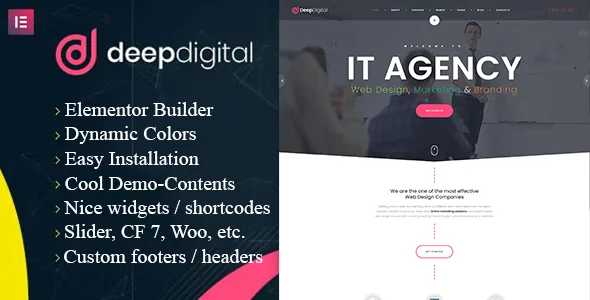
The vendor describes two editing layers that work together. Elementor provides the drag-and-drop canvas, and the description makes a point of section ordering: you can sort a page's sections in whatever order you like rather than sticking to the demo's sequence. Around that sits a customizer panel for header and footer options and what the vendor calls unlimited colour schemes.
The practical reading is that page structure lives in Elementor while site-wide furniture lives in the customizer. Changing your header treatment or palette should not mean rebuilding every page, and reshuffling a home page should not mean touching global settings.
Two details are worth checking before you plan around them. First, the theme is marked "Gutenberg Optimized: No" on the marketplace, which says nothing about whether the block editor functions — it says the vendor has not declared block-editor-specific styling or patterns. If you want to mix core blocks into Elementor layouts, test how they render. Second, "unlimited colour schemes" is a vendor phrase without a stated mechanism; confirm in the customizer whether you are setting global variables or per-element colours.
The appointment system, and how it sits beside the plugins
Version 1.0.2, dated 13 February 2024, added "the new appointment system", listed alongside fixes for shortcodes and widgets. The changelog gives no further detail: it does not say whether appointments are a custom post type, a booking form, a calendar view, or something that connects to a calendar service.
For an agency site this is the kind of feature that usually means a consultation booking form rather than a full scheduling engine. Treat the demo as the specification until the documentation says otherwise, and check what happens to a submitted request — whether it is stored, emailed, or handed to a third party.
Separately, the marketplace compatibility attributes list Contact Form 7, Elementor, Elementor Pro, Events Calendar, and WooCommerce 8.x.x and 9.x.x. Those are declarations of what the theme has been prepared to work with, not a statement that any demo requires all of them, and not a claim that the appointment system depends on Events Calendar. If your agency sells products or tickets, the WooCommerce entries are the ones to verify against your own store setup.
Package contents, imagery and the declared ranges
The ThemeForest file list names layered PSD, PSD, PHP, CSS and JS files, so the design source for at least some templates is part of the package. That is useful if a designer on your side wants to adapt mockups before they reach Elementor.
The marketplace attribute for high resolution is set to "No", while the vendor description says high-resolution images for demonstration purposes can be provided on request through the demo content. Read together, that suggests the demo photography is not simply bundled at full quality with the theme files. For a design agency site the demo's visuals do much of the persuasive work, so the cost of licensing comparable photography belongs in the budget rather than the afterthought column.
The vendor declares WordPress 6.5.x through 6.9.x and lists Firefox, Safari, Opera, Chrome and Edge as supported browsers, with a responsive layout, 4+ columns and widget-ready status. Those are declarations captured from the marketplace listing on 4 November 2026, not results from a test install, and the item's own update date is 29 April 2026. The most recent changelog entries are social icon updates and optimisation fixes in 1.0.4 — modest maintenance rather than a redesign.
Where this theme earns its place
DeepDigital fits a studio that already works in Elementor and wants a colourful, section-based agency site with a demo it can adapt rather than a framework it has to build from scratch. The customizer/element split keeps global changes away from page-level editing, and the appointment addition gives a service business a way to take enquiries without reaching for another plugin.
The open question is imagery. If the demo's high-resolution photography is what sold you on the look, budget for it separately and check what the demo content actually imports before you commit to a direction.
Questions & answers
Is DeepDigital still an Unyson theme?
No. The vendor changelog dates the move to Elementor to version 1.0.1 on 27 June 2023, described as a new engine version compatible with Elementor Page Builder. Unyson shortcodes appear only in the older 2.x entries. Because the numbering restarts at 1.0.1, older write-ups and version numbers can be misleading — check dates.
Do I need Events Calendar or WooCommerce to use the theme?
Nothing in the supplied listing makes either a requirement. They appear in the compatibility attributes, which describe what the theme has been prepared to work with. The vendor's demo list and feature description do not tie any demo to those plugins.
Can I use the WordPress block editor with DeepDigital?
The marketplace marks the theme as not Gutenberg optimized, which means the vendor has not declared block-editor-specific styling or patterns. It does not establish that blocks are unavailable. Page building is documented through Elementor, so check how any core blocks you need render inside or beside Elementor layouts.