Eleven packages, not one flexible demo
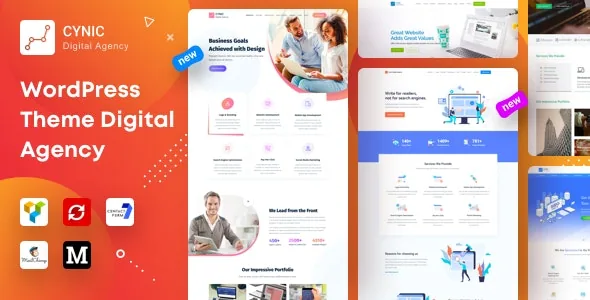
Most agency themes hand you a handful of homepages and leave you to assemble the rest. Cynic's vendor instead describes the product as "11 Distinct Package", listing each one by name: Trendy, Illustrated, Modern and Classic Small Digital Agency; Modern SEO Agency; Modern and Classic Big Digital Agency; and Trendy, Illustrated, Modern and Classic One Page Agency. That grouping is the theme's actual organizing idea, and it makes your first decision a package choice rather than a layout tweak.
The names are not decorative. They indicate both a visual direction (trendy, illustrated, modern, classic) and a scale (small agency, big agency, one page). If you already know the shape of the site you are building, this narrows the field quickly; if you do not, you will be comparing demos rather than designing from an empty canvas.
Three scale tiers, with page counts the vendor states
The vendor's prose breaks the packages into three sizes. One is described as having 42 pages and framed as the fit for big agencies. A second is aimed at small-to-medium agencies with eighteen pages. The remainder are one-page builds, described as a compact version for startup agencies.
Those numbers are the vendor's own description of the package contents, not a count of what any particular build includes. Read as scale indicators, they are still useful: a 42-page package means a deep menu and many inner templates to keep consistent, while an eighteen-page package asks you to curate down and a one-page package asks you to compress services, portfolio and contact into a single scroll with anchor navigation. The three tiers are genuinely different editing jobs.
Note also that the vendor's prose elsewhere mentions six demo variations and ten demos in different paragraphs. The named package list is the most specific statement in the description, so work from that when counting.
Import is how a package arrives
Cynic lists one-click demo import as a feature, and the vendor says the demos can be set up "for 5-10 minutes in just a single click." The practical consequence is that a package arrives populated: pages, menus and demo content are already in place, and your work is replacement rather than construction.
That suits an agency site that needs a credible structure fast, and it changes what you should check first. Open the imported homepage, an inner service page and a portfolio item and confirm the hierarchy makes sense for your services before you start swapping copy. Rebuilding content inside a structure you have not reviewed is the expensive version of this workflow.
WPBakery is the surface under the packages
Pages are edited in WPBakery Page Builder, which the vendor describes as included for both front-end and back-end editing. That means the rows and modules you see in a demo are editable items rather than hard-coded markup — which is what makes repurposing a big-agency package for a smaller roster realistic.
A caution on the bundle. The vendor's feature block advertises WPBakery, Slider Revolution, Linearicons and Meta Box Group with individual dollar values and a "Save $100+ in total" line. Treat those as vendor statements about what the marketplace product bundles, and check what is actually present in any build you obtain rather than assuming the list transfers.
The marketplace compatibility attributes recorded on 4 November 2026 name Visual Composer and WPBakery Page Builder alongside WPML. Visual Composer and WPBakery share a lineage, so confirm which one the demos you intend to use are built with before you plan custom modules.
Showing work: services, filtering and modal video
For an agency, the portfolio path matters more than the homepage. The vendor lists single service pages, Isotope filtering, modal popups and modal video as ways to present case studies and services.
Isotope filtering is what lets a portfolio index hold mixed categories — branding, SEO, PPC, development — without splitting them into separate pages. Modal popups keep visitors on the index while they read a short case study, and modal video suits a showreel or a client testimonial. The trade-off is real: a modal is fast to browse but shallow, and a dedicated case-study page still does the deeper convincing. Decide which of your projects deserve a full page before you populate the grid.
The vendor also names GIF image support, which is a small but practical detail if you want motion in a static preview image.
The everyday content layer
The remaining features are the ones you live with after launch. The vendor lists different blog layouts, standard and load-more pagination, an Ajax contact form with validation, MailChimp newsletter integration, multiple Google Maps, a sticky header, a Redux-powered admin panel and live customizer colour changes.
Two of these deserve more attention than they usually get. Standard pagination versus load-more changes how a reader moves through an archive: numbered pages are predictable and shareable, while load-more keeps attention on one screen but hides how much content exists. And because brand colours are editable in the live customizer, the palette difference between the trendy and classic packages is adjustable rather than fixed — useful if a package's structure fits but its colour direction does not.
The vendor also notes child-theme readiness. If you expect to modify templates, that is the safer route than editing parent files.
Compatibility, read carefully
The marketplace software-version attribute spans WordPress 5.0.x through 6.0.x. That range is a statement about what the theme has been declared compatible with, not a ceiling on where it will run, and not proof of testing on any later release. If your site is on a newer WordPress version, verify against the build you actually use.
The Gutenberg Optimized attribute is recorded as No. That tells you the vendor is not positioning block-editor templates as the theme's design system. It does not establish that the block editor is unavailable or broken, so do not treat it as a blocker if you only edit blog posts in Gutenberg while building pages in WPBakery.
Files are listed as PHP, CSS and JS, and the vendor marks documentation as well documented — useful if your team needs to hand the site to someone else.
Typeface and images you inherit or replace
The vendor names Raleway as the theme's Google Font and credits Unsplash and Pexels for imagery in the demo, alongside a Linearicons icon set. The font is a starting point you can change; the photography is not included in the same sense, and agency sites carry much of their credibility in portraits, team shots and case-study visuals. Plan for your own photography before you commit to a package, because the illustrated and trendy variants lean heavily on imagery to read as intended.
That is where the honest evaluation ends: pick the package by scale and visual direction, then look at how its portfolio and service pages are actually structured before you replace a single line of copy.
Questions & answers
Does Cynic work with the block editor?
The marketplace records Gutenberg Optimized as No, which means the vendor does not present block-editor templates as the theme's design approach. Pages are built in WPBakery. That attribute does not establish that Gutenberg is unusable for ordinary post editing.
Is WPML support included?
WPML appears in the marketplace compatibility attributes recorded on 4 November 2026, alongside Visual Composer and WPBakery. The listing does not describe how the demo packages are set up for translation, so confirm the language configuration on the specific package you intend to use.
Are the bundled plugin values part of the price?
The vendor advertises WPBakery, Slider Revolution, Linearicons and Meta Box Group with individual values and a total savings line. That is a vendor statement about the marketplace product's bundle, not a description of what any particular build contains. Check the actual files and plugin folders in the copy you work from.