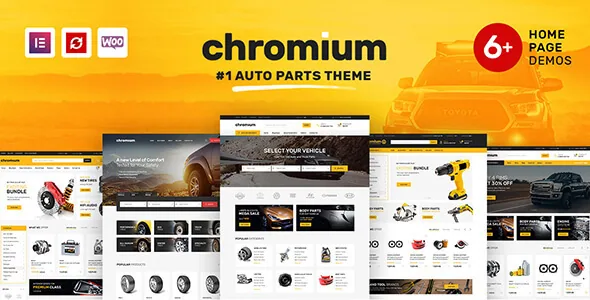
The parts filter is the reason to consider this theme
Chromium's listing opens with a Make Model Year filter and describes it as highly customisable, with the option to add more filter fields and modify the existing ones. Everything else in the feature list — page layouts, mega menus, Google fonts — could belong to almost any business theme. The filter is specific to how someone buys a replacement part: they know the vehicle on the driveway, not the product name.
The practical value depends on catalogue size and shape. A shop with a few hundred SKUs mapped to a handful of makes gains a shortcut; a shop covering many makes across decades gains a way to avoid dead-end browsing, but only if the vehicle data behind it is accurate. The vendor describes the capability, not the field editor itself, so treat the extent of customisation as something to confirm rather than assume.
The filter demo data is a separate install, and that is the real work
The description points to dedicated instructions for installing the filter demo data, which suggests sample vehicle records come as content to import rather than arriving automatically with the theme. That distinction matters when you scope a project: the filter component and the vehicle values are two tasks.
For a specialist seller covering one or two makes, the data step is small. For a general parts retailer, building out makes, models and year ranges is the substantial part of going live, and errors there are more damaging than a weak homepage — a filter that returns the wrong fitment costs trust faster than slow design does. Plan who owns that data before you plan the layout.
Free Elementor sets the editing boundary
According to the vendor, the free version of Elementor powers the theme's pages and provides standard plus custom elements for filling them. Nothing in the description makes a Pro licence a prerequisite, so the editing workflow is drag-and-drop on the Elementor canvas rather than template-file work.
That framing has a limit worth keeping in view. Elementor handles structure and styling; the dynamic parts — the parts filter, WooCommerce product data, mega menu behaviour — come from the theme and WooCommerce. If your team is comfortable composing pages visually but not editing PHP, this arrangement fits. If you need custom widget logic, that is a separate build.
Five home pages, and a mega menu that carries the catalogue
The vendor lists five demo data sets with unique home page layouts and unique mega menus. Five starting points mostly reflects different merchandising priorities, so the choice is about which arrangement puts your strongest content near the top rather than about variety for its own sake.
The mega menu claim carries more weight for a parts shop, because navigation is where large catalogues usually fail. Make, category and vehicle type all compete for the same header row, and the listing does not say how many columns or levels the menus support or whether they can be populated from taxonomy terms. Test the menu pattern against your own category tree during evaluation, since retrofitting a navigation structure later touches more than the header.
WooCommerce runs the checkout, and the declared version range is broad
The marketplace attributes recorded on 3 November 2026 list Elementor together with WooCommerce 9.x.x, 8.x.x, 7.x.x and 6.x.x, and WordPress versions from 6.8.x back to 6.0.x. The WooCommerce band spans several major releases, which is relevant if the theme is going onto a store that is not on the newest branch. These are listing declarations observed at that date, not the result of installing or testing the theme here.
What the theme does not do is replace the store layer. Checkout, payments, shipping rules and tax logic stay with WooCommerce and whichever extensions you add. Chromium's contribution is the presentation layer and the vehicle filter, so the transactional path is only as good as the stack around it.
Revolution Slider is an inclusion you claim, and Gutenberg sits alongside Elementor
The vendor lists Revolution Slider as included free and says a copy is obtained by opening a support ticket. That is an inclusion to request rather than a plugin already sitting in the theme folder, so it should not be counted as a packaged asset when you plan.
The feature list also records Gutenberg compatibility, and the attributes mark the theme as Gutenberg Optimized. This sits alongside an Elementor-built theme rather than replacing it: if part of the site runs on the block editor, such as a blog, the listing suggests blocks are supported there, while the designed page layouts remain Elementor work. The ThemeForest file list names PHP, CSS and JS files.
Where the theme stops being a shop
The vendor pitches Chromium beyond retail — auto repair shops, car washes, oil-change services, dealers and car blogs. On those sites the filter can work as a parts or vehicle lookup while the layouts, menus and Elementor pages carry the bulk of the site, with WooCommerce optional.
That makes the theme's centre of gravity clearer than a general feature list does. It is a shop theme with a vehicle-aware navigation idea built in; if you are not selling online and do not need a fitment lookup, the filter and WooCommerce integration are weight you are carrying for nothing.
Questions & answers
Do I need Elementor Pro to build Chromium's pages?
The vendor says the free version of Elementor powers the theme's pages and supplies the standard and custom elements used to fill them. No Pro licence is described as required, though any third-party add-ons you choose are a separate decision.
Does the Make Model Year filter work out of the box?
The vendor documents a separate procedure for installing the filter demo data, which suggests vehicle records are imported content rather than something that appears automatically. How much data work is needed depends on how many makes and models you sell for.
How is the Revolution Slider copy delivered?
The vendor lists it as free and says you request a copy by opening a support ticket, so it is claimed through support rather than shipped as a ready plugin inside the theme files.


