An event manager that handles the booking desk, not just an events page
Restaurant themes usually stop at a menu, a gallery and a reservation button. The vendor description for Chicago adds a layer a working venue has to run anyway: an integrated event manager that registers single-day events with start and end times, recurring and multi-day events, and multiple ticket types per event.
Bookings are managed rather than passed along. The vendor lists approval and rejection, CSV export and "and more" for the bookings screen. So a tasting night, a live set or a fixed-menu evening can be booked on your own site instead of pointing diners at a third-party listing.
The description stops short of capacity limits or per-ticket inventory behaviour, so treat ticket rules as something to confirm on the demo before you build a launch around them.
OpenTable or your own form: a decision to make before launch
Reservations are a fork, not a count of features. The OpenTable route needs one thing from you: your restaurant's OpenTable ID, entered in the theme so the booking conversation happens inside that service. The alternative is the theme's built-in form, which records check-in date and check-in time, with the vendor listing management of reservation submissions alongside it.
Where the bookings already live settles the choice. A venue on OpenTable keeps its existing book and surfaces it on the site. A venue taking bookings by phone or email can use the theme's form and work through submissions from the dashboard without paying for another service.
The vendor presents these as alternatives, so pick one and set it up that way rather than planning to switch after the site is live.
Two of the four demo setups are one-page builds
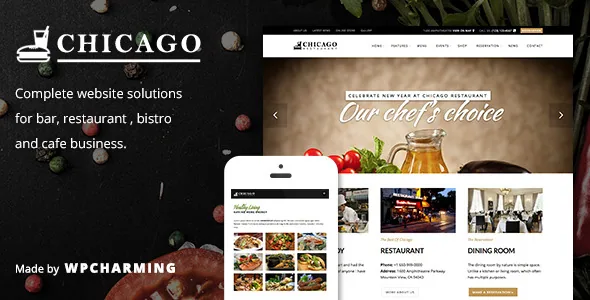
The vendor lists four setups: a default restaurant layout, a boxed variant, a one-page build with a full-screen treatment, and a one-page build led by a slider. Layouts run full width or boxed, and one-page sites are supported next to conventional multi-page ones.
Those are broader differences than another row of homepage variations. Boxed puts the whole site inside a visible frame; a one-page build stacks the menu, gallery, events and reservation form into a single scroll with anchor navigation, which changes how visitors move through the site rather than only how the top of it looks.
Demo data files are included and the vendor ships a one-click importer. Importing writes pages, menus and settings into the WordPress installation you point it at, so run it on a fresh or staging copy first.
What the changelog says about upkeep
Releases 1.3 through 1.5 are almost entirely stack maintenance. WPBakery Page Builder and Slider Revolution are bumped to newer bundled versions in each of them, WordPress compatibility extends through the 6.x line, and PHP work appears in stages: 1.3 records PHP 8+ compatibility, 1.4 records PHP 8.3, and 1.5 fixes Page Settings for PHP 8+.
Two practical readings follow. The bundled builder and slider are kept in step with the theme rather than left at an old version, which matters if you plan to use either. And the theme has been adjusted for current PHP, so an install on a recent PHP version is less of a gamble than the product's age might suggest.
Version numbers are worth reading rather than glancing at. The marketplace version and the copy you install are not automatically the same, and the version reported inside WordPress is the only number that describes what you are running.
Block editor status, demo images and the theme's name
The compatibility attributes record Gutenberg Optimized as No, while a 1.1.7 changelog entry records "Support Gutenberg". Those statements come from different periods of the product. The reasonable conclusion is narrower than either alone: the designed editing path is WPBakery, and the demos and options are built around it. Gutenberg Optimized being recorded as No does not by itself establish that the block editor is unusable, so if your team writes in blocks, test that path before committing.
The vendor is explicit that no images from the demo are included in the theme package. Budget for photography and licensing, and expect an imported demo to look unlike the preview until you replace the media.
One naming detail saves confusion later: the theme was renamed from Chicago to ChicagoRestaurant to avoid a clash with a WordPress.org theme using the same name. The current identifier matches that renamed version, which is the entry to look for in the installed theme list.
Declared compatibility and what the package contains
As observed on the marketplace listing on 4 November 2026, the declared WordPress range runs from 6.0.x to 6.6.x, with WooCommerce 7.x and 8.x plus WPML named as compatible plugins, and the vendor's last update dated September 2024. The listed files are PHP, CSS and JavaScript; documentation is described as well documented; the layout attribute names a responsive two-column design.
WooCommerce is the listing worth weighing if you plan to sell wine, retail goods or vouchers next to bookings. The vendor describes the theme as compatible, and the shop pages themselves come from WooCommerce, so its default templates and settings apply.
Other vendor-listed controls are 600+ Google Fonts selectable for body, header, heading and menu, a translation-ready .pot file, and Retina-ready output. These are vendor and listing declarations, not a tested matrix against your own plugin stack.
Questions & answers
Can Chicago run event tickets and table reservations at the same time?
They are described as separate systems. The event manager covers registrations, recurring and multi-day events, multiple tickets and booking approval. Reservations go through either your OpenTable ID or the theme's own form with check-in date and time. A venue could use events for special nights and reservations for normal service.
Is WPBakery Page Builder included, or do I need a separate licence?
The vendor states the page builder is included with the theme, and the changelog records bundled WPBakery updates through version 1.5. That is a vendor claim about the package rather than a licence determination for your install, so confirm the plugin's registered status in your own WordPress before relying on it.
Are the demo photographs included in the theme?
No. The vendor states that none of the images used in the demo are available in the theme package, so plan to source and license your own food and interior photography.