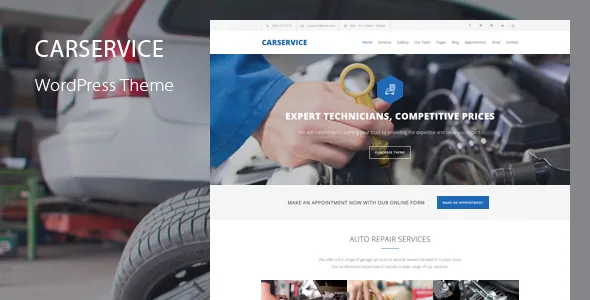
The quoting form is the product, not the styling
Plenty of automotive themes are a service list, a team grid and a contact page. Car Service from QuanticaLabs puts a pricing form at the centre: the vendor describes the bundled Cost Calculator for WordPress plugin as a headline inclusion, aimed at repair estimates, maintenance work, diagnostics and custom jobs.
That reframes what the site is for. Someone with a broken car wants a number before they want a brand story, so the calculator page is where the site earns its keep. It also means the calculator's contents have to be maintained — service tiers, labour units, parts options — by whoever knows the real prices.
The 11 pre-made calculation forms in the demo content show how far the plugin reaches beyond garages. Only one is the Car Service Cost Calculator; the rest include cleaning, renovation, mortgage, BMI, hosting and loan calculators. Treat them as working samples of the form mechanics rather than a set of automotive templates.
Eight Elementor widgets that map to a repair quote
The vendor states that the plugin has dedicated Elementor integration through eight widgets: Cost Calculator, Form Container, Dropdown Box, Slider Box, Input Box, Switch Box, Summary Box and Contact Box. Each covers a piece of the estimating job. A dropdown picks a service, a slider sets hours or quantity, a switch adds an optional extra, the summary box totals it, and the contact box collects the enquiry behind the number.
The plugin's own form builder, used outside Elementor, has a longer field list: text, number, email, hidden and submit inputs, date picker, checkboxes, radio buttons, a summary box and a contact details box, arranged in unlimited rows with multi-column layouts. Multiple summary fields can appear in one form, and currency and unit markers can be placed before or after a value.
Two inclusions matter for a public estimator. A terms and conditions checkbox and reCAPTCHA support are both listed, so consent and basic spam filtering are covered by the form rather than bolted on afterwards. The forms are also described as responsive, which matters because a fair share of visitors will be standing beside the car.
Taking a deposit or sending a payment link
According to the vendor, Stripe Payments can be attached to calculator forms for one-time charges and subscriptions, with daily, weekly, monthly and yearly periods plus custom intervals such as every two weeks. Currency is set per form, and each form can carry its own payment mode and recurrence settings.
The choice that matters commercially is how the customer reaches checkout: instant redirect, or a payment link emailed to them. Instant redirect suits a booking deposit; a link suits an estimate the customer may want to compare before paying. The vendor also says customers can pick the payment period and interval while filling in the form, rather than having it fixed by you.
What the description does not settle is tax handling, refunds or what happens when a recurring payment fails. Those are business decisions the theme does not answer for you.
Where a submitted estimate actually goes
Submissions are not only emailed. The vendor says calculations and submitted forms are stored in the database and can be read from the WordPress admin panel, alongside notifications sent to the client and to admins using templates you can edit, with recipients you can change.
Editable success, cancel and subscription pages and payment tracking are listed too. For a workshop with several people handling enquiries, a stored record is the difference between a lead someone owns and a notification nobody can find.
The description stops short of saying who should hold admin access to those records or how long they should be kept. The theme supplies the storage; the access rules are yours to write.
Two builders, two demo sets, one decision
The vendor describes full Elementor integration and separately lists WPBakery Page Builder as included, with 30+ custom Car Service components in the WPBakery version. A combined count puts page builder components at 50+, naming service lists, project lists and team member displays among the dedicated elements. The one-click importer is described as letting you choose demo content for either Elementor or WPBakery.
So the demo pages exist twice, and importing is a choice, not a default. If your team already works in WPBakery, the 30+ components are the reason to stay; if you are starting fresh, the calculator's eight Elementor widgets are the most thoroughly documented route in the vendor's description. Whatever you pick, build pages in that builder — running both gains you a second set of templates nobody edits.
Most of the theme's layout controls are global. Sticky columns can be set so any column floats as the reader scrolls, useful for holding a live summary alongside a form, and a colour picker changes the whole scheme at once. Fonts come from Google Fonts via the theme options panel, which also handles logo and footer settings, contact form configuration and sticky menu and responsive mode toggles. Per-page variation has to come from the builder.
Package, language and compatibility claims
WPML compatibility, RTL mode and .po/.mo translation files are all stated. They are three separate things: the .po files carry the theme's own strings, WPML runs a site in more than one language, and RTL governs layout direction. The description does not explain how a translated calculator form behaves.
The vendor lists premium images, a 90-icon Streamline icon font and a social icon font as included, and credits Open Sans. Layered PSD files are offered free on request through the vendor's support route rather than sitting in the downloadable package, which the marketplace files field records as PHP, CSS and JS.
Compatibility attributes seen on 4 November 2026 name WordPress 4.9.x through 7.0.x, WooCommerce 5.x through 10.x, Elementor, Elementor Pro, WPBakery and WPML, with the marketplace's latest version recorded as 9.7. Those are listing declarations rather than results of running the theme, and the version you receive may not be that latest one. A WooCommerce shop template is among the predefined pages, though the description says nothing about how the shop is styled for automotive retail.
Questions & answers
Do I need both Elementor and WPBakery to use Car Service?
No. Both are described as included and the demo importer lets you choose content for either one, so you pick a builder and build your pages there. Nothing in the description suggests both must be active.
Can the calculator take payment, or is it estimate-only?
Both, if you connect Stripe. The vendor describes one-time and subscription payments inside calculator forms, with either an immediate redirect to checkout or a payment link sent by email. Without Stripe, a form still produces a calculation that is stored and emailed.
Where do submitted estimates end up?
The vendor says submissions are saved in the database and can be viewed from the WordPress admin, with email notifications to clients and admins using editable templates and changeable recipients.