The vendor's description contradicts itself on the page builder
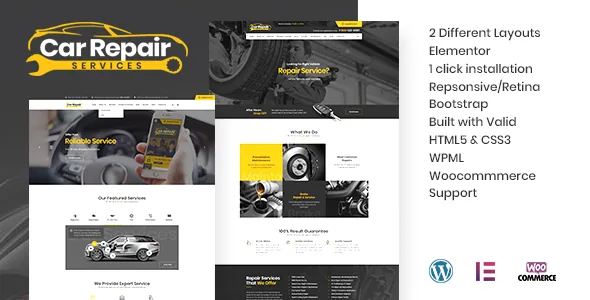
The feature highlights in the vendor's description open with "Drag and drop page builder – Visual Composer ( 34$ Value )." A few paragraphs earlier, the same text carries a note: "Version -3.0 Is major update with Elementor." Both statements are in the description you would read before buying, so the editing route is genuinely unclear from the vendor's own copy.
The marketplace attributes break the tie. Elementor appears in the Compatible With list and Visual Composer does not, which supports reading the Elementor note as the current state and the Visual Composer bullet as text left from an earlier release. That is a reasonable reading, not proof that every demo page opens in Elementor.
It matters before any design decision. Elementor pages are maintained through its widget panel; Visual Composer content historically relied on shortcodes, and moving from one to the other is not a switch you flip. The vendor's demo is the place to see which builder actually renders the layouts.
What each of the named pages asks you to maintain
The description lists the content that makes this an automotive theme rather than a generic business layout: a page with the schedule of the service, a "Free Consultation" form page, a company area, a description of work, a questions and answers page, and team members.
Every one of those is a page you fill. A service schedule only helps a visitor if it matches your bay availability and turnaround times. The team section needs names, roles and photos, and the attributes record High Resolution as No, so plan on your own photography rather than lifting preview images.
The Q&A page is the least obvious of the set. It only earns its navigation slot if someone answers the questions customers actually ask — whether you handle a particular marque, how long a brake job takes, what happens when a part is backordered. That is copywriting work, not theming work.
The enquiry form, and the booking line it does not cross
Contact Form 7 is named both in the compatibility attributes and in the vendor's description, which says forms can be built "as per your requirements." Paired with the Free Consultation page, that describes a standard lead capture: a form collecting vehicle make, the problem and a phone number, delivered to an inbox.
The boundary is worth stating. Contact Form 7 is a form builder, not a booking engine. Nothing in the vendor description suggests the theme manages appointment slots, availability, deposits or confirmations. If you want customers to reserve a specific time online, that capability is not described here, and you would be adding it with a separate tool.
You also install the plugin and configure the fields and mail settings yourself. The theme supplies the page and the styling around it.
WooCommerce is a compatibility claim, not a described shop
WooCommerce 7.x.x, 8.x.x and 9.x.x appear in the Compatible With attributes, and the vendor says the theme suits "stores with spare parts and accessories for car repairs." The description stops there. There is no word on product templates, cart placement, checkout styling, or whether the demos include any shop pages.
Treat that gap as real. A listed integration means the theme declares compatibility; it does not tell you how a parts catalogue will look once your products are in it. If selling parts is central to the project, plan to style product pages yourself and check the demo and documentation for shop behaviour before committing.
Gutenberg Optimized is recorded as No. That attribute describes block-editor optimisation, not the availability of the block editor, so it does not mean WordPress's own editor is closed off. It does mean you should not expect block patterns built for this theme.
Typography and global styling live in the Redux panel
The vendor states the theme is built on the Redux options framework, with typography chosen from the Google Fonts library through the theme options panel. In practice that puts typeface and related brand choices in one admin panel instead of repeating them page by page.
Child theme compatibility is stated as well, which covers what the panel does not reach: template files can be overridden without editing the parent theme. Together they give you two layers — panel settings for global styling, a child theme for structural changes.
The responsive claim is specific: a layout working from 320px to 1920px, with a mobile menu and responsive sliders. Listed browsers are Firefox, Safari, Opera, Chrome and Edge. Internet Explorer appears in the prose but not the attributes, so it is not a safe assumption.
RTL layout and translation are separate promises
The product name includes "+ RTL," pointing to right-to-left layout support, which matters for Arabic, Hebrew and Persian sites. Separately, the vendor says the theme is translation ready with po/mo files included and works with WPML.
Those are different things. RTL handles the direction a layout flows in. The po/mo files carry the theme's own interface strings into another language, while your page content is translated through WPML or whichever multilingual setup you run.
If a right-to-left market is the target, the useful check is which demos are actually built right-to-left. RTL in a title is a scope statement, not a demonstration that each section holds up when mirrored.
What the declared package contains
The files-included attribute lists PHP, CSS and JS. There is no PSD, Sketch or Figma entry, so layered design sources are not part of the declared package — relevant if you planned to rebuild banner artwork from originals.
The High Resolution attribute is recorded as No, even though the vendor prose calls the theme retina ready. The two pull against each other. The safe reading is that preview imagery is not guaranteed to arrive as reusable high-resolution assets, so budget for your own hero and service-card photography.
The listing is marked well documented, and the demo content import is described as part of setup. What remains worth settling before you commit is narrow: open the demo, see which builder the pages are made with, and check whether any shop or RTL pages appear there. The page set, the form workflow and the options panel all follow from the vendor's description rather than from running the theme.
Questions & answers
Does this theme use Elementor or Visual Composer?
The vendor description carries both claims: a feature bullet selling Visual Composer and a note that version 3.0 was a major update to Elementor. The compatibility attributes list Elementor and not Visual Composer, which points to Elementor as the current editor, but confirm the demo pages before you buy.
Can visitors book a service appointment through the theme?
Nothing in the vendor description describes appointment booking. What is named is a Free Consultation form page, with Contact Form 7 listed as compatible for building the form. That covers enquiry capture, not scheduling with availability or confirmations.
Is the spare-parts shop included?
WooCommerce 7.x, 8.x and 9.x appear as compatible versions and the vendor mentions stores selling spare parts. How shop pages are styled, or whether demos include them, is not described, so check the demo if selling parts matters.
Does "+ RTL" mean the site is already translated?
No. RTL refers to right-to-left layout direction. Translation readiness is a separate claim: po/mo files for the theme's own strings plus WPML compatibility. Your content still needs translating through a multilingual plugin.


