Four variants, and that is the first decision
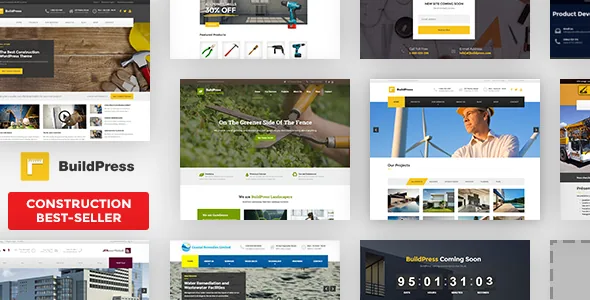
The vendor's opening line describes BuildPress as a set rather than one design: BuildPress Classic, BuildPress Light, BuildPress Landscape and BuildPress RTL. The same note adds that all four are available with Elementor, and that all four still work with Page Builder by SiteOrigin.
That reframes the usual starting question. On a construction or landscaping site you are not choosing whether to use a page builder, but which of four starting points to take and which of two editors to keep. Landscape points at the garden and outdoor side of the trade the product name covers; RTL covers right-to-left reading. The description does not explain whether the variants are packaged as separate installs or switched some other way, so confirm that on a staging copy before you commit content to one.
The theme is built on the Underscores framework, per the listing attributes. Underscores is a bare WordPress starter, which is consistent with the vendor's framing of customisation as adding functionality rather than working around a fixed structure.
Elementor is documented further than SiteOrigin
Elementor and Elementor Pro sit in the declared compatibility attributes alongside Visual Composer. SiteOrigin support comes from the vendor's own text rather than that attribute list, so the two editing routes are documented to different depths. If you plan to build on SiteOrigin, the listing gives you less to go on.
Whichever you pick, settle it before the layout work starts. The description does not say whether the variants share templates or whether content made in one editor moves to the other, so treat the editor as part of the project's foundation rather than a setting you can swap later.
One attribute reads "Gutenberg Optimized: No." That is a statement about optimisation, not availability: WordPress's block editor still exists on the site, but the vendor makes no block-first claim here.
Project grids carry the portfolio argument
For a builder, renovator or landscaper the portfolio does the selling. The vendor says Essential Grid comes free with BuildPress and describes it as the way to show a company's portfolio in various stylish grid formats.
Keep two layers apart. Essential Grid arranges project images into grids; the page builder arranges the page around them. The vendor's bundled-plugin statement is a description of what the item ships with, not a check of the contents of any particular archive.
Visual Composer is supported but explicitly not bundled, so a plan that depends on it needs its own licence.
Layout switching in the Customizer, and the shop path
Instead of assembling every page type from scratch, the vendor points to the real-time WordPress Customizer for page layouts, naming front page, regular page, shop and blog as examples you change there. The preview updates before anything goes live, which helps when you are adjusting a front page with a client looking over your shoulder.
The same description credits the theme with custom widgets and sidebars, and the listing marks it widget-ready with a 4+ column option. A shared sidebar for contact details, certifications or opening hours is built once and reused across service pages.
WooCommerce compatibility is declared, with the attributes naming the 6.x and 7.x lines. That covers a materials shop or a tool catalogue, but the description treats the shop as integrated rather than configured, so products, shipping and payment setup remain your work.
Eight translation sets and automatic right-to-left direction
The vendor says BuildPress is already translated into English, German, Russian, Dutch, French, Spanish, Turkish and Slovenian, with WPML declared as compatible. Treat that as shipped string coverage rather than a finished localised site: menus, project names and service copy still belong to you.
The more concrete RTL detail is that right-to-left direction activates automatically when the theme detects WordPress installed in an RTL language. That is a sensible default for a contractor working in Hebrew or Arabic, and it is worth checking on your own install, since automatic switching depends on how the locale is detected.
Demo import, blurred demo photos and the listing's declarations
The vendor advertises a one-click demo installer that imports demonstration content as a starting point. One note matters before you plan photography: the images in the demo are copyrighted and arrive blurred in the demo content, so you import the layout and then replace the imagery with your own project shots. For a construction site that is the right outcome anyway.
The attributes recorded on 3 November 2026 describe a responsive, high-resolution, widget-ready theme shipping PHP, CSS and JS files with documentation rated well documented. Declared WordPress support runs across the 6.0.x to 7.0.x lines, and named browsers are Firefox, Safari, Opera, Chrome and Edge. Those are listing declarations, not the results of running the theme on your server.
The vendor also mentions ClevrBot, an AI support agent offered to Proteus Themes customers, without explaining how it connects to a site; it is not a reason to choose the theme.
Questions & answers
Do the Classic, Light, Landscape and RTL variants install as separate themes?
The vendor presents them as variants of BuildPress rather than describing four independent installs, and the description does not spell out how they are packaged or switched. Confirm the mechanism on a staging install before assuming content can move between them.
Can I mix SiteOrigin and Elementor on the same site?
The vendor says both editors are supported across the variants, but the description does not address mixing them within one site or whether templates transfer between them.
Is Visual Composer included with BuildPress?
No. The vendor states the theme fully supports Visual Composer while the plugin itself is not bundled, so it needs its own licence. Essential Grid, by contrast, is described as coming free with the theme.