The shop is configured through order rules, not just layouts
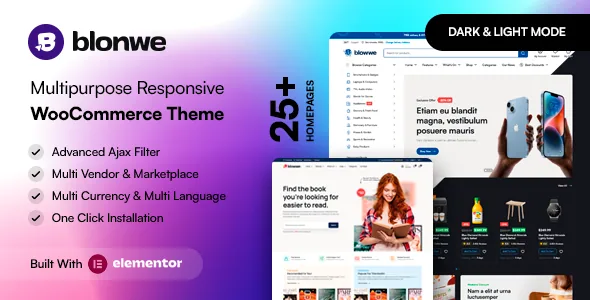
Plenty of WooCommerce themes sell themselves on homepage designs. KlbTheme's feature list for Blonwe spends its length on storefront mechanics instead. Among the named options are a minimum and maximum quantity setting, a minimum order amount, catalog mode, a Buy Now button, a mobile sticky add-to-cart bar, a free-shipping progress bar and a cart popup notice after an AJAX add.
Those settings address problems that appear after a shop starts selling. A minimum order amount discourages very small baskets; a quantity ceiling stops a customer ordering more than the stock you can ship; catalog mode turns the store into a browsable catalogue without checkout. Catalog mode is also listed as fixed for the single product page in version 1.0.9 of the changelog, which suggests it is a whole-shop switch rather than a page template.
These are vendor descriptions of the theme's options, not results from a test install. What they do tell you is the kind of shop the theme was written for: one where the owner expects to set trading rules from the theme settings.
An AI button inside the product edit screen
Version 1.3.0 of the changelog records a KLB AI integration for generating product descriptions and short descriptions with OpenAI, along with buttons labelled "Generate Full Description (AI)" and "Generate Short Description (AI)" on the WooCommerce product editing page.
The workflow that implies is straightforward: you write or import a product, then generate draft copy in the place you would normally type it, and edit the result before publishing. That is useful for a catalogue with hundreds of near-identical items, where the bottleneck is repetitive writing rather than page design.
Two practical points follow from the wording. The buttons live on the product edit screen, so the feature belongs to the shop-admin workflow rather than to the Elementor canvas. And it is a vendor claim about an integration with a third-party service, which means an OpenAI account or key arrangement is part of the setup cost you should confirm in the documentation before planning on it.
Filters and product pages aimed at browsing
The feature list treats product discovery as a set of separate controls rather than one search box. Named items include an advanced attribute search filter, AJAX shop filters, AJAX product search with variable SKU, filtering by colour and by brand, category filters, a mobile filter panel and product status filters for in-stock and on-sale items. Variations can be shown on the archive, which saves a click on products that differ only by size or colour.
On the product page the vendor lists quick view, wishlist, image zoom, video from YouTube and Vimeo, a 360-degree view, a stock progress bar, a countdown timer, sticky titles and an extra tab option added in 1.3.1. Gallery layout choices arrived over several releases, including one-column and two-column galleries and a two-column carousel.
Not every shop needs a 360 view or a countdown. The filters are the more consequential part: they determine whether a visitor with a specific requirement can narrow a large catalogue without leaving the archive page, and the changelog shows that area being revised repeatedly, with load-more and infinite-scroll pagination updated in 1.3.2 and AJAX search extended to variable SKUs in 1.3.0.
Multi-vendor and multilingual buyers in the same feature list
Two entries in the vendor's list are worth reading together: Dokan multi-vendor readiness and compatibility with RTL scripts such as Arabic. Dokan is a plugin that turns a WooCommerce installation into a marketplace with separate sellers, so "ready" means the theme declares support for that setup rather than including marketplace functionality of its own. You still install and configure Dokan.
On the language side the vendor lists WPML, Polylang and Loco Translate support, a .POT file for translation, and a right-to-left layout that the changelog has been patching since version 1.0.1, including an RTL rating fix in 1.0.4. Social login and registration through Google and Facebook, added in 1.3.1, sit in the same account-and-access area.
If your store depends on those specifics, treat the declarations as a starting point for a staging test with your own plugin versions rather than as a guarantee.
Where page building fits
Blonwe is an Elementor theme. The feature list names the Elementor page builder, and the marketplace compatibility attributes recorded on 4 November 2026 list both Elementor and Elementor Pro. A one-click demo data installer with XML is also listed, plus one-click theme updates and online documentation.
Gutenberg Optimized is marked No in those same attributes. That describes the vendor's stated optimisation target, not a removal of the block editor, so a mixed workflow of Elementor templates for landing pages and the standard editor for posts remains plausible but unverified here.
Less obvious: the theme's own maintenance lives in a companion plugin. Nearly every changelog entry from version 1.0.6 onwards updates both "WooCommerce outdated files" and the Blonwe Core plugin, sometimes with nothing else in the release. Whatever version you run, plan on keeping that plugin current alongside the theme.
Declared compatibility, as recorded
The marketplace attributes captured on 4 November 2026 declare WooCommerce 7.x.x through 10.x.x, WordPress 6.4.x through 7.0.x, Bootstrap 4.x, Contact Form 7, WPML, Elementor and Elementor Pro, plus Facebook and the browsers Chrome, Firefox, Safari, Opera and Edge. The package is listed as PHP, CSS and JavaScript files, with widget-ready areas, a responsive layout and four or more columns.
Those are declarations attached to a listing, not a record of the theme running on your server with your plugins. The changelog does show the theme being adapted to platform changes over time, including PHP 8.2 and 8.3 deprecation fixes in 1.1.1 and 1.1.4, an Elementor 3.26.0 fix in 1.1.9, and a recurring cycle of WooCommerce template updates. That pattern is the best available signal about how actively the shop layer is maintained.
Questions & answers
Does Blonwe work without Elementor?
The vendor builds the theme around Elementor and lists Elementor and Elementor Pro as compatible. The marketplace marks Gutenberg Optimized as No, which describes the vendor's optimisation target rather than proving the block editor is unusable. Nothing in the supplied evidence describes an Elementor-free editing path for templates.
Is Dokan included with the theme?
No. The feature list describes Blonwe as Dokan-ready, meaning the theme declares support for the multi-vendor plugin. The marketplace listing covers the theme files only; Dokan itself is a separate plugin you install and configure.
Where does the OpenAI description generator appear?
According to the changelog entry for version 1.3.0, the KLB AI integration adds "Generate Full Description (AI)" and "Generate Short Description (AI)" buttons to the WooCommerce product edit page. It is described as a vendor integration with OpenAI; the listing does not state the account or key arrangement required.