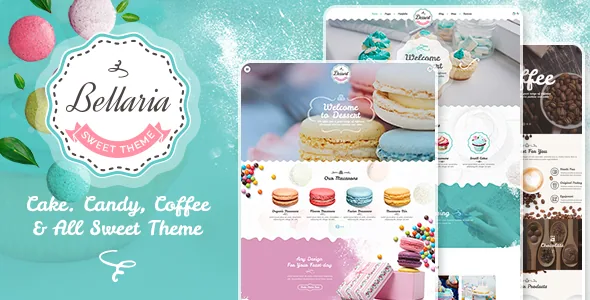
The storefront, not the frosting, is what the update log keeps touching
Plenty of bakery themes are sold on photography. The marketplace description for Bellaria does mention retina graphics and a responsive design for tablets and mobile, but the record that actually distinguishes the theme is its changelog. From the 2018 release to version 1.2.2 dated 13 December 2025, the vendor returns to WooCommerce template files again and again: 3.3.1, 3.4.1, 3.5.1, 3.6.1, 3.7.0, 3.8.0, 3.9.0, 4.4.0, then 7.x, 8.6, 9.2, 9.4, 10.0.2 and finally 10.4.2.
Read plainly, that means the theme ships overrides for WooCommerce templates and the vendor keeps those overrides in step with shop plugin releases. For a bakery taking custom cake orders or selling boxes of pastries, this is the part of the record worth knowing, because stale template overrides are a common source of odd storefront behaviour after a WooCommerce update. It describes the vendor's update habit; it says nothing about how any particular copy behaves on your install.
The marketplace compatibility attributes, observed on 4 November 2026, list WooCommerce 9.x.x, WPBakery Page Builder and WPML, with WordPress 6.9.x under software version. Those are declarations from the listing, not results from running the theme against your plugin stack.
What the shop fixes say about where the theme intervenes
Changelog entries record corrections, not features, but they show which parts of a storefront Bellaria styles itself. Across releases the log names mini cart positioning, a missing store notice, a misplaced product rating, out-of-stock product handling, product search widget behaviour, cart thumbnails, subcategory titles, variation spacing, missing product images and a select-options control.
That tells you the theme does not leave cart, product listing and single product pages to WooCommerce defaults. If the shop is the point of the site, those are the areas to click through on the vendor's demo before committing. If you only need a menu, opening hours and a gallery, the same overrides are extra surface your site carries without using.
The vendor also treats legacy widget screens as part of the supported setup: version 1.1.4 added the Classic Widgets plugin to the required list, and the marketplace still describes the theme as widget ready. A widget-heavy sidebar therefore comes with a plugin dependency to plan for.
Layout and colour are global settings, not per-section choices
The vendor's feature list separates two styling controls that work at different levels. Wide and boxed layouts decide whether the site fills the viewport or sits inside a frame with space at the sides. Unlimited colour variations with easy colour management decide the palette that fills it.
Where that colour work happens is the practical question, and the description answers it indirectly: a powerful theme options panel and a shortcode generator are listed as distinct features, alongside columns listed as 4+ and a shortcode generator for content blocks. The options panel is where site-wide colour and layout settings live. Needing a palette that shifts page by page is a custom CSS job, not a setting to look for in the builder.
One changelog line is a reminder that the two systems interact: version 1.0.6 fixed an issue between the theme options panel and Gutenberg, and added a custom-colour option for the title area. Element-level colour in the builder and global colour in the panel are separate layers, and the panel wins where they overlap.
Editing runs through WPBakery, with a theme panel above it
Visual Composer, now sold as WPBakery Page Builder, is listed as included, along with Slider Revolution, a sidebar generator, custom widgets, FontAwesome and Google Fonts. Contact Form 7 is named as ready, so a contact and order-enquiry form is a plugin step rather than a theme feature. One-click demo import is listed too, which is how the demo content arrives.
The marketplace marks Gutenberg Optimized as No. That records that the vendor has not declared block-editor optimisation; it is not a statement that the block editor is unavailable. The workflow described runs through the builder and the options panel.
Small header features are documented in the log as additions rather than settings you hunt for: version 1.0.9 added cart and search icons to the sticky menu, version 1.1.5 added a new-tab option for header social icons, and version 1.0.6 added an option for custom icons in the menu. Each is a header decision you would otherwise solve in a child theme.
Translation, RTL, and the strings that were fixed late
WPML appears in the marketplace compatibility list, and the changelog records RTL work in more than one release, including a dedicated entry in 1.1.8 and an RTL-and-builder compatibility fix as far back as 1.0.3. If the bakery trades in more than one language or uses a right-to-left script, those two facts together are a better starting point than the compatibility claim on its own.
Translation fixes recur throughout: missing strings in versions 1.0.1 and 1.0.3, and incorrect text domain loading in 1.2.0 and 1.2.1, corrected as recently as July 2025. That history suggests strings have been repaired over time. It does not establish that every string in the current release is translatable, so plan a pass over your own pages.
The marketplace file list names PHP, HTML, CSS, JS and PSD files. The vendor states plainly that stock photos are not included, so the cake photography on the demo is placeholder material you replace with your own or licensed images. The PSDs help a designer adapt the visual language; they do not affect day-to-day editing.
Matching Bellaria to a bakery that actually sells
The pattern in the log splits two kinds of bakery project cleanly. A theme whose stated workflow is WPBakery plus a global options panel, and whose changelog spends seven years on cart, product listing and template overrides, is built for a site where ordering happens. A look-first brochure site inherits that maintenance without using the parts it protects.
If you go ahead, three items deserve a look on the live demo before you plan the build: the shop pages named in the changelog, the Classic Widgets requirement if your design leans on sidebars, and the absence of demo photography from the package. The changelog is the strongest evidence in the listing, and it is evidence about upkeep rather than about how the theme will look with your products.
Questions & answers
Does Bellaria require WooCommerce to work?
No. WooCommerce appears in the marketplace compatibility list and much of the changelog concerns shop templates, but the vendor describes the theme for cakes, bakery and coffee shop sites generally. The storefront overrides only matter once WooCommerce is active, and the marketplace attributes note WooCommerce 9.x.x as the declared compatible range.
Can I use the block editor with Bellaria?
The marketplace marks Gutenberg Optimized as No, meaning the vendor has not declared block-editor optimisation. The described workflow is WPBakery Page Builder plus a theme options panel. Nothing in the listing establishes that the block editor is unavailable, and the changelog shows the two have coexisted since a 2019 compatibility fix.
Are the demo cake photos part of the package?
No. The vendor states that stock photos are not included. The marketplace file list names PHP, HTML, CSS, JS and PSD files, so plan to supply your own photography or licensed stock for cakes and products.
Why is Classic Widgets listed as a required plugin?
Version 1.1.4 added the Classic Widgets plugin to the required list, and the marketplace still describes the theme as widget ready. Treat it as part of the supported setup when your design uses sidebar or footer widget areas.