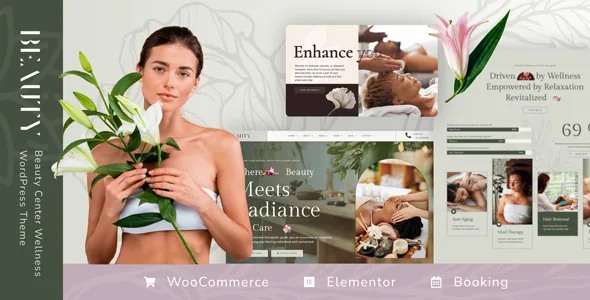
A treatment record that is also a booking and a product
Nicdark frames Beauty around the treatment rather than around the salon homepage. The listing says the single treatment page holds "all the information that the wellness center needs to communicate to their customers," and that a massage booking system with calendar integration is built into the theme rather than delegated to a third-party bookings plugin.
That same treatment can be sold. The vendor describes buying treatments or products through WooCommerce, with PayPal named as the payment method, and treats can be set up from both the back-end and the front-end editor. So the record carries marketing copy, an appointment, and a price.
These are vendor claims from the marketplace description, not results from an install. The listing does not document slot lengths, availability rules, staff calendars or what happens at payment during booking, so those are the things to watch in the live demo before you commit a real schedule to it.
Keyword filtering with a preview, and what it does not specify
The listing says treatments are "filtered through a search box" by keyword, and that the Ajax form shows a treatment preview as the visitor types. In practice that means a client can recognise a specific massage from the result panel instead of scanning a list page.
Nicdark calls the system advanced, but the description stops at keyword filtering. No filter fields, sorting, category logic, duration or price facets are spelled out. If your catalogue has to be sliced by therapist or treatment length, the demo is the closest thing to a specification you have: try the searches your clients would run and see what the field accepts.
Treatments and shop products share one WooCommerce install
Beauty is sold for a business that does both: services booked, goods shipped. The vendor text keeps returning to the "spa shop," describes building a single product page, a cart for purchasing products, and PayPal checkout, and says customers can leave a rating for each product.
The review placement is worth reading precisely. The listing says that on a treatment page a visitor "can see all comments of the other spa customers" — a statement about treatment pages, not a site-wide review block. If reviews need to appear across the whole shop, test that.
What this means for your build is two content types with different logic running on one WordPress install. The theme claims the front end; shipping zones, tax rules and your plugin stack stay your configuration work.
The demo you import decides whether the shop exists
The vendor's import instructions carry more consequences than any feature bullet. During content import you choose a demo, and the "original demo" is described as a simplified version "without scrolling effects and various transitions and without the shop section," aimed at users new to WordPress, with limited functionality.
The other demos reproduce the design shown on the intro page, and each requires plugins that the importer highlights. The critical line: every Elementor demo except the original needs the pro version of Elementor with all its widgets, which the vendor states is not included in the package. Free alternatives are mentioned as possible substitutes, though the layout then depends on how closely they match the widgets in use.
So the shop-and-effects version of the previewed site is not reproducible from the theme files alone. Decide about an Elementor Pro licence before you plan the import, or start from the original demo and build the shop pages yourself.
Five demo subjects, and a separate schedule for yoga
The demo roster spans beauty salon, massage therapy, wellness center, yoga studio and nail salon. For the salon, massage and wellness subjects the description stays on treatments, categories and the spa shop.
Yoga is the outlier. The vendor says the yoga studio demo uses "the easy yoga courses schedulate system" to display courses. That is a statement about a course schedule, and nothing in the listing claims it is the same engine as the treatment booking. If you run classes with fixed times rather than one-to-one appointments, find out which system you would actually be configuring before choosing that demo.
For nail salons and beauty centers, the difference is presentation — service categories, treatment listings, the booking path — rather than a separate feature set.
Elementor builds the pages, and CSS is the escape hatch
Elementor is the builder the vendor names, with drag-and-drop composition and a live view. The marketplace attributes also mark the theme as Gutenberg optimized, which means the block editor is not disabled; it does not mean the imported layouts are block-built. In practice the demo designs are Elementor templates, and that is where edits happen.
Nicdark notes that custom CSS can be added without editing template files, which covers small typographic and spacing changes. The marketplace file list names PHP, CSS and JS — the theme's own files, not a bundled plugin library.
The attribute record observed on 4 November 2026 declares WordPress 4.9.x through 6.9.x and WooCommerce 5.x through 8.x, plus WPML, Contact Form 7, Gravity Forms, WPForms, Events Calendar, Easy Digital Downloads, WPBakery Page Builder and Elementor. Those are listing declarations about compatibility, not test results against your own stack, and the breadth is wider than most builds will exercise — your form plugin is one of three named options, not a requirement.
What to weigh before you start building
The theme earns its complexity if your site has to describe a treatment in enough detail to sell it, take an appointment for it, and sell physical products beside it. Nicdark describes all three as part of the theme.
If you only need a brochure site for a salon, the booking machinery and the Elementor Pro requirement for the complete demo are costs you will not recover. If you want the previewed look with the shop included, budget for the pro builder and check the booking flow on the demo first — the listing explains the features but leaves the operational details to the demo and the documentation.
Questions & answers
Do I need Elementor Pro to use Beauty?
Not for the theme itself, and not for the simplified "original" demo. The vendor says every other Elementor demo requires the pro version with all widgets, which is not included in the package, so the full previewed layouts and the shop section depend on that licence or on free alternatives that match the widgets used.
Is the massage booking system a separate plugin?
The marketplace description presents the booking system as built into the theme with calendar integration, rather than naming a third-party booking plugin. Cancellation rules, staff availability and pay-at-booking behaviour are not documented in the listing.
Can one site sell products and take treatment bookings?
The vendor describes treatments and shop products both going through WooCommerce, with PayPal named as the payment method, plus ratings on products. That is a listing claim; checkout, tax and shipping setup is done on your own install.
Which WordPress and WooCommerce versions are declared?
The attribute record observed on 4 November 2026 lists WordPress 4.9.x through 6.9.x and WooCommerce 5.x through 8.x. These are vendor declarations rather than results from testing against your plugins or PHP version.


