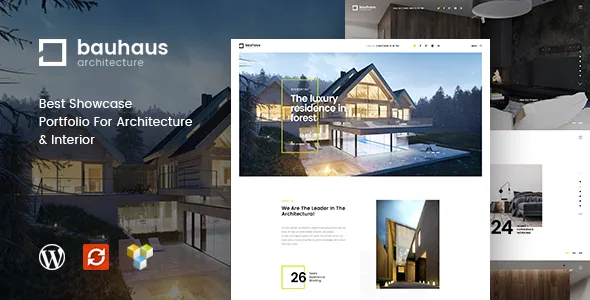
The demo photographs look finished. They are also licensed to the demo
Bauhaus makes its impression through large photographs of buildings and interiors, and the one-click demo import brings the media files with it, so a fresh install looks like the showcased site rather than a wall of grey placeholders. The vendor's note immediately limits that: the licences cover the demo site only, and using the same images on your own site means buying licences yourself.
For a studio site this is the largest non-theme cost. Project photography is the content that sells the work, so plan on your own shoot or properly licensed stock before launch. The imported images are still useful as a reference for how the theme sequences full-width photographs, captions and project details.
The same applies to decorative imagery the demo brings in. If a picture shapes how visitors read the site, it needs to be yours or licensed.
Projects are a post type, and pages are built in WPBakery
The theme registers a project custom post type, and the vendor ties it to Visual Composer in the feature list. That pairing sets the structure: a project is a record of its own rather than a blog post with a gallery dropped into it, and the layout around it comes from builder elements.
Each project page is therefore your work rather than a fixed template. The vendor acknowledges the consequence in a short note, saying that if a full page will not accept further elements you can change the existing element through the page builder. Templates give you a starting composition, not a locked one.
WPBakery and Visual Composer both appear in the marketplace compatibility attributes, alongside Contact Form 7 and WPML, and Slider Revolution is named in the feature list. Those are vendor declarations, not a record of what is bundled in any particular package. The layout section of the demo, where buildings and rooms are paced against each other, is the honest test of whether the composition style suits your portfolio.
One opening image per page, which a project site needs
A studio rarely wants a single banner standing for every project. The vendor lists a custom header image for each page, and on a project-heavy site that is the setting you will use most: a concrete house and a soft-furnished apartment open on their own photographs instead of sharing one.
It also pairs with the dark and light styles. When pages alternate between a dark full-bleed image and a pale, text-led layout, the per-page header lets you match the opening image to the tone of that page.
Beyond this, the vendor's layout description stays general: unique layouts and balanced typography, with the design kept minimal so projects lead. The supplied material gives no count of homepage variations, so judge layout range from the demo rather than from a number.
Settling colour in the Customizer
The feature list names dark and light styles, a live colour changer, unlimited colour and further options for changing colours. Taken together, these describe a theme where you set the palette and watch it apply, instead of editing stylesheets.
For a small studio that is a workable editing surface. A black-and-white interiors brand and a warm-neutral one can both come out of the same theme without a child theme, and the vendor also lists WordPress Customizer support and all Google Fonts. Colour and type are the two levers most studios want, and both are exposed.
Translation is supported separately: the vendor lists a .pot file for the theme's own strings, and WPML appears in the compatibility attributes. How translated text sits against your typographic choices is worth checking on your own staging build.
Sidebars you can move, replace or switch off
The vendor describes moveable and unlimited sidebars: place the sidebar left, right, or disable it. That is a layout decision with visible consequences on a portfolio site. A project page where a photograph runs to the edge usually wants no sidebar, while a page describing the studio's process can carry one with a short profile or a service list.
Unlimited sidebars means pages are not tied to a single widget area shared across the site. A building page can have a set for specifications while the contact page keeps a simple one. The theme is marked widget-ready, so what you place there are ordinary WordPress widgets.
This is where Bauhaus differs from themes that treat every page as one canvas: some pages need something alongside the content and some need it gone, and the vendor exposes both without template edits.
The version record, read on 4 November 2026
The marketplace listing declares support for WordPress 5.0.x through 6.8.x and names IE10, IE11, Firefox, Safari, Opera, Chrome and Edge as compatible browsers. It reports version 1.3.1, updated 4 February 2025. Those are claims from the listing, not the result of an install against a current WordPress release, a PHP build or a plugin stack.
The older browsers in that list say more about the theme's age than about how it behaves now. What the changelog does show is ongoing maintenance: an earlier release records full Gutenberg editor compatibility, version 1.3.0 moved the theme to WordPress 6.x with updated plugins and Customizer work, and 1.3.1 addressed PHP 8.x and revised the demo import.
The listed files include PHP, CSS and JS alongside Layered PSD and PNG files, which helps if a designer needs to adapt graphic elements to a studio's identity. For a Bauhaus download decision, the meaningful check is the demo import and one project page built in WPBakery on the WordPress version you run, rather than the version number alone.
Questions & answers
Can I keep the images that come with the demo import?
The vendor says the demo import includes the media files, but that the licences cover the demo site only. Publishing the same images on your own site would require buying licences yourself, so budget for your own photography or licensed stock for anything visitors see.
Does Bauhaus work with the block editor?
The listing marks Gutenberg Optimized as Yes, and a changelog entry records full Gutenberg editor compatibility. Daily page building in the demos happens in WPBakery, and the project post type is described as supporting Visual Composer, so test a page in whichever editor you intend to use.
Is it only for architecture studios?
The vendor positions Bauhaus for architecture and interior companies and also names construction, furniture and personal portfolio sites. The design emphasis is consistent across them: minimal styling that puts projects first, dark and light styles, and a per-page header image for each project.


