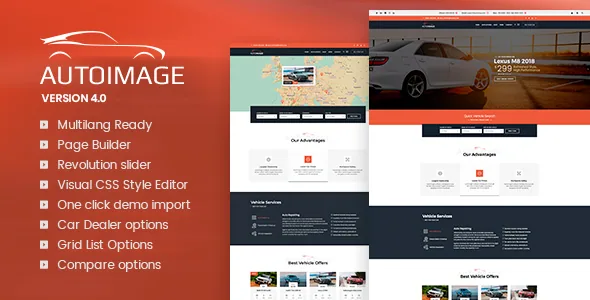
Grid, list and compare: the inventory decisions the vendor names
Most of the vendor's feature list is short and generic, but three entries are specific to selling cars: "Grid List Options," "Compare options" and a broader "Car Dealer options" block. Read together, those describe how your stock pages can behave rather than how they look.
The marketplace description frames the grid/list pair as a choice about presentation: you "can use the selection of list and grid layouts to ad your cars in a style that matches your preferences." A grid suits a forecourt where photographs do the selling; a list leaves room for the details a buyer scans for. Treat the exact number of layout variants as something to confirm on the demo, since the vendor does not count them.
Compare options change behaviour, not just layout. A comparison feature implies selecting vehicles, holding those selections somewhere, and a view that lines them up. None of that mechanism is documented in the supplied material, so if shortlisting cars is central to how you want visitors to shop, check that flow on the live site first.
The "Car Dealer options" label is worth keeping in proportion. It reads as a settings layer for dealer-specific content, not as an inventory management system, stock feed importer or finance calculator. Nothing in the material describes syncing vehicles from a DMS or a classifieds feed, so plan how listings reach WordPress separately.
A homepage order built around deals, stock and testimonials
The vendor offers "two different starting page layouts" and sketches the composition of one: a full-width slider image for offers and deals, a list of products from the catalogue, and an area for customer feedback.
That sequence is practical for a dealership with active promotions. The slider carries the current offer or a hero vehicle, the catalogue strip shows there is stock behind it, and the testimonial block answers the trust question that sits under any vehicle purchase. If your strongest asset is a rotating set of finance or seasonal offers, that order does much of the work for you.
The second layout is not described in the supplied material, so comparing the two on the demo is the only honest way to choose. Inventory depth is the useful filter: a forecourt with a dozen cars and one with several hundred need different front pages.
One-click demo import is listed, which matters here because the demo carries the homepage sequence and catalogue blocks as arranged pages. Importing gives you a structure to edit, not your own stock.
WPBakery rows, Revolution Slider heroes, and CSS without a stylesheet
The marketplace lists WPBakery Page Builder among the theme's compatible tools, and the vendor's own list names a page builder, Revolution Slider and a "Visual CSS Style Editor." In practice the page shell is assembled from builder rows and columns, the hero rotation is built in Revolution Slider, and styling can be adjusted without editing theme files.
Revolution Slider being a separate tool has a planning consequence. Slide content lives in the slider's own interface, so whoever maintains promotions needs to be comfortable there and not only in the page builder. It also means the hero is not limited to whatever the theme options provide.
The marketplace marks Gutenberg Optimized as No. That is a grading of how deeply the theme is built for the block editor, not proof that blocks are unavailable, but it does tell you the intended editing surface is the builder. A team that works exclusively in block templates would be changing tools rather than adapting this theme.
The visual CSS editor's exact controls are not described, so inspect it rather than assume it replaces custom stylesheet work.
Translation readiness, and where it stops
WPML appears in the compatible-with attributes, and the vendor calls the theme "Multilang Ready" and localized, with translation described as "easy but quite time consuming." Those are compatibility claims. The theme is built to work with WPML and its strings are prepared for translation, which is not the same as a finished multilingual dealership site.
Vehicle names, trim levels and finance copy still need writing in each language, and those are the bulk of the work on a car site. Budget for the content, not just the configuration.
What the file list includes, and the images that do not come with it
The packaged files are listed as Layered PSD, PHP, CSS and JavaScript. The layered PSD separates this from themes that ship code only: a designer can adjust the design source in Photoshop instead of reverse-engineering CSS.
The vendor is explicit that images are for preview only and "not included in the final purchase files," with a request to contact the author for permission before commercial use. That is a real budget line for an automotive theme, where hero photography and vehicle shots carry most of the visual weight. The vendor also credits Flaticon for icons and three stock photo sources, which tells you where the originals came from and therefore where a licence would have to be arranged.
Widget-ready areas are listed too, so recurring blocks can sit outside the builder.
Declared WordPress range, read as a declaration
The marketplace attributes observed on 5 November 2026 declare support from WordPress 4.9.x through 7.0.x, list marketplace version 4.6.8, and record a vendor update dated 30 September 2025. The breadth of that range reads as a broad declaration rather than a record that every entry was retested.
Treat the list as a declaration, not a guarantee for your stack. PHP version, the builder's own release, WPML configuration and any dealership plugin you add are not resolved by a version list. The declared browser support is equally broad, from current Chrome, Firefox, Safari, Opera and Edge back to IE9.
A practical order of work: check the declared range against your host's PHP and WordPress versions, then exercise the inventory grid, list and compare views with a realistic number of vehicles before committing to homepage content.
Questions & answers
Does Autoimage include a vehicle inventory management system?
The vendor lists "Car Dealer options" as a feature, but the supplied material does not describe an inventory manager, stock feed importer or DMS connection. Plan on how vehicles get into WordPress separately unless the vendor's documentation shows otherwise.
Are the demo images included with the theme?
No. The vendor states that preview images are used for demonstration only and are not part of the purchase files, and names the stock sources and icon library used. You will need your own licensed photography.
How many vehicles can be compared at once?
The vendor lists compare options without documenting the mechanism, storage or limit. Check the comparison flow on the live demo before relying on it as part of how visitors shop.


