The catalogue presentation is what you configure
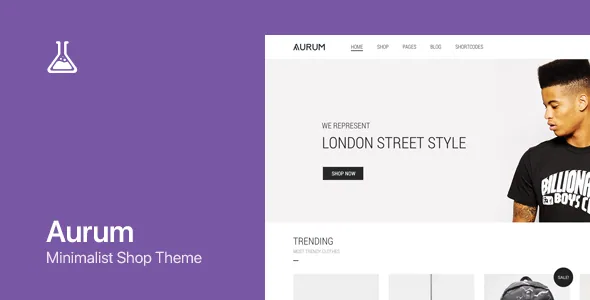
Laborator describes Aurum as a minimalist WooCommerce theme for boutiques, bookstores, technology stores, jewellery shops and other web shops. The feature list that follows is unusually shop-specific: it names four header types, four different shop item hover effects and a catalog mode, rather than a stack of page templates.
That shapes the work order. Before you compose a homepage, you decide how a product tile behaves when a cursor crosses it and how a sticky menu, logo and navigation sit above the catalogue. Those are the choices a visitor meets on every category page, and Aurum treats them as settings rather than layout you rebuild per page.
Four header types is a bounded choice, not an unlimited header builder. You pick a variant and adjust from there; you do not assemble a header from individual elements.
What catalog mode and AJAX add to cart change
Catalog mode is listed as a theme feature. In a shop context that setting is the lever between a browsing storefront and a buying one: the catalogue presents products while the transactional path stays out of the way. The vendor does not spell out exactly what catalog mode hides, so check the theme options on a staging copy if the store has to support both states at once.
AJAX add to cart is the companion feature. Adding a product updates the cart without a page reload, which matters most on grid pages where shoppers add several items in sequence. Combined with the hover effects, the grid becomes the working surface of the store rather than a set of links into product pages.
The listing also names YITH Wishlist and touch carousels. Wishlist support arrives through a separate plugin rather than core theme code, so confirm which version the listing assumes before you promise the feature to a client.
The Custom CSS tab works per screen size
The most specific claim in the feature list concerns styling: a Custom CSS tab where you can write CSS, LESS or SASS "for each screen size".
Read that as an addition to the theme options, not a replacement for them. Typography selection, an image or text logo, and the header and shop toggles handle the routine decisions. The CSS tab is where you go when a breakpoint needs a rule the panels do not expose, such as tightening spacing on a product grid at tablet width.
It also tells you what kind of customisation the theme expects. You write styles; you do not drag a visual style editor around. If your workflow depends on a designer adjusting spacing in a live preview without touching code, expect the theme's own panels to be the limit of what changes safely.
WPBakery, 55 layout elements and two bundled sliders
The vendor states that WPBakery Page Builder is supported and included, and lists 55 custom Layout Builder Elements plus eight custom Visual Composer shortcodes by Laborator. A Layout Builder is also named as a separate entry, so the theme's own composition tools sit alongside the page builder rather than inside it.
Layer Slider and Revolution Slider are both listed as included. Two slider plugins in one package creates a decision rather than an abundance: pick one for the hero and stay with it, or you end up maintaining two sets of slider content for the same position.
One exclusion is stated plainly: UberMenu is supported for the mega menu but is not included with the theme. Budget for that plugin separately if a mega menu is part of the design. The vendor also notes that sample images in the live preview are for demonstration only and are not part of the purchase, so product and lifestyle photography is your own cost either way.
Building a category page from the catalogue extras
Beyond the product grid, the feature list includes a products carousel, a products shortcode, feature tabs, an image-plus-category banner, text banners for calls to action, testimonials and a custom search page with content filtering.
Those pieces point at a particular page shape: a category landing page that opens with a category banner, runs a carousel of chosen products, and uses feature tabs to separate ranges or attributes without sending the shopper to a new URL. The filtered search page handles the visitor who arrives knowing roughly what they want but not which category holds it.
Advanced Custom Fields support is also listed, which extends the same idea to product or page metadata you define yourself. The blog side is comparatively small, with two blog page types, a post gallery and a blog posts shortcode. That fits a store where editorial content supports the catalogue rather than leads it.
Compatibility, as the listing declares it
The marketplace compatibility attributes, observed on 3 November 2026, list the Block Editor, WPBakery Page Builder, WooCommerce 6.x through 8.x, WPML, Gravity Forms and Bootstrap 5.x, with Gutenberg Optimized marked yes. Declared software support runs across WordPress 5.8.x to 6.5.x. Changelog text shown for the theme also refers to WordPress 6.9.x and WooCommerce 10.7.x support.
Treat those as listing declarations, not as proven combinations on your stack. Gutenberg Optimized being marked yes, with the Block Editor also listed, means the block editor is a declared editing route; it does not mean the demo layouts are built with blocks, since the feature list is written around WPBakery.
Packaged files are listed as PHP, CSS and JS, and documentation is marked well documented. Your host's WordPress, WooCommerce and PHP versions, together with the other plugins in the stack, are the variables to test on staging before committing a client to the theme.
Questions & answers
Does Aurum need WPBakery to build pages?
Laborator lists WPBakery Page Builder as supported and included, and the theme's feature set, including the 55 layout elements and eight custom shortcodes, is written around it. The listing also records the Block Editor as compatible and Gutenberg Optimized as yes, so blocks are a declared route too. The demo layouts, however, are described in WPBakery terms, so mixing both editors on one site is a decision to make deliberately.
Is the mega menu included?
No. The vendor states that UberMenu is supported for the mega menu but is not included with the theme, so you would license it separately.
Can I use Aurum without running a checkout?
Catalog mode is listed as a theme feature, which is the setting intended for a storefront that presents products without a full buying path. The description does not detail exactly what catalog mode hides, so verify it in the theme options before relying on it for a client requirement.
Do the demo images come with the theme?
They do not. Laborator states that sample images viewed in the live preview are for demonstration purposes only and are not included with the purchase.