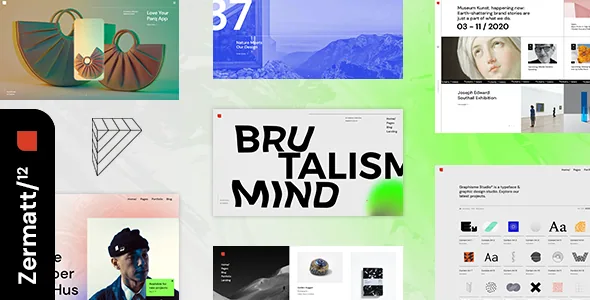
Four showcase layouts, and a second set for the case study
Select-Themes splits portfolio presentation into two independent choices, and that split is the reason Zermatt reads as an agency theme rather than a blog theme with project thumbnails. The vendor's Portfolio List shortcode carries Masonry, Gallery, Slider and Justified Gallery arrangements. Single project pages get their own set of arrangements, described as Gallery, Images, Masonry and Slider.
Because the two lists are separate, an index built as a dense masonry wall can lead into a project page paced as a slider, and neither decision constrains the other. The justified gallery layout is the one with a visible job: it packs images of differing aspect ratios into full rows, which helps a studio whose case thumbnails were not shot at matching crops.
Narrowing the list is handled in two ways. The vendor lists a category filter on portfolio lists, and separately a Portfolio Category List shortcode. The filter trims an existing grid in place; the category list is where taxonomy itself acts as navigation, such as a services page that sends visitors to the relevant slice of work.
These are vendor descriptions of the shortcode options. How the four arrangements differ in spacing, caption placement and hover treatment is something the demo shows and the feature list does not.
Logos are stored per state, not per site
The header inventory is more granular than a type list. The vendor names five header types — Vertical Sliding, Vertical, Minimal, Standard and Zermatt Switch — and then separates behaviour from type: sticky, fixed, or sticky only on scroll up. That third option is the one with a design consequence on a long portfolio page, because navigation returns when a visitor scrolls upward without holding height the rest of the time.
Logo slots follow the same logic. Zermatt carries separate logo versions for normal, sticky and mobile header states, and a further pair for dark and light header skins. If your mark has a light-only variant that fails on a white sticky bar, those slots let you supply the correct file instead of compromising on one.
The surrounding menu pieces are listed as a group: a fullscreen menu, a customisable mega menu, a side area, an optional header top widget area, and anchor support so a menu item can jump to a section on the same or another page. Anchors are what make a one-page agency presentation workable. The vendor also refers to header and footer widget areas in the plural, so the chrome around the content is editable from the admin. The changelog records a fix for vertical and vertical sliding header dynamic height in version 1.3, which suggests that area has been maintained rather than announced once.
Awards, marquees and link showcases as shortcodes
The vendor declares full compatibility with the Elementor page builder, and the changelog shows the relationship being kept: version 1.3 records fixes for Elementor grid size and widget search, and version 1.6 records improved Elementor compatibility. Those are vendor-recorded changes, not results from a build on your own stack.
Where the shortcode library earns its place is in content an agency site tends to need and a generic widget rarely covers. The vendor names an Awards List, an Interactive Link Showcase, a Text Marquee and an Image Marquee, alongside Team List, Clients List and Testimonials List shortcodes. Awards, client logos and team entries are typically the sections that get assembled by hand in a page builder and then fall apart when a new entry arrives; keeping them as list entries means the section grows from data rather than from a duplicated row.
The rest of the library is conventional but wide: pricing table, progress bar, counter, countdown, video button, banner, dropcaps, info section, call to action, infographic pieces, Instagram and Twitter lists, and a customisable Google Map. A preloading effect offers a choice of 15+ loader icons — treat that as art direction, since the count says nothing about load performance. Parallax sections and a variable grid size are also listed.
What the listing declares about the rest of the build
The vendor says a child theme is included, so customisations can sit outside the parent theme files, and custom sidebars can be created. Footer layout is adjustable from one to four columns. The blog repeats the portfolio's layout vocabulary — list, gallery, masonry, slider and justified gallery — with post formats for standard, gallery, link, quote, video and audio, and related posts on single post views.
Compatibility is declared rather than demonstrated. The listing names Contact Form 7, Elementor, WPML and WooCommerce, with WooCommerce 9.x.x and 10.x.x in the attributes, and the vendor's feature list includes Product List and Product Categories List shortcodes. The declared WordPress range runs from 6.5.x to 7.0.x, as observed on 4 November 2026. Treat all of that as a starting point for testing your own PHP version, plugin set and hosting rather than as a result.
Two points come straight from the vendor's own text. The demo photography is presentational and needs a stock licence of your own before it can appear on your site. And Revolution Slider is described as included with the theme, with the changelog tracking its version alongside the Zermatt Core plugin in each release — a claim about what the vendor bundles, not a description of any particular package you might obtain.
The questions the description leaves open
Beyond a landing demo URL, the description says nothing about how many complete demo sites exist. If a ready-made page set matters to your schedule, that is a demo question rather than a feature-list question.
The vendor claims fully responsive and retina-ready output but says nothing specific about how the portfolio layouts reflow at narrow widths, and no accessibility or performance claims are made at all. The most economical check for an agency site is a small one: put a project with four or five images through each single-project layout and watch where the spacing strains. That is the part a feature list cannot settle for you.
Questions & answers
Can different pages use different portfolio layouts?
The vendor presents portfolio lists as a shortcode with Masonry, Gallery, Slider and Justified Gallery variants, which points to choosing the arrangement where you place the shortcode rather than globally. Single project pages are described with a separate Gallery, Images, Masonry and Slider set. Confirm both on the demo before planning a mixed scheme.
Do I need to write code to build an agency site with Zermatt?
The vendor states no coding knowledge is required and pairs Elementor with a shortcode library. That is a claim about the intended workflow. Shortcodes such as the marquees and the interactive link showcase still need configuring, and the vendor's documentation and video tutorials are the reference for how far the settings reach without editing files.
What is worth testing first?
The portfolio layouts with your own image ratios, and the header behaviour with your logo set across normal, sticky and mobile states plus dark and light skins. The listing declares WordPress 6.5.x through 7.0.x and WooCommerce 9.x.x and 10.x.x, observed on 4 November 2026, but those are declarations rather than tests of your stack.