The design work sits behind the login
Most community themes are a blog layout with BuddyPress output falling into the content column. WildCommunity takes the other position. The vendor promises "over 40 inner pages" and then names them, and almost every entry belongs to the logged-in experience rather than the public site.
Read that list as a workflow. Onboarding runs registration, login, password recovery and account activation. Group life gets a group forum page, a single topic page, group activity, group members, send invites, group settings and a group details edit page. Private messaging gets inbox, sent messages, compose and notices. Social connections get a friends page and a friendship requests page, while group membership gets a groups invitation page. Participation is tracked through Topics Started, Replies Created, Favorites and Subscriptions, and account control ends with general settings and email notification settings.
That is specific enough to plan against. If the loop your community runs on is join, find a group, talk in the forum, follow people, tune notifications, the theme already treats each step as a layout someone drew. The gap is everything outside that loop: a custom directory, a booking flow or a reporting screen is still your work.
Two mechanisms for members-only content, at different scales
The theme's clearest editorial idea is that one site has to read as two sites depending on who is looking. The vendor describes "intranet groups" that display different content blocks for members and for guests, an extranet arrangement, and separately lists a shortcode that makes parts of a text visible to members only.
Those operate at different levels. Content blocks handle structure: a sidebar, a call to action or an entire region that appears once someone is signed in. The shortcode handles a sentence or a paragraph inside otherwise public copy. Together they let you describe a group publicly and then reveal its schedule or contact list to the people who joined. The vendor's pop-up notification window for new messages and friend requests belongs to the same thinking: the signed-in experience carries its own signals.
How granular the block switching gets is something the feature list states rather than shows. The supplied material does not describe the editing controls behind it, so test the exact options in a working install if your plan depends on a particular region.
Group forums first, site-wide forums second
The forum layer is bbPress, listed as compatible with bbPress 2.6.x and 2.5.x. Where the forums sit matters more than the plugin name: the page inventory includes a group forum page and a group single topic page, so discussion attaches to a group instead of pooling in one flat bulletin board. A Create a Group page with its own details, settings, forum, avatar and invites steps completes that structure.
The site-wide side is spelled out too: a forum page with bbPress forums and recent topics, a second layout built around subforums and recent topics, and a bbPress search page covering forums, topics and replies. Once a community has more than a handful of groups, the search page earns its place, because visitors tend to look for a topic they half remember rather than browse a directory.
The pairing you end up with depends on the bbPress release you install. The compatibility attribute stops at 2.6.x, which is a ceiling to check against your own plugin version rather than a promise of forward compatibility.
A front page you can swap without a rebuild
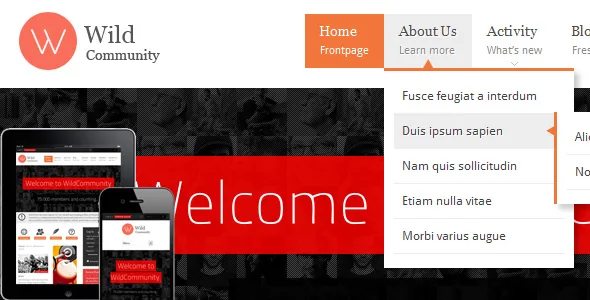
Public layout is handled by counting rather than by a builder. The vendor lists four frontpage designs, with links under the demo's Home menu item, plus an option to display any page on the front page.
That last option is what matters for a community site. It turns the front page into a slot: a blog index while announcements matter, a gallery during an event, a conventional marketing page once the network has members. Changing it is a setting, not a design project.
Two page templates are declared for BuddyPress extensions, which gives third-party member features somewhere to live. The layout is responsive with two columns and widget-ready sidebars, so the side areas in the demo are places you populate. Nothing in the material describes composing pages in the block editor, and the marketplace marks Gutenberg Optimized as No; read that narrowly, as the theme not being prepared around the block editor rather than the block editor being unavailable.
Named companions are compatibility claims, not bundled code
The vendor extends the community through a list of companions: rtMedia for photo, music and video uploads, Events Manager for events, WooCommerce for a shop, Contact Form 7 for a contact page, AddThis for sharing, Gravatar for avatars. The description mentions WPMU compatibility, translation readiness and no core file changes, and pitches BuddyPress itself as a route to hundreds of extensions.
Those are declarations of compatibility rather than code you receive, and only two page templates are named for extension output. For a member site most of these are the right questions to ask, but each plugin you add brings its own template expectations, and the vendor's list is a starting point rather than a styled page for every extension.
Set the maintenance question before the design question
The marketplace listing shows the vendor's last update as April 2021 and declares WordPress support from 5.4.x through 6.0.x. The description text still labels its own feature list as version 1.4.4 while the marketplace entry carries 1.5, a small sign that the written material has not kept pace with the release number.
Those facts set the order of your decision. The member screens, the guest-and-member content switching and the group forum layouts form a coherent, specific design for a community, and they are exactly the sort of work that is slow to commission. But a theme with a declared ceiling of WordPress 6.0.x, last updated years before current releases, needs its plugin layers checked against a current site before you commit, since BuddyPress, bbPress and any extension ship their own template expectations.
The theme's support claim is worth reading alongside the date. The description advertises working with the "latest 10.x version of BuddyPress" — an unversioned moving target from a 2021 listing — so treat it as the vendor's statement at that time, not as a current pairing.
The files include layered PSD artwork alongside PHP, CSS and JavaScript. The vendor states the PSDs cover single graphic elements only and that no full-page PSD is included, so they help with logos, buttons and recurring pieces rather than whole layouts.
Questions & answers
Does WildCommunity need BuddyPress, or can it run as a plain blog?
It can run as a blog — the vendor lists a blog page, single post page, blog archives and a blog search page. But the product is organised around the member area. Registration, profiles, groups, messaging, friends, activity and settings pages all assume BuddyPress is active, and without it you are using a small fraction of what the theme lays out.
Are the demo's images and content included?
The vendor describes a quick demo content installation, and the marketplace file list names layered PSD, PHP, CSS and JavaScript files. The supplied material says nothing about licensing for demo photography, so plan on supplying your own media.
Can I hide part of a post from logged-out visitors?
The vendor lists a shortcode that makes parts of a text visible to members only, alongside broader control over which content blocks members and guests see. Both are vendor features; the supplied evidence does not detail the shortcode's scope, such as whether it works inline in any post type.