Reactions are a bundled plugin, not a BuddyPress setting
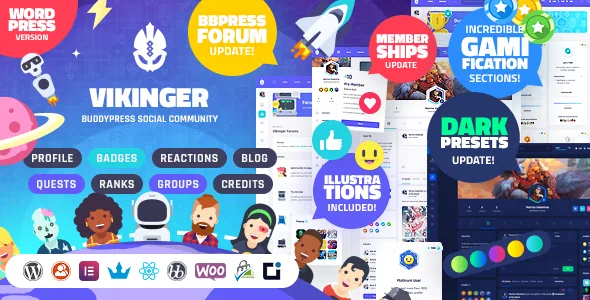
The most concrete thing in the vendor's description is a piece of software: a reactions plugin written specifically for Vikinger, with reaction illustrations drawn by the seller. That matters because it tells you the interaction is maintained as part of the theme rather than inherited from BuddyPress.
Eight reactions are named: Like, Love, Dislike, Happy, Funny, Wow, Angry and Sad. The scope is wider than a single stream. According to the description, members can react to profile posts and also to comments and replies, so the feedback sits at more than one depths of a conversation thread.
If your community plan depends on sentiment beyond a single like counter, this is the feature to evaluate first. It is also the one most tied to the theme's own code, which becomes relevant later when third-party plugins enter the picture.
Sharing and the rebuilt status composer
Sharing works as a separate activity type. A Share button under a post opens a popup showing the original post with a status box for your own comment; the vendor says you can share friends' activity and your own posts. Resurfacing an old post with new context is the practical use, and it is a different action from quoting in a reply.
The status box was rebuilt rather than restyled. The vendor lists photo and GIF uploads, editing your own posts after publishing, and YouTube links created by pasting a URL. Posts can also be marked pinned or favourite, with custom icons making those states visible at a glance.
Together these choices imply a feed where members keep returning to their own older posts. Editing after publishing is the one to check in the live demo, since it changes how a community polices its own threads.
Badges, quests, three credits and six ranks form one loop
The gamification is usually described as four features. Read as a system it is closer to a currency flow, and the vendor's wording makes the connections explicit.
Badges use GamiPress Achievements and unlock with credits. Quests use the same Achievements component, so completing one also earns credits. Credits themselves are GamiPress Points split into three named currencies — Gold, Gems and Emeralds — with the current balance shown in the top bar. Ranks use GamiPress Ranks: six levels reached by collecting credits and meeting requirements, with each member's rank number and progress attached to their profile avatar through an outer progress bar.
So the visible reward on an avatar is the end of a chain that starts with an unlock or a completed quest. Worth noting is that each of those asset families arrives as PSDs of Photoshop vectors — badges, quest medals, the three credit icons and the six rank shields — which the vendor says can be recoloured or extended.
Before you build a progression scheme, check one thing in the live preview: the requirements that gate each rank are configured in GamiPress, not invented by the theme, so the six-rank ladder is a starting structure you will finish in the plugin.
The author hub moves community admin in front of users
BuddyPress sites tend to push profile and group administration toward wp-admin, which is disruptive for members who are not site staff. The vendor's answer is an author hub where users change their avatar, cover photo, social networks and personal information themselves.
Group management lives in the same place. Inside the hub, the vendor says users can create and manage groups, promote members to moderators or admins, and check invitations. That is the routine work a group owner does, handled without a dashboard login.
For a site where groups are the main organising unit, this is less of a convenience than a design requirement — group owners who cannot administer their own group tend to abandon it. It is also the part of the description with the least configuration detail, so treat the hub's permission model as something to inspect rather than assume.
The React trade-off the vendor states plainly
React is used to make parts of the interface respond without a page reload. The named examples are filtering activities and pinning, favouriting, reacting and commenting on them.
The seller then draws the consequence itself: plugins or addons that work out of the box with stock WordPress, BuddyPress or GamiPress may not work in Vikinger without the vendor adding support. That is a real constraint, and it applies to exactly the area community sites accumulate plugins in — media sharing, moderation, notifications, extra gamification.
The practical approach is to settle your plugin shortlist before launch rather than after, and to test each candidate against the activity stream specifically. A plugin that hooks a form into a standard BuddyPress activity update has, by the vendor's own account, no guaranteed equivalent in a theme where that update is handled in React. Not every addon will break; the point is that you cannot infer support from compatibility with the parent plugin alone.
Illustration assets and the blog views
The package includes editable design assets: PSDs of the credits, rank shields, badges, quest tokens, section banners and landing illustrations, all as Photoshop vectors, plus every SVG icon and 16 avatars (15 people and one smiley).
The vendor is careful about what those files are not: they are illustration elements, not complete page comps. If you expected layered PSDs of full layouts to hand to a designer, this bundle does not include them. What you get is the artwork vocabulary that makes the gamified interfaces look consistent, which is harder to source elsewhere.
The blog side is described with three listing views — list, small grid and big grid — and standard, video, audio and gallery post formats with three different open-post layouts. Reactions apply to blog posts as well as community activity, so a member's usual reaction vocabulary carries over into editorial content.
What the marketplace listing declares
Observed on 4 November 2026, the listing declares compatibility with BuddyPress 10.x.x, bbPress 2.6.x, WooCommerce 7.x.x, Elementor and ReactJS, with WordPress 6.2.x in the software version field. The theme is marked responsive, widget ready and high resolution, supports Firefox, Chrome and Edge, and the ThemeForest bundle lists PHP, CSS and JS files, with documentation described as well documented.
Read those as declarations attached to the product at that point, not as results from testing on your server or with your plugin set. The BuddyPress branch in particular is worth checking against whatever you plan to run, since BuddyPress version lines move independently of WordPress. Elementor appearing in the list says the builder is declared compatible; the vendor's description builds its community screens with the theme's own components rather than describing a builder-driven workflow.
The vendor also points to setup and customisation videos as part of the documentation, which is the sensible place to confirm how the author hub, reactions and rank requirements are configured before you commit.
Questions & answers
Do I need GamiPress installed for the badges, quests, credits and ranks to work?
The vendor describes each of those systems as built on a specific GamiPress component — Achievements for badges and quests, Points for the three credits, Ranks for the six-level ladder. The theme supplies the design and the connections between them; the underlying rules and requirements are configured in GamiPress itself.
Can members react to comments, or only to posts?
The seller states the reactions plugin is integrated so members can react to profile posts and also to comments and replies. Blog posts carry reactions as well.
What are the Three credits and how does the balance display?
Gold, Gems and Emeralds, mapped to GamiPress Points. According to the description, a member's current balance stays visible on the top bar, while a credits widget on the profile holds the fuller display.