Five post types do the structural work
The vendor's feature list puts "5 Different custom post types for easy sections management" near the top, and the description names them: courses, events, slides, testimonials and galleries. That is the organising idea behind Universe. A course is a course record, not a page with a heading that says course.
For an education site this changes how the backend reads. Course listings, event calendars, a testimonial strip and a slider all draw from their own types, so adding a term or retiring an event is a content action rather than a layout edit. The theme is aimed at colleges, universities and event-led education sites, where that rotation is constant.
One thing the listing does not spell out: how those types present themselves on the front end. The marketplace description stops at the presence of the types and a theme options panel; it does not describe archive templates or single-course layouts in any detail. Judge that from the demo rather than from the file list.
A homepage built from widgets, and sidebars you can add per page
The homepage is listed as "totally widgtelized" (the vendor's spelling), with custom widgets supplied alongside. Rather than a fixed front-page layout, the front page is a stack of widget areas you populate.
The sidebar side is more open than usual. The description says you can create "as many sidebars as you want per page or post basis." In practice that lets a course section carry a different sidebar from the admissions section, or an event page drop the sidebar entirely, without touching templates.
The trade-off is that a widgetised front page is only as good as the widgets you place. There is no page builder in the listed feature set, and no shortcode library is advertised. If you want drag-and-drop hero sections and bento grids, this is not that theme.
What the vendor says it deliberately leaves out
The description makes a point of restraint: "no fuzzy animations, no zillions of shortcodes — just what matters: Content!" That is a positioning claim rather than a specification, but it does set expectations. You are buying a content-led layout with a modest set of presentational controls, not an animation package.
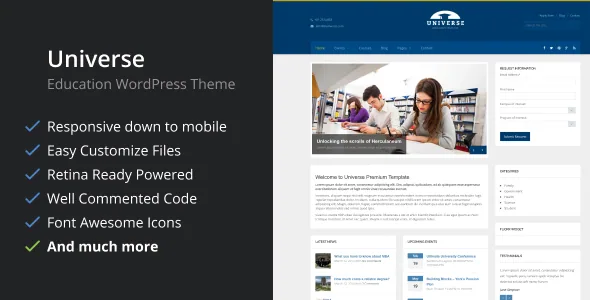
The controls it does name sit in a theme options panel: typography with more than 600 Google Fonts, layout settings, code integration, logo upload and a custom CSS field. Four pre-defined skins — blue, red, violet and brown — set the base palette. Font Awesome icons and high-resolution assets round out the visual layer.
If your brand colour is not one of those four, the custom CSS field is the route the vendor leaves open. That is a workable arrangement for a department site with an existing stylesheet, but it is not a full colour-system interface.
The gallery type and its filtering
Galleries are the one content type with a stated interaction behaviour. The feature list says "Include filterable gallery with sortable options." For a school or university, that maps onto campus photos, event recaps or a student work showcase, where a visitor narrows the set by category instead of scrolling everything.
The listing does not describe where the filter controls appear, whether they are taxonomy-driven or how many items a view holds. Treat the sortable gallery as confirmed to exist and confirmed to filter, with the mechanics to be checked in the live demo.
Language, forms and the Google Maps key
Translation is handled two ways in the vendor's description. It ships with .po and .mo files for translating strings, and the theme is described as "fully compatible with WPML plugin, tested and approved by WPML team." The WPML line is the vendor's claim about an approval process; it is worth confirming against your own WPML setup rather than taking the phrasing as an independent certification.
Contact Form 7 is the named forms integration, and the changelog shows that relationship getting attention: version 1.5 records "Better support for contact 7 form plugin." Bootstrap 4.x also appears in the compatibility attributes.
Google Maps is integrated, and version 1.7 added a theme option for a Google Maps API key. That detail matters practically, because Google now requires a key for embedded maps; without it, the map area will not render as intended.
The update record, read plainly
As observed on the marketplace listing on 4 November 2026, the latest version is 1.7 and the vendor's last update is dated 24 June 2021. The declared software range in the compatibility attribute runs from WordPress 6.0.x to 6.7.x.
The changelog is short and specific. Version 1.7 lists minor bug fixes and the Google Maps API key option. Version 1.6 updated the TGM Plugin Activation class for an XSS vulnerability fix. Version 1.5 removed older Bootstrap files, improved Contact Form 7 support, addressed child theme compatibility, added a Google Maps marker option and corrected padding on the course search page.
Those entries are useful signals — the child theme fix and the course search padding correction suggest real projects were reported against them. The gap between the June 2021 code and a WordPress 6.7 install is the fact to weigh. Nothing in the record says the theme breaks on newer releases, and nothing says it was tested on them either. The marketplace also marks Gutenberg Optimized as No, which describes how the theme was built for the block editor rather than a statement that the block editor is unavailable.
Browsers listed run from IE9 through Edge; that list describes the era the theme was built in.
Where Universe fits and where it does not
Universe suits a college, school or university department that publishes structured, repeating content: a course catalogue, a calendar of events, a testimonial set and a photo gallery. The custom post types and the per-page sidebar assignment give an editor somewhere sensible to put all of that without a page builder in the loop.
It fits less well if your workflow depends on building pages with blocks or a drag-and-drop builder, or if you need a theme that has tracked WordPress releases within the last few years. In both cases, the last-updated date is the deciding fact rather than the feature list.
This page records what the marketplace listing claims for Universe. It is not a report of hands-on testing on a current WordPress install.
Questions & answers
Does Universe require a page builder?
No builder is named in the vendor's feature list. The homepage is assembled from widgets, and the theme ships custom widgets for that purpose. Content sections come from five custom post types rather than builder elements.
Can I have different sidebars on different course or event pages?
The vendor says unlimited sidebars can be created and assigned per page or post. That means an admissions page and an individual course page need not share the same sidebar layout.
Is the WPML compatibility independently verified?
The theme description states it was tested and approved by the WPML team. That is the vendor's claim. .po and .mo files are also included for translating strings manually.
Will the Google Maps section work without an API key?
Version 1.7 added a theme option for a Google Maps API key, which points to the key being required for the map to display. You will need to generate a key in your Google account and paste it into that option.