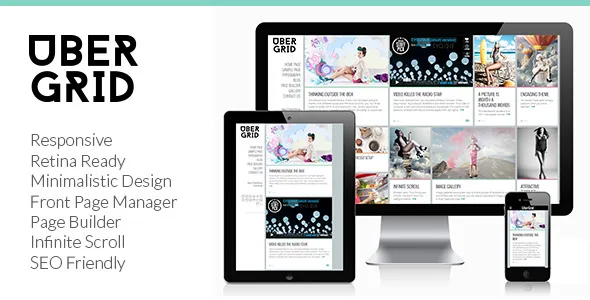
The grid is built from post formats, not from a canvas
Ubergrid's own feature list puts the content model before the layout controls: post formats support for Standard, Video, Audio, Link and Gallery. That list is short and specific, and it tells you what the theme expects each tile in the grid to be. A video post, an audio post, a gallery and a plain article are not variations of the same card here; they are the declared set of tile types the theme was built to render.
So the first question is not which page builder you like. It is whether your publishing pattern fits five formats. A magazine that runs written articles, photo galleries and the occasional embedded video is inside that set. A site that needs quote posts, aside posts, statuses or custom post types as first-class grid items is outside what the listing describes.
Three columns and a responsive layout are the stated defaults, with the theme flagged as high resolution / retina ready so the imagery holds up on tablets and phones. The PSD files in the package matter here too: layered source files ship alongside the PHP, CSS and JavaScript, which is useful if you plan to redraw the tile design rather than accept it.
Three named admin surfaces, three different jobs
The vendor description separates management into things it names individually: a Theme Manager, a Front Page Manager, a one-click site builder, and a page builder. Reading those as one feature is a mistake, because they imply different screens and different decisions.
The Front Page Manager is the one to think about first. A theme that gives the front page its own manager is usually treating the home layout as a composition of listed items rather than as the newest posts by default, so the homepage is a thing you configure. The Theme Manager is described as part of the same toolkit without further detail in the listing, and the one-click site builder is described as the route that imports demo content to get a site moving.
What the listing does not do is explain how each screen interacts with the others, or what happens to your front page configuration when you change theme settings. Treat the names as an outline of the admin, not as a specification.
Infinite Scroll changes how the grid behaves for a reader
Infinite Scroll is listed as a feature, and it is the item with the biggest effect on how a grid theme actually feels. New tiles load as the reader reaches the bottom of the page instead of a pagination link. For a visual grid of images, video and gallery posts that keeps someone scrolling through the archive.
It also changes what you have to check. A footer with contact details or a newsletter signup sits below content that keeps extending, so the practical build decision is whether the footer is reachable at all or whether the important links belong in the header and a widget area. The theme lists two widget areas, which is a small budget for sidebars, headers and footers combined — plan which surfaces get one before you start.
Ajax Forms and oEmbed support appear in the same feature group. oEmbed means pasted media URLs from supported providers render inside posts, which pairs naturally with the video and audio formats in the tile set.
The page builder handles inside pages, not the listing
The vendor's page builder line is unusually concrete for a theme of this age: Forms, Accordion, Text Boxes, Map, Image Box. That reads as a set of modules for building the content of an ordinary page — an about page, a contact page, a services page — rather than a tool for composing the post grid itself.
That division is worth holding on to. The grid and archives come from the theme's own templates and post formats; the builder is for pages that are not part of the feed. Accordion and text boxes cover structured informational copy, the map module covers a location, and the form module covers contact or enquiry, with Ajax Forms listed separately as a behaviour.
Also in the settings list: unlimited colours, Google Fonts, a favicon upload, and social network links. These are global, so the palette and typeface are chosen once rather than per page — sensible on a site where many people publish, and the opposite of what you want if each section needs its own look.
Where the 2019 dating actually bites
The marketplace attributes, observed on 4 November 2026, declare support for WordPress 5.1.x, 5.0.x and 4.9.x, and the vendor's last update is dated 31 May 2019. That is a long gap, and it is the single fact that should shape your decision more than any feature on the list.
The last release, version 1.3.9, records two changes: an Envato Market plugin update and a new Pukka Core plugin replacing the Pukka Grid plugin. That second line matters if you are working from older documentation or an older copy, because plugin names in guides may not match what you install.
Compatibility is also declared for WPML as the only listed plugin, and for IE11, Firefox, Safari, Opera and Chrome. The theme is marked Gutenberg Optimized: No, which describes how it is tuned for the block editor rather than whether the editor exists — but since the theme's own composition paths are the Theme Manager, the Front Page Manager and its page builder, you should expect to build with those rather than with blocks.
None of this is a statement that the theme fails on a current WordPress install. It is a statement that nobody has documented otherwise. Test on a staging copy with your own plugin stack before committing a live site to it.
What to check before you build on it
Individual theme listings rarely answer the questions that decide a real project, so list them early. Does a Link-format post need a clickable title only, or a destination URL field? How does Infinite Scroll interact with the front page configuration? Does the demo importer bring in sample posts that you must then delete, or placeholder pages?
Two further items are worth confirming from the theme's own documentation — described as extensive and the listing marked well documented — rather than from this article: the exact role of the Theme Manager, and whether the page builder's modules can be used inside the front page composition.
The image credits illustrate a small but real point. Demo photographs are credited to Mina Šarenac and are for demonstration only, so a live site needs its own imagery before the grid looks finished. With three columns and retina-ready output, that means sourcing photographs at sufficient resolution.
Questions & answers
Can I use Ubergrid with the block editor?
The listing marks the theme as not Gutenberg optimized, which describes its tuning rather than removing the editor. The theme's documented building tools are its Theme Manager, Front Page Manager and page builder modules, so a project that wants to compose pages primarily in blocks is working against the theme's stated design.
Which post formats does the grid support?
Standard, Video, Audio, Link and Gallery, according to the vendor's feature list. Those five are the tile types the theme was built around, so unusual formats or custom post types as grid items fall outside the description.
Is the declared WordPress range a compatibility guarantee?
No. The attributes list WordPress 5.1.x, 5.0.x and 4.9.x with a last vendor update in May 2019. Treat that as a declaration from the listing, not as a record of testing against current WordPress, PHP or your plugin stack.
What are the included PSD files for?
The package file list names PHP, CSS, JavaScript and PSD. The layered sources are design material for adapting the tile and page layouts, not something WordPress loads at runtime.