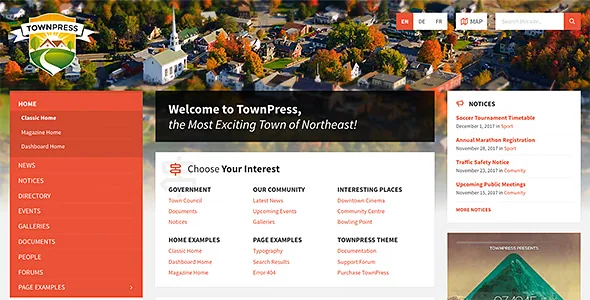
A civic site organised as content types, not page templates
Most local-government themes sell you a homepage and a set of inner page layouts. LSVRthemes describes TownPress the other way round: the theme ships post types for the things a municipality actually publishes, and the layouts sit on top of them. The vendor lists seven modules — Directory, Documents, Events, Galleries, News, Notices and People — each with its own entry in the WordPress admin.
The practical consequence is that a clerk adds an event, a notice or an official's profile as a record with fields, rather than as a page with shortcodes pasted in. Whether that is an improvement depends on your team. People who think in structured records and reuse them across the site will find it natural. People who expect to draw each page individually will find the field sets restrictive.
The vendor also states that post types you don't need can be disabled, so an administration panel can be trimmed to the modules a particular council uses. A parish site that publishes notices and events but never runs a business directory can turn Directory off rather than leaving an empty section in the menu.
Notices and News are deliberately separate feeds
The distinction the vendor draws between News and Notices is the most telling detail in the whole description. News is described as keeping citizens, visitors and the public informed. Notices are described as a way to display important information messages "without bloating the main news feed."
That split reflects how municipal communication actually behaves. A road closure, a boil-water advisory or a change of bin collection day is not a news story; it has a short life and needs to be found fast. A press release about a new park bench is news. Putting both in one chronological feed means urgent notices get buried by the next ordinary item, and residents learn to scan past the section.
If your council already runs two separate feeds — an alerts box and a news listing — TownPress models that arrangement instead of forcing you to fake it with categories and a custom query.
Documents that mix uploads and external links
The Documents module is described as providing access to both local attachments uploaded into your WordPress installation and external links. That matters more than it sounds for council sites, because the things residents come looking for are scattered: a PDF of the annual budget lives on your server, an agenda might sit in a separate meeting-management system, and a planning application may live on a regional portal.
Being able to file all three in one place, from the resident's point of view, avoids the usual problem of a documents page that is half your own PDFs and half a list of links to other websites with no consistent entry.
The vendor describes this as one capability. It does not document how external links are presented, whether they are visually marked as leaving the site, or how the archive is filtered. If your document library is large and needs faceted browsing by category and date, that is a question for the documentation before you commit.
Directory entries carry contact details and opening hours
The Directory module is positioned for local businesses, with the vendor naming contact details and opening hours as the fields it displays. This is the module that most clearly differs from a generic blog post type, since opening hours are structured data rather than a sentence in a paragraph.
The vendor gives the same module map support: Google Maps, Mapbox and OpenStreetMap are all named as providers for both directory listings and event locations. Offering three providers is unusual and useful in a European municipal context, where Google's terms, data-residency questions and internal policy can all push against using its maps.
These are vendor claims about supported providers, not a record of anyone testing each provider against a live configuration. Which provider your site ends up using, and what that requires in the way of API keys or accounts, is worth confirming in the vendor's documentation before you plan a launch date around it.
Events with location, time and recurrence
The Events module is described with four attributes: precise location, date, time and recurrence. Recurrence is the one that separates a usable civic calendar from a list of dates, because a great deal of what a council publishes repeats — the weekly market, the monthly planning committee, the Tuesday toddler group at the library.
Entering each occurrence as a separate event is the sort of task that quietly stops happening after a few months, leaving a calendar that looks abandoned. A recurrence field is what keeps a recurring commitment on the site without manual re-entry.
Pairing each event with a location is what supports the map output described above. If your venues are few and fixed, this is straightforward; if events are spread across dozens of halls, parks and rooms, the location data is only as good as the discipline of the people entering it.
Branding, translation and right-to-left layouts
For colour, the vendor offers two levels. A set of admin colour pickers lets you create a custom scheme in a few clicks, and a dedicated CSS (SCSS) file allows every colour in the theme to be changed. The first route suits a communications officer; the second suits whoever maintains the child theme.
A child theme is included, which the vendor presents as the starting point for more advanced code customisation and says the front-end code can be overridden through it. For a public-sector site that will outlive the team that built it, having an obvious place for customisations is worth more than a larger settings panel.
On language: the theme and the bundled LSVR plugins are described as completely translatable, and the theme switches to RTL mode automatically when the site language is a right-to-left one. Translation files are listed as included. The scope of "completely" is a vendor statement, so if your site runs in more than one language, check which strings the translation files actually cover.
The block editor comes first, and the demo is a one-way import
TownPress is described as optimised for the WordPress block editor, with Elementor and WPBakery Page Builder supported as alternatives. The marketplace attributes mark Gutenberg Optimized as Yes and list WPBakery Page Builder among compatible plugins; the vendor's FAQ says the bundled version of WPBakery is included.
The detail that changes how you plan is buried in the demo-content note. The vendor says importable demo data is for the block editor only, and imported demo pages can be edited using the block editor only. So the demo you click through online may have been assembled in a builder, but what lands in your installation is block content. If your team works in Elementor or WPBakery, the demo is a design reference, not a starting point you can carry on editing in your builder of choice.
Demo images are also excluded, for copyright reasons, so a fresh import will not look like the preview until you supply your own photography.
What the theme is actually good for
TownPress earns its keep when the site's job is to publish structured civic information on a predictable schedule: meetings and events, documents, notices, officials and service contacts. In that setup, the module set replaces plugins you would otherwise assemble, and the option to disable unused post types keeps the admin readable for staff who are not web professionals.
Where the fit is less clear is a site that mostly needs bespoke storytelling pages — a campaign landing page, a redesign of the mayor's annual address, a microsite for a consultation. The modules do not help there, and the block-only demo import means design flexibility comes from your own block or builder work.
One further note on upkeep: the vendor's changelog entry for the latest marketplace release records improved compatibility with WordPress 7.1 alongside a framework update. That is a statement about vendor maintenance, not evidence that the theme has been tested against your plugin stack or PHP version.
Questions & answers
Can I turn off modules the council doesn't use?
The vendor says post types you don't need can be disabled, with the stated goal of keeping the admin free of clutter. The description does not say whether disabling a module also removes its front-end templates or only its admin menus.
Can I edit the imported demo pages in Elementor or WPBakery?
The vendor states that importable demo data is for the WordPress block editor only, and that imported demo pages can be edited using the block editor only. Elementor and WPBakery are supported for building pages, but the demo import is not a route into them.
Do the demo images come with the theme?
No. The vendor states that images seen in the live preview are not included, for copyright reasons. You will need your own photography or licensed images before the site resembles the preview.
Are Google Maps, Mapbox and OpenStreetMap all usable out of the box?
The vendor lists all three as map providers for directory listings and event locations. The description does not cover what each provider requires to configure, such as accounts or API keys, so treat that as documentation to check.