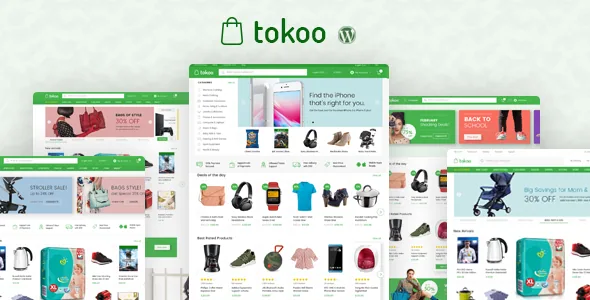
A storefront built for one kind of catalogue
Most WooCommerce themes present themselves as flexible. MadrasThemes takes the opposite line: Tokoo is described as a chef's knife rather than a Swiss Army knife, made for a single purpose — an eCommerce site that resembles large electronics marketplaces such as Snapdeal and AliExpress. The vendor lists the design decisions behind that: smaller type, simpler headers, a cleaner checkout, better navigation and less whitespace.
That narrowing is the useful part. If your product grid is the whole point of the site — phones, components, appliances, accessories — the layout vocabulary you inherit is already tuned for a dense, price-led catalogue instead of a brochure page with a shop bolted on. If your site is mostly editorial or service pages, the same choice works against you, because the theme's effort has gone into product presentation.
Treat all of this as the vendor's description of the product. Nothing here comes from running the theme on a test install.
Five home pages, seventeen product blocks
Tokoo's homepage layer is the concrete expression of that brief. The vendor describes five different home page templates and 17 blocks to choose from, with the home pages organised to show more products in different arrangements. The intended workflow is not to pick one demo and stop — you mix the 17 blocks into new combinations, either through custom code or a page builder, to get a homepage that fits your catalogue.
Read the block count as an inventory of product-showcase units rather than a set of finished pages. Different blocks suit different jobs: a wide grid for a category hero, a narrower arrangement for accessories or related items. Changing which blocks appear, and in what order, is how a second store using the same theme ends up looking different from the first.
The five home pages are starting points for that mixing. One thing the description does not claim is that editing a template updates every page built from it, so treat each homepage as content you assemble rather than a global design rule.
Headers and navigation for a crowded catalogue
Electronics stores tend to carry long menus and deep categories, and the vendor addresses that in two places. Four header styles are included for desktop, plus one header used only on mobile that removes the extra items a small screen cannot hold. If you plan a promo strip, a search field, a cart icon and a login link above the fold, choosing among four headers is how you decide which of those get the space.
The mega menus matter more than they sound. Tokoo ships both vertical and horizontal mega menus, and the vendor states these do not need a third-party plugin. A vertical panel is the familiar pattern for listing product categories down the side of a marketplace-style header; the horizontal version spreads categories and featured links across the width.
The supplied dummy content follows the menu style of common eCommerce sites, so an imported demo arrives with a structured menu example to edit. It is a pattern to replace with your own categories, not a finished taxonomy.
Search, and what Algolia changes
The vendor's note on search is the most decision-heavy item in the feature list. WordPress and WooCommerce search, as described, looks through product titles and descriptions only. Tokoo is described as compatible with Algolia, which replaces that with an external search service built for larger catalogues.
"Compatible" is the operative word. Adding Algolia is a separate setup with its own account and indexing, not a switch inside the theme, so budget for it as you would any third-party service. The payoff is search that handles the queries an electronics shopper actually types — model numbers, partial names, filtered results — instead of a title match.
On the browse side, the demo set covers shop grid, list, right sidebar and fullwidth layouts, plus two- and four-column product category pages. Those four shop layouts are the ones to weigh against how much filtering and comparison information your category pages need to display.
Multi-vendor and affiliate use sit on plugins
The product name mentions affiliates, dropship and multi-vendor, and the vendor's wording is careful enough to matter. From version 1.1.6, the theme is described as compatible with Dokan and WCFM for building multi-vendor sites. Those are the marketplace engines: vendor dashboards, commissions, payouts and per-vendor product management live there, while Tokoo provides the storefront around them.
Affiliate and dropshipping work follows the same pattern. The theme supplies the electronics shop front; the import and affiliate mechanics come from dedicated plugins, several of which the marketplace tags alongside the item. None of that is bundled logic inside the theme, and the supplied material does not detail a specific import workflow, so plan those integrations as their own project with their own testing.
If you are building a single-brand store, none of this applies and the theme is simply a product-focused WooCommerce setup. The vendor compatibility attributes observed on 5 November 2026 list WooCommerce 10.x.x alongside WordPress 6.9.x and 7.0.x; these are declarations from the listing, not results from a live install.
Building pages, and styling them
Home page blocks can be arranged through custom code or a page builder, and the vendor names Elementor and King Composer as compatible, describing both as tools for customising home pages and static pages. If your team already works in one of them, that is the editing path for content pages. Everything else — the shop templates, single product page, cart and checkout — comes from WooCommerce and the theme rather than a canvas you rebuild.
The marketplace marks Gutenberg Optimized as No. That is a statement about block-editor optimisation, not a claim that the block editor is unavailable, so don't read it as a hard exclusion.
Branding is handled in a smaller way: six predefined primary colours, plus a colour picker if your brand uses something else. That covers the accent colour across the storefront. Anything beyond it is CSS work, and the package's file list is PHP files, with no design source files among them.
What the demo import does and does not bring
The vendor's one-click importer is described as genuinely one step, pulling in images and sliders rather than leaving sliders as a manual follow-up. That is worth knowing because those extra steps are the usual friction in demo imports.
The boundary is equally clear. The imported site uses placeholder content and default WooCommerce products, and the vendor states plainly that the preview images are not included in the package. So the photography you see on the live demo is not what lands in your install — the layout, structure and sliders are. Budget for your own product and lifestyle imagery before you judge the result.
The vendor also points to a leaner demo variant and to a trial arrangement offered through their support channel for anyone who wants to see the theme before buying. Their performance note is candid too: a theme plays only a small role in site speed, and they credit caching plugins such as WP Rocket or W3 Total Cache rather than claiming built-in speed guarantees.
Questions & answers
Do I need Dokan or WCFM to use Tokoo?
No. The vendor lists Dokan and WCFM as compatible from version 1.1.6 for multi-vendor sites, but a single-brand electronics store does not need either. The plugin becomes necessary only when separate sellers need their own dashboards and product management.
Does the imported demo include the product photos from the preview?
No. The vendor states that the dummy data contains placeholder content and default WooCommerce products, and that preview images are not part of the package. You get the page structure, blocks and sliders, and supply your own imagery.
Is Algolia required?
The theme works with WooCommerce's built-in search, which the vendor describes as limited to titles and descriptions. Algolia is listed as compatible rather than required, so it is an optional upgrade with its own account and indexing setup if your catalogue needs stronger search.