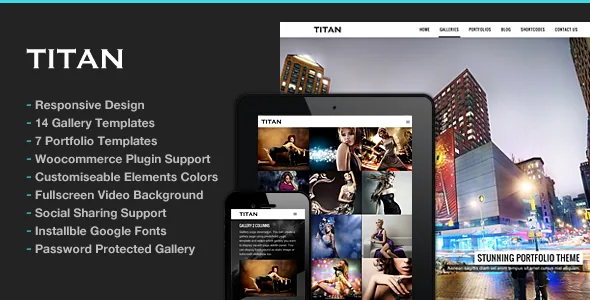
Password-protected galleries change who a Titan site is for
A photography site usually has one public face. ThemeGoods' feature list for Titan adds a second mode: password protection for galleries, added to the standard gallery type back in version 1.9 of the changelog. That single option covers the work photographers actually do off the homepage — client proofs, wedding deliveries, a preview before publication — inside the same theme rather than through a separate proofing service.
It also sets the tone for the rest of the feature list, which reads as a description of a photo collection rather than a page-building system. Galleries and portfolios are separate custom post types here, so the theme is organised around the objects your work lives in.
The counted template menu
Titan's feature list gives numbers rather than adjectives: 8 homepage gallery options, 14 gallery templates and 8 portfolio templates, alongside support for a static content homepage when you would rather lead with a statement than a grid.
The useful distinction is between those three counts. Homepage gallery options decide how a visitor first meets the work — a fullscreen slideshow reads differently from a grid of thumbnails. Gallery templates decide how a single set of images is presented on its own page. Portfolio templates decide how a body of projects is listed and browsed. A filterable portfolio listing is listed as well, which matters once there are enough projects that a flat grid stops being navigable.
A portfolio item does not have to be a photo set
The vendor states that portfolio content can be static page content, YouTube, Vimeo, self-hosted video or a custom link. That is broader than the usual photography-theme assumption, and it changes how you structure an archive.
A commercial shoot can point at a written case study. A film or motion piece can live as an embedded video. A self-hosted video keeps the file on your own server. A custom link lets an item hand off to an external gallery or a client's own site. The practical effect is that Titans' portfolio list can hold mixed media without every entry being forced into the same image template, and fullscreen YouTube and Vimeo support is listed separately for pages and galleries.
What a visitor gets beyond the photographs
Several listed features concern the mood of the site rather than its structure. Music can be attached to the homepage and to pages. Image galleries support comments, which turns a set of photographs into something a client or audience can respond to in place. Fullscreen slideshows are available for the photo gallery itself.
On the design side, Titan ships a Skin Manager for configuring your own skins, plus a colour picker for element colours, installable Google web fonts, flexible page columns and a set of shortcodes covering typography details such as dropcaps and two- through six-column splits. These are the controls that let two Titan sites look unlike each other without touching CSS — though the vendor also lists custom CSS in the theme admin, which is the route for anything the panel does not reach.
The editing surface is shortcodes, not blocks
The marketplace attributes record Titan as not Gutenberg optimised, and the feature list lines up with that: built-in shortcodes, a shortcode generator plugin, a shortcode-based approach to styling and columns, and an extensive galleries admin that accepts multiple images at once and can reuse images already in the media library.
So the workflow to plan for is a theme options panel plus shortcodes in the content area, with galleries and portfolios managed as their own post types rather than assembled block by block. That is workable for a portfolio site where the layout repeats and the photography varies. It is worth weighing if your team now builds everything in the block editor or expects to hand a site to a client whose editing habits are block-first.
Worth noting too: theme released in June 2013, still receiving entries. The changelog runs from the initial release through PHP 8 fixes in version 3.0 and compatibility work in 2025, which is a long maintenance record for a theme of this age rather than a recent rebuild.
Compatibility as declared, observed in November 2026
The marketplace attributes recorded on 3 November 2026 declare WordPress versions from 4.9.x up to 7.0.x, WooCommerce 6.x through 9.x, a responsive layout at four or more columns, high-resolution assets, widget-ready sidebars and a package containing PHP, CSS and JS files. The vendor's own changelog adds PHP 8.3+ compatibility in version 3.0.1 (5 April 2025) and WordPress 6.8.1 support in version 3.0.2 (7 June 2025).
These are declarations from the listing and the vendor notes, not the results of anyone running Titan against your PHP version or plugin set. The wide WordPress range is the part to treat with most care: it describes what the vendor states the theme supports, not evidence that every entry has been exercised recently. A staging install with your actual plugins is the only way to know.
The demo photography is licensed, and it is not in the package
The vendor's image note is explicit: some images in the demo are used for preview only, credited to individual Flickr photographers and Shutterstock. Buying or downloading the theme does not give you the photographs that make the preview look the way it does.
That is the largest unstated cost in a Titan project. A theme built around fullscreen slideshows and large gallery grids lives or dies on the images inside them, so budget for a shoot or a stock licence before judging the finished site against the demo. The theme supplies the containers, the templates and the gated-gallery mechanism; the pictures are your contribution.
Questions & answers
Can Titan keep client galleries private with a password?
Yes, according to the vendor's feature list, which includes password-protected gallery support. The same option was added to the standard gallery type in the theme's changelog. Treat it as a per-gallery access gate for proofs and previews, and test the behaviour on your own install if the galleries contain work you cannot afford to expose.
Can a portfolio item be a video or an external link instead of photos?
The vendor states that portfolio content supports static page content, YouTube, Vimeo, self-hosted video and a custom link. So the portfolio list can mix written case studies, embedded video, video files hosted on your own server, and outbound links alongside image-based projects.
Does Titan work with the WordPress block editor?
The marketplace listing does not describe Titan as Gutenberg optimised, and its feature list is built around shortcodes and a shortcode generator rather than blocks. Pages assembled with the block editor may still display, but the theme's own design controls are documented through shortcodes and theme options, so plan the editing workflow around those.
Do the demo photographs come with the theme?
No. The vendor states that images in the demo site are used for preview purposes only, with credits to Flickr photographers and Shutterstock for the rest. You need your own photography or a stock licence to reproduce a comparable look.


