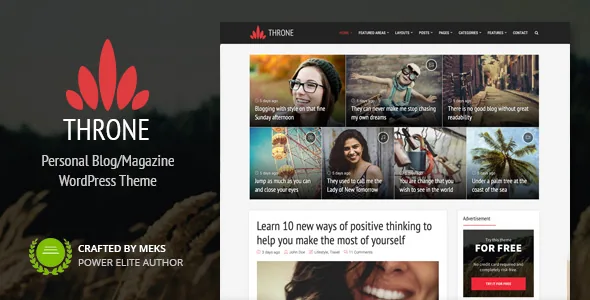
A home page with two floors
Throne does not sell a single grid. The vendor describes the front page as a featured section at the top holding promoted posts, with the classic post listing underneath, and puts the total of possible combinations at more than 50. That number is only useful once you decide what the split is for: how much of the first screen a handful of chosen pieces gets, and how much the steady stream below.
The changelog shows the control growing in the other direction too. Version 1.2 let the main listing be managed the way the featured area already was — filtered by category, filtered by tags, or filled with hand-picked posts — and version 1.3 added a switch to turn the listing off entirely if you want the featured area to stand alone.
A related option arrived in the same 1.2 release: the welcome area can sit above or below the featured zone. Small as it is, that setting decides whether a text introduction or a block of promoted posts greets a first-time visitor.
Assigning a different layout to each category
The vendor's feature list mentions category-level layout assignment, where each category can carry its own layout so category pages look and behave differently from one another. For a blog that publishes reviews, photo diaries and link roundups from the same install, that means the archive a reader lands on after clicking a tag is not forced into the template used on the home page.
Page-level control came later. Version 1.7 added a featured layout option for pages, with the ability to override the site-wide choice on an individual page. That matters on a blog with a few static pages — an about page or a reading list can be left plain without fighting the theme's default composition.
Headers run the same gamut. The vendor lists several layouts, from a simple navigation bar to a news-style header carrying banner ads and mega menus, which suits a magazine front page better than a single-column personal blog.
Choosing how readers reach older posts
Underneath all that layout work sits a decision that usually gets made last: pagination. Version 1.7 introduced Load More and Infinite Scroll as alternatives to numbered paging, set in the theme options under General. Version 1.7.1 then fixed both on the layouts the release notes call C and D.
This is worth planning before launch rather than after. Infinite scroll hides the footer from anyone who never reaches the end of the stream, so a site whose footer carries a newsletter signup or an archive menu is making a trade when it turns numbering off. Load More keeps that endpoint within reach.
Writing inside the editor
Content formatting relies on a set of 12 shortcodes that the vendor names in part: columns, highlights, dropcaps, buttons, pull quotes, progress bars and social icons. These are the pieces a long-form essay would otherwise need blocks or raw HTML for, and putting them behind shortcodes keeps a review or a column consistent when more than one person writes for the site.
Post formats are another sign the theme expects a mixed feed — video, audio, image, quote, gallery and link are all listed, alongside embedding support for Facebook, Twitter and Instagram posts. If you publish a written piece one day and share a clip the next, each entry can present itself properly.
Sidebars go beyond the usual single widget column. The vendor describes unlimited sidebars, each attachable to specific posts or pages, plus a widgetised footer. An individual essay and a category index can therefore carry different supporting blocks without a plugin for the job.
What sits outside the theme
Version 1.8 is the release to read before planning anything else. The vendor records that, to meet marketplace requirements, the theme options panel was removed from the theme, the theme's own widgets were removed, and social sharing was removed. Each lives elsewhere now: the options panel needs the Redux Framework plugin, the custom widgets need a companion plugin called Throne Buddy, and sharing needs Meks Easy Social Share, with network selection and ordering moved into that plugin's settings screen. All three are installed from Appearance → Throne plugins.
Two fields were retired in the same release. Custom JavaScript and Google Analytics code left theme options, with Insert Headers and Footers suggested instead, while the additional CSS and favicon fields were redirected into WordPress's own Customizer sections.
So a fresh install is more than activating one theme. Plan for enabling Redux Framework before you can reach the layout settings, and Throne Buddy if you want the custom widgets the feature list still advertises. That said, the theme's options screen does keep a built-in translator, which lets you rewrite on-screen strings from the panel instead of editing language files.
Layout, metadata and related posts over time
Later entries record gradual additions rather than a redesign. Version 1.5 added an option to show reading time in post meta, and support for the Entry Views plugin so post view counts could display and posts could be ordered by them. Version 1.6 added full related-posts output on single posts.
Version 1.4 gave each layout its own posts-per-page setting, an option to make share buttons permanently visible, and a fallback for manually picking posts or pages on the home page. Above it all, version 1.3 added header controls that a personal blog tends to want: a retina logo, a separate logo for the sticky header, the scroll distance at which the sticky header appears, and toggles for tags, featured-image captions and lightbox behaviour.
Block editor support, added gradually
Throne started life as an options-panel theme with shortcode-driven content, and the changelog shows blocks being fitted around that rather than replacing it. Initial editor support appears in 1.7, styling for WordPress 5.0 blocks in 1.7.3, and fixes for block-editor font size in 1.8.3. Version 2.1 corrected gallery post format styling to work with Gallery Blocks from WordPress 5.8 onward.
Version 2.2, the last entry, records tested compatibility with WordPress 6.3 and PHP 8, plus fixes to the inherit option in single-post layout settings and mobile styling. The vendor's update date on the listing is 5 September 2023.
The compatibility attribute on the marketplace listing, recorded on 4 November 2026, declares a much wider range, from WordPress 4.9.x up to 7.0.x. A tested version named in a release note and a declared range in an item attribute are not the same claim, and a range does not mean every version in it was exercised. If you are running a recent WordPress release, that gap is yours to settle with your own staging install.
Language, package contents and the demo
WPML is the translation plugin named in the compatibility field, and version 1.6.1 records RTL styling improvements. Paired with the in-panel string translator, that covers article content and interface labels as separate jobs.
The listed package contents are PHP, CSS and JS files, which describes the theme itself. Documentation is marked well documented, the vendor points to a step-by-step setup guide, and one-click demo content import is included — the practical way to see the featured-plus-listing structure filled with sample posts before rebuilding it with your own.
Browser support in the attributes reaches back to Internet Explorer 8 through 11 alongside current Firefox, Safari, Opera, Chrome and Edge. Those older entries date the declaration more than they recommend anything; the modern browsers are the ones that count.
Questions & answers
Do I need extra plugins for Throne's options panel, widgets and sharing?
Yes, according to the vendor's version 1.8 notes. The theme options panel requires the Redux Framework plugin, the theme's custom widgets require Throne Buddy, and social sharing requires Meks Easy Social Share. All three are installed from Appearance → Throne plugins.
Can different categories use different layouts?
The vendor states that a different layout can be assigned to each category. Version 1.7 also added a featured layout option for pages, with the ability to override the site-wide choice on an individual page.
Which WordPress version was Throne last tested against?
The final release note, version 2.2, records tested compatibility with WordPress 6.3 and PHP 8. The marketplace compatibility attribute lists a wider range up to WordPress 7.0.x, but that is a declared range rather than a record of testing on each version.


