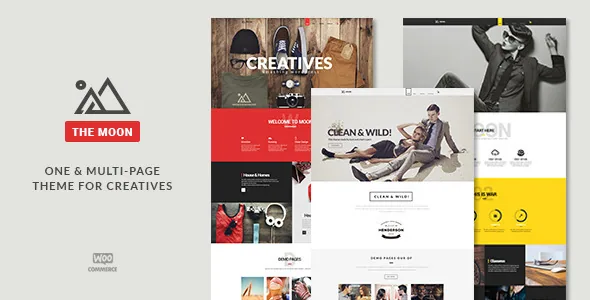
A theme package that includes design source files and three slider layers
The most concrete thing in the listing is what the marketplace file list names: Layered PSD alongside PHP, CSS and JS files. A layered Photoshop file is unusual company for a WordPress theme download, and it changes the handoff if a designer is involved — logo, header treatment and page mockups can be opened and edited rather than reverse-engineered from the live stylesheet.
The vendor's feature list matches that media-heavy bent. Master Slider is listed as included, Layer Slider is listed as included, and a portfolio thumbnail slider is described with four thumbnail size options. So slideshow duty can be split three ways: a fullscreen slider, a portfolio thumbnail strip, and whichever of the two bundled slider plugins suits the section.
That inventory also tells you what kind of site The Moon was built for. A studio, agency or freelancer portfolio that leans on large images and motion gets more from it than a text-forward brochure site. The vendor descriptions are the source for these claims; treat the plugin bundling as vendor-stated rather than something confirmed by running the package.
The opening screen the theme is organised around
Pixflow describes a "Special intro section" and a "Custom text rotator with 8 styles", and builds on that with a video background section, fullscreen video and fullscreen slider options. Read together, these are the ingredients of a first screen: a large image or video plate, a headline cycling through rotating phrases, and an animated transition into the content below.
Eight rotator styles rather than one is the detail worth noticing. If the opening line has to carry a tagline, a service list and a call to action at different moments, having several animation treatments lets you pick a rhythm instead of accepting a single default. On a one-page site this matters more than on a multi-page one, because the intro is not just a header — it is the thing that establishes the whole page.
The same motion vocabulary carries inward. Parallax support and animated elements are both on the vendor list, so sections can keep moving as the visitor scrolls rather than flattening out after the hero.
One page or many, with a demo import as the starting point
The vendor frames the theme as "One page or Multi page", and says a multi-page version can be built without touching code. In practice that means the same visual system can produce a long scrolling portfolio and a set of separate inner pages — services, about, contact, blog — from the same theme options.
"3 click demo import" is the vendor's starting mechanism. A demo import writes pages, menus and widgets into the WordPress install it runs on, so the sensible place to run it is a fresh install or a staging copy rather than a site with existing content. Pixflow's 2016 changelog entry for version 1.8.5 also records that the importer was improved to bring in media, theme settings and sliders, and that theme setting export and import were added — useful if you build one site and want to carry the configuration to another.
Don't read the demo import as a promise that a finished site appears. It gives you a populated layout to edit; the copy, images and structure are still yours to replace.
Page assembly runs through Visual Composer and shortcodes
Layouts are assembled in Visual Composer, which the vendor lists as "ready" rather than as a dependency spelled out in detail. The supporting material is a shortcode generator described as coming with "tons of shortcodes", unlimited shortcode colours, and a price table shortcode written specifically for Visual Composer — the kind of element a services or pricing page needs.
The colour claim is the one to plan around. Unlimited shortcode colours alongside unlimited theme colours and 620+ icon fonts suggests a theme-options-driven workflow: pick a palette, and buttons, tables and icons inherit it. That is a different editing model from dragging individual blocks and styling each one.
The listing records Gutenberg Optimized as "No". That is a statement about block-editor optimisation, not evidence that the block editor is unavailable for your posts. But if your team's whole workflow is block patterns and site editing, The Moon's described surface — Visual Composer plus a shortcode generator plus theme options — is not shaped around it.
Header, sidebar and widget levers
Navigation is the part of a creative site most likely to need variation, and the vendor lists unlimited header styles across three general types, with two header hover styles. The changelog adds detail from earlier releases: a wave menu in version 1.2, a hybrid menu fix, mobile menu improvements, and the ability to put a footer link in the main menu that scrolls to the contact section.
Multiple sidebars are listed, which matters if blog posts, portfolio items and contact pages need different side columns rather than one shared widget area. The theme is recorded as widget ready, and the vendor names custom widgets individually: Skill, Video, Flickr, Facebook and Instagram. Those are period-specific names — Flickr and Facebook widgets imply a social sidebar rather than a modern embed-and-block approach.
For a studio site, the practical combination is a header type that suits a transparent overlay on the hero, one sidebar for articles, and a widget area for social proof.
Portfolios, blog formats and the shop
Portfolio work is handled as its own content type. The vendor lists multi-portfolio readiness, custom post formats, and a portfolio thumbnail slider with four thumbnail sizes; the version 2.0 changelog adds a portfolio shortcode and a gallery shortcode, and records that the images carousel shortcode now opens in a Light Gallery popup.
Blog presentation is listed as classic and toggle blog layouts, with testimonial and carousel post types alongside custom post formats. These are theme-provided templates rather than plugins, so the reading experience for a case study or an article is decided by the theme rather than assembled.
WooCommerce is declared ready, and a 2016 entry records compatibility with WooCommerce 2.6 plus a fix for the quantity counter position. That is a long way behind current WooCommerce releases, so if you plan to sell anything, verify the shop templates against the version of WooCommerce you actually run before committing. Google Maps, Contact Form 7 ready styles, WPML and translation readiness round out the vendor list — each is a declaration, not a tested guarantee.
What the version history says about upkeep
The changelog's newest dated entry is version 2.0, released 29 March 2017. It adds the portfolio and gallery shortcodes and a newer Visual Composer compatibility line. Earlier entries show steady maintenance through 2015 and 2016 — WordPress 4.5 compatibility in 1.8.5, a security-related plugin update in 1.8.4, importer improvements.
The marketplace listing separately records a vendor update date of 3 September 2024, which the supplied changelog does not explain. That gap is worth holding as a question rather than an answer: the dated release notes stop in 2017, so nothing in them documents work after that point. The marketplace latest version is 2.0.
The declared attributes, observed on 4 November 2026, list WordPress 6.5.x as the software version and compatible browsers including IE9 through IE11, alongside Firefox, Safari, Opera and Chrome. A browser list that still names Internet Explorer says something about how long the product has been maintained. Treat the WordPress version as a declaration to confirm after installation rather than a tested matrix against your plugins and PHP version.
Who the package suits
The Moon fits a creative studio, freelancer or agency portfolio that wants sliders and an animated intro already built, and that has a designer who will use the layered PSD for branding and mockups. It also suits a one-page launch site that may later grow into a small multi-page site from the same theme options.
It fits less comfortably where the work happens in the block editor, where WooCommerce needs to run a current shop, or where you need documented maintenance after 2017. The listed feature set is broad and the slider inventory is genuine, but the release record is the honest constraint to weigh against it.
Questions & answers
Does The Moon work with the block editor?
The listing records Gutenberg Optimized as "No", which describes optimisation for the block editor rather than availability of it. The editing surface the vendor describes is Visual Composer with a shortcode generator and theme options, so plan a Visual Composer workflow rather than a block-first one.
What is in the theme download?
The marketplace file list names Layered PSD, PHP files, CSS files and JS files. The vendor also lists Master Slider and Layer Slider as included. File details for the copy available here are shown on the package panel, not in this article.
Can I build a multi-page site instead of a one-pager?
Yes, according to the vendor, which describes "One page or Multi page" and says a multi-page site can be built without code. The demo import can populate a starting layout, ideally on a fresh install or staging copy.
Is the theme current with WordPress 6.5?
The attributes declare WordPress 6.5.x, observed on 4 November 2026, but the changelog's newest dated entry is version 2.0 from March 2017 and does not document later releases. Confirm compatibility against your own plugin and PHP stack before relying on it.