A live flag that travels with the story
Most magazine themes describe layout. The Fox's vendor description spends its space on what an editor does on a busy day, and the sharpest example is the live post feature.
You mark a post as live for breaking news, and that status is labelled in two places: on the homepage and in the post header. A developing story therefore reads as developing whether a reader finds it on the front page or lands on the article directly. That is a small mechanism with an outsized effect on a news site, because the alternative — a headline that stops announcing itself as live once the reader is inside the page — is the reason readers complain they thought a story was finished.
Review publishing has its own path. Posts carry scores, and a widget collects the best-rated ones, which suits sites where reviews accumulate into an archive rather than appearing once.
Two editorial features that arrive through separate plugins
Co-author bylines depend on the Co-Authors Plus plugin, and view counts with a most-viewed list depend on Post Views Counter. The vendor names both explicitly as plugin pairings rather than built-in modules.
Plan accordingly. A byline-heavy desk, or a homepage rail that ranks by traffic, is only as reliable as those two plugins are installed and maintained. Everything else the vendor groups with the editorial tools — author box, related posts, share buttons for Facebook, X, Pinterest, WhatsApp and email, a reading progress bar and autoload of the next post — is described as part of the theme.
Newsletter signup goes through MC4WP for Mailchimp, which is a third dependency worth listing before you scope a build.
Ad slots with a separate version per screen size
The vendor lists ad positions at the top and bottom of single posts, before and after post content, as a block inside the page builder, and as a widget. Between them, that covers the placements most publishers actually sell: above the article, below it, in the sidebar, and anywhere a builder page needs a unit.
Each slot accepts an image with a link attached, or raw ad code such as Google AdSense. The detail that changes how you set up a campaign is that every slot carries separate desktop, tablet and mobile versions. You can serve a wide leaderboard to a desktop reader and a smaller unit to a phone without adding another plugin to make the decision for you. Whether your ad network permits that split is a question for the network.
The builder stops at the front page and category fronts
The built-in page builder has a deliberately narrow remit: homepages and category pages. Its block list is post grid, post list, post masonry, post carousel, post group, heading, text, image, ad, subscribe form, authors and sidebar.
Read that list as the theme's theory of how a magazine front page gets assembled. Most blocks are article furniture — the loops, the ad, the newsletter ask, the byline strip — and the generic layout pieces are limited to heading, text and image. If your plan includes marketing landing pages with bespoke sections, this is narrower than a full site builder. If it includes a homepage plus a set of category fronts built from article cards, the blocks cover it without a third-party builder installed.
Headers are built the same way, in the Customizer, with sticky and off-canvas menu behaviour. The mega menu is enabled per menu item, so a section that needs a multi-column dropdown gets one and the rest of the navigation stays plain.
Seven article heads, and why the dark palette matters
Seven single post layouts are listed, including a full-width hero and a half hero, so the article head can be a full-bleed image or a split treatment depending on the story. Featured images can be pulled automatically from a YouTube or Vimeo link, and post formats cover video, gallery and audio.
Dark mode is described as having its own text and background colours rather than inverting the light defaults. That distinction decides whether night reading actually works: a palette chosen for dark backgrounds keeps contrast and avoids the washed-out greys you get from a mechanical inversion.
Fonts come from Google Fonts or from font files you upload yourself, which matters if you license a typeface and would rather serve it from your own server. Logos can be text or an image.
Importing a demo onto a site that already has content
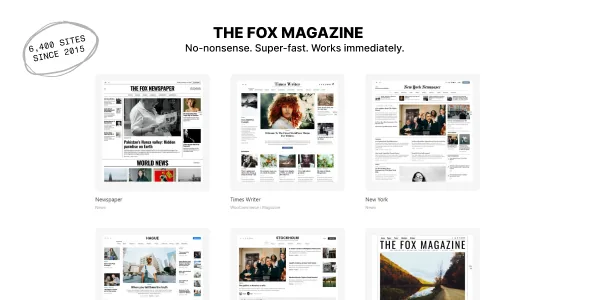
The marketplace description lists 37 demos with Elementor versions of some, and makes a claim about how they relate: each one is a different configuration of the same theme, so a layout seen in one can be reused in another. The demo list is a menu of arrangements, not a set of separate products.
Import runs two ways — with the demo's sample posts, or as settings and styles only. The second is the one that matters when you launch onto an existing archive: your content stays and the configuration arrives around it.
Two cautions belong here. Demo images are demonstration assets and the vendor states they are not included in the theme, so photography is your own budget line. And importing styles onto live content is still a change to a working site; take a backup first.
Performance statements, and what they are worth
The vendor describes a critical CSS option that prints above-the-fold styles inline, says the theme has been tested with more than 100,000 posts, and names LiteSpeed Cache, WP Rocket and Imagify among the optimisation plugins it works with. Treat the 100,000-post figure as the vendor's own stress statement — a comfort signal for large archives, not a benchmark you can carry over to your hosting.
None of this was measured while preparing this page. If page weight decides the choice, the live demo can be run through PageSpeed Insights on your own terms, which tells you more about a real page than any figure quoted in a listing.
Compatibility as recorded in the listing
The marketplace attributes, observed on 3 November 2026, name WordPress 6.x and 7.0.x, PHP 7.4 and 8, WooCommerce 6.x through 8.x, WPML and the Block Editor, with Gutenberg Optimized marked yes. Package files are listed as PHP, CSS and JS. A child theme is included, and the theme is described as working with WordPress Multisite.
The vendor also states that Elementor is supported but not required, and that the theme runs with either the Block Editor or the Classic Editor. Those are listing-level claims, not installation results; the pairing of your WordPress release with the theme version you deploy is the thing to confirm before launch. The vendor's claim of development since 2015 is likewise something a changelog can corroborate and a description alone cannot.
Questions & answers
Do I need Elementor to build a homepage with The Fox?
No. The theme has its own builder for homepages and category pages, and the vendor says it works with the Block Editor or the Classic Editor. Elementor is listed as supported but not required.
Which editorial features depend on other plugins?
Co-authors need Co-Authors Plus, view counts and most-viewed lists need Post Views Counter, and the newsletter signup form uses MC4WP for Mailchimp. The vendor names these as separate pairings rather than built-in features.
Can the same ad slot show different creatives on mobile and desktop?
Yes, per the vendor: each ad slot has separate desktop, tablet and mobile versions and accepts either a linked image or ad code such as AdSense. Your ad network's own rules still govern what may be served.
Can demos be imported without their sample posts?
The vendor offers a styles-and-settings-only import for sites that already have content. Demo images are excluded from the theme either way.


