Bold Builder writes text as well as layout
The vendor's most specific addition to Tabula is a feature dated rather than described in general terms: from October 2023, an AI Content Generator in Bold Builder generates text from input data inside the editor. The stated purpose is producing copy for design and development work without leaving the page you are assembling.
That placement matters more than the AI label. A school site is built by people who know the timetable and the fees but often not the phrasing. Generating a first draft of a course description in the same panel where you set the columns keeps the writing and the layout in one pass, instead of drafting in a document and pasting it in.
The vendor does not list the workflow as a separate plugin, and it gives no detail on what input data the generator expects or how good the drafts are. Treat it as a starting point you edit, and keep a real person reviewing anything that describes a course, a teacher or a price.
Two element controls that fit a term calendar
The backend editor feature list includes time-limited content appearance and a hide/appear option tied to screen resolution, both set per element rather than site-wide. On a school site those are the two settings most likely to save work.
Time-limited appearance covers the things with deadlines: an enrolment window, an early-bird price, a summer intensive, an exam-period notice. You set the period and the element stops showing; nobody has to remember to remove it after the deadline has passed.
The resolution control is where a timetable earns its keep. A six-column weekly grid reads well on a laptop and collapses into something unusable on a phone. Because the setting applies to individual elements, you can hide the dense version at small widths and show a simpler arrangement in its place, without rewriting templates. The description does not say how the time controls are configured or what breakpoints the resolution option uses, so check both in the builder before you build a page around them.
Schedule, Event, Price list and Steps line
The element list names a Schedule element, an Event element, a Price list and a Steps line, which is an unusually school-shaped set. A Schedule is the recurring weekly grid; an Event covers the one-off date such as a recital or an open evening; a Price list sets out fees row by row instead of in prose; a Steps line suits a sequence such as placement test, enrolment, first lesson.
What the vendor describes is presentational. None of these elements is said to take registrations, hold class capacity or connect to a booking system. What the Schedule element actually produces — a typed table or something more structured — is not stated either, so the demo is the place to see the shape before committing.
A theme with a Schedule element changes who maintains the timetable. The term change becomes an edit to one block with its own fields rather than a hand-adjusted layout on a page.
The bundled Cost Calculator answers fee enquiries
Bold Themes' Cost Calculator plugin is listed among the plugins included with the theme, and the vendor describes it as customizable and free with Tabula. Where a price list shows a table, the calculator returns an estimate to the visitor based on the choices they make.
That distinction is only worth having if your fee really is combinatorial: instrument plus lesson length plus term count, or language plus intensity plus group size. A schedule of fixed term prices does not need a calculator; a school quoting per enquiry does.
Configuring it badly produces a number you have to disown in an email, so the options and the rounding need testing with real prices. The vendor states the plugin is included and customizable, and does not describe payment processing, enrolment records or calendar booking as part of it. Quote building and registration are separate problems; Tabula addresses the first.
Copying a layout between pages and between sites
The vendor describes full clipboard functionality with copy and paste from one page to another, and from one website to another. Multi-campus schools and small agencies are where the second half matters: a department landing page built once can be pasted and edited rather than rebuilt.
Cross-site pasting suggests a layout can be carried into a second Tabula installation, which suits a group running separate campus sites under one design language. The description does not say what happens to referenced images or theme-specific settings in transit, so test it on your own installs before planning a rollout around it.
Layout otherwise follows the listed Bold Builder options: full-width or boxed pages, multiple header styles including a sticky header, left or right sidebars, per-page overrides of global settings, colour schemes with a picker, parallax and transition effects. The per-page override is the one with daily consequence — a one-page summer camp promo need not inherit the institutional homepage's header treatment.
Choosing among twelve homepages
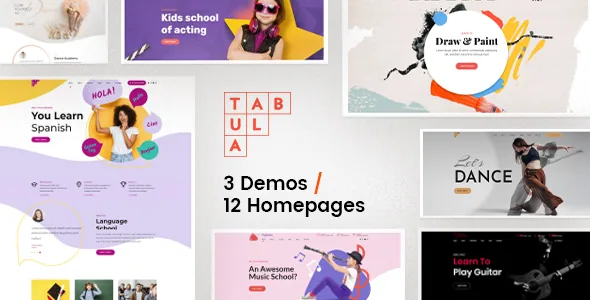
The vendor counts 3 demos with 12 homepages of distinct design and designed inner pages, plus 1 RTL homepage, all importable with the bundled Bold Themes WordPress Importer. Twelve is not automatically useful; it is twelve decisions, and a team that picks three will still be weighing the rest.
The number reads better as coverage of school types. The vendor names language schools, art and music classes, acting and dance studios, academies and freelance teachers, and a homepage built around a gallery of student work does not resemble one built around a term timetable. Match a demo to your actual intake rather than to whichever preview looks best.
The licensing note sits alongside that decision. The vendor states demo images are not licensed for third-party use on production sites and must be licensed separately if you keep them, so budget for your own photography of classes from the start.
Typography built around dash ornaments
The headline options are described with unusual specificity: attractive headline fonts with dashes shaped as a circle, a star, an art dot, a speech balloon and a guitar pick. The guitar pick is a stylistic commitment — it signals a music school instantly and would sit oddly on an exam-prep academy.
Alongside these sit Google Fonts, SVG logo support and a colour picker, which puts identity decisions at theme level rather than page level. That suits a small school with no designer on staff, provided it exercises restraint: pick two or three ornaments and hold to them rather than spreading all five across the site.
Gutenberg Optimized is marked Yes in the marketplace attributes observed on 4 November 2026, and the theme's options run through the native WordPress Customizer. Bold Builder remains where page layout is assembled, so plan for layout edits to happen there even if standard posts use the block editor.
Declared compatibility and the package
The marketplace attributes observed on 4 November 2026 list WordPress 6.0.x through 7.0.x, WooCommerce 6.x through 9.x, and WPML, and the vendor's own supported plugin list adds Contact Form 7, W3 Total Cache and Yoast. The vendor also states responsive and retina-ready output, widget-ready areas, child theme readiness, translation readiness and Multisite testing, and lists IE11, Firefox, Safari, Opera, Chrome and Edge as compatible browsers. These are declarations from the vendor and marketplace, not results from running the theme against your PHP version or plugin mix.
Two of them carry weight for a school. WPML matters if you publish a bilingual prospectus or teach in more than one language. The RTL homepage matters if the site uses a right-to-left script, though a single RTL homepage is narrower than a full RTL design system — check the inner pages you will actually use. The declared WooCommerce support suits a shop for uniforms, instruments or course materials; it is not described as a route for class fees.
The marketplace records the latest version as 1.3.5 with a vendor update in July 2026. The theme's changelog is where a given release's changes are documented, and the bundle list on the marketplace names PHP, CSS and JS files.
If the timetable you rewrite each term and the fee you quote per enquiry are the centre of the site, the Schedule, Price list and Cost Calculator combination is the reason to look at Tabula. If you need enrolment with capacity limits and payments, these elements are presentation and the registration layer is still your decision.
Questions & answers
Does Tabula take bookings or payments for classes?
No. The vendor describes Schedule, Event, Price list and Steps line elements plus a bundled Cost Calculator, and lists WooCommerce as supported. None of these is described as handling capacity, registration records or payment for a class place. Booking remains a separate integration.
Can I automatically hide an enrolment notice after a deadline?
The backend editor feature list includes time-limited content appearance as a per-element option, so an enrolment banner or early-bird price can be set to show for a defined period. The description does not explain how the period is set, so confirm the controls in the builder before relying on them for a deadline.
Can I use the demo images on a live school site?
Not without licensing them. The vendor states that images on the demo sites are not licensed for third-party use on production sites and need separate licensing if kept. Plan for your own photography of classes and students.
What does the AI Content Generator in Bold Builder do?
The vendor says the feature, added in October 2023, generates text from input data within the builder. The description does not detail the inputs, the output quality or any review step, so treat generated copy as a draft that someone checks before it describes a course, a teacher or a price.