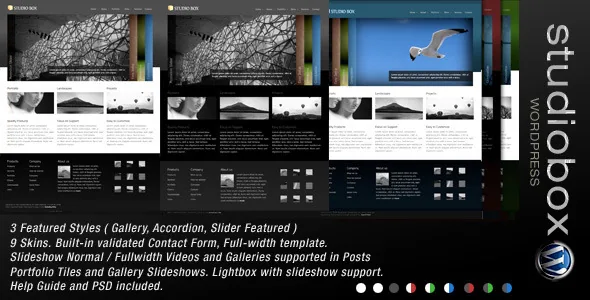
A homepage built from slide mechanisms, not a page builder
Nothing in the vendor's description introduces a page builder, a block pattern library or a drag-and-drop layout tool. What it describes instead is a homepage assembled from slide behaviours: a "Home Page featured block", "Accordion slides", "Scroll slides" and a "Gallery slideshow with thumbnails". Those are four distinct ways of presenting work on the same front page, and they define how a visitor first meets the portfolio.
The frame around them is fixed. The marketplace attributes list Layout as Fixed and Columns as 2, and there is no fluid or boxed layout choice in the feature list. If you are picturing a full-bleed grid you can widen at will, that is not what this theme offers; you are working inside a two-column structure the theme has already decided.
A V1.7 changelog entry says the homepage became "more flexible to fill", which suggests the featured area gained room rather than becoming configurable in the modern sense. Treat it as a theme where you choose and order slides, not one where you reshape the page skeleton.
What each slide type actually asks of you
The four mechanisms are not interchangeable skins on one slider. An accordion holds items collapsed and opens the one a visitor picks, so it works when each item needs a label or thumbnail that can be scanned before opening. Scroll slides advance as the visitor moves through the page, which suits a short sequence you want read in order rather than clicked through.
The gallery slideshow with thumbnails is the most self-explanatory: images run in sequence with a thumbnail strip giving direct access to any frame. That is the mode to pick when the work is a set of photographs and the visitor should be able to jump rather than wait.
Your decision is really about volume. A handful of strong pieces suits a scrolling sequence or a featured block; a larger body of images is easier to browse as a slideshow with thumbnails. The vendor does not state limits on how many items each mechanism holds, so the practical ceiling is something you establish in your own build.
Nine skins and a category-driven navigation layer
The theme ships with nine skins, according to the vendor's feature list, and a Theme Options panel to work from. Skins are the fastest way to shift the overall palette; they are not a design system you extend, and the evidence gives no indication of how far each skin reaches into typography or component styling.
Navigation connects to WordPress's own taxonomy rather than a separate structure. The feature list names "Drop down menus with subcategory" and a "Subcategory supported sidebar", which means categories and their children shape both the menu and what appears beside content. For a portfolio organised by discipline — photography, print, motion — that is a workable arrangement because the hierarchy already exists in your category tree.
The sidebar detail is worth noting if your work is unevenly distributed across categories. Because sidebars respond to subcategory, what appears next to a page can change depending on where the visitor is. The marketplace attributes also mark Widget Ready as Yes, so those sidebars take standard widgets.
Portfolio items mix video and image, and the hover tells you which
The vendor describes a "Portfolio showcase (optional Recent item display)" and an "Item showcase with video and images. (easily identifiable hover icons)". The second phrase is the useful one: because a single portfolio entry can hold both video and images, visitors need to know what happens before they click, and the hover icons are the theme's way of signalling it.
That mixed-media behaviour is a practical distinction. A studio with a handful of motion pieces and a lot of still work can put both in the same portfolio stream without separate templates or a visibly different card style.
The optional recent-item display is a toggle on the showcase rather than a separate page type, per the description, so the same portfolio layout can either lead with recent work or stay purely curated. Combined with a lightbox and slideshow gallery mentioned in the feature list, the portfolio reads as a sequence of viewing surfaces rather than a grid of posts.
Theme Options, image handling and the background manager
Configuration lives in Theme Options. The changelog shows what has been folded into it over time: V1.8 records a Theme Options upgrade, and V1.7 added a WordPress background colour and image manager, so background treatment is set natively instead of through custom fields.
The same release moved the theme to "Uses Post Image (without timthumb)". That is a maintenance detail with a practical edge: timthumb was an external image-resizing script that older themes relied on and that caused problems when it was not kept current. Handling images through WordPress's own post image functions removes that dependency.
V1.7 also introduced a blog template, a slideshow gallery template built from image attachments, and jQuery no-conflict code. The no-conflict change matters less for a fresh build than for coexistence with plugins that load their own jQuery, which is most of them. The contact form is built in, and the vendor says it validates input.
Where the age of the theme shows, and what to check
The vendor's declared software range is WordPress 4.0, 3.9, 3.8 and 3.7. That is a statement of what the theme was tested against, not a limit on what it will run on, but it tells you the theme's own frame of reference is the 2013–2014 era. Nothing in the record describes how it behaves on current WordPress releases.
The same goes for other attributes. Gutenberg Optimized is marked No, which speaks to block-editor readiness rather than proving the block editor is unavailable, and it is consistent with a theme whose layout is fixed. High Resolution is marked No, so there is no retina-oriented asset claim. The browser list runs from IE6 to IE10 alongside Firefox, Safari, Opera and Chrome, which is a legacy targeting profile rather than a statement about current browsers.
None of that is a verdict. It is the list of things to confirm on a staging install with the plugins you actually intend to use, particularly if you need block-based editing or modern image delivery.
What the package declares
The ThemeForest file list names Layered PSD, PHP, HTML, CSS and JS files. The layered PSD is the outlier in a WordPress theme and is only useful if a designer is producing matching graphics from the same layouts; it is not a substitute for your own imagery, and the vendor does not claim that preview images are included.
The marketplace record observed on 4 November 2026 puts the item at version 1.8, with documentation described as well documented and a vendor support forum referenced in the description. Those are listing attributes rather than tested facts about your install.
Questions & answers
Can I change the two-column layout to full width?
The listed attributes record the layout as fixed with two columns, and the feature list names no fluid or boxed layout switch. The evidence does not show a supported way to alter the column count, so plan on the two-column frame rather than assuming it is adjustable.
Does Studio Box support the block editor?
The record marks Gutenberg Optimized as No, which describes block-editor readiness rather than proving the block editor is unavailable. The theme's own editing path is Theme Options plus the template's fixed structure, so test block-editing behaviour on a staging copy before committing.
Can one portfolio item hold both video and images?
Yes, according to the vendor's description: the item showcase is described as supporting video and images together, with hover icons that identify which a visitor is about to open.


