Built around what a school publishes every week
Most education themes give you a homepage, a blog and a contact form, then leave the school-specific content to your own workarounds. StylemixThemes' feature list for Smarty names five separate pieces of school furniture instead: a timetable module, a teachers and classes manager, a Food Menu module for the cafeteria, an Events custom post type and a Donations custom post type.
Read together, those describe the recurring information a school site actually has to maintain. A timetable is not a blog post. A cafeteria menu changes on its own cycle and belongs in its own structure. Staff and classes are related to each other, and events follow a calendar rather than a publication date. If your site is genuinely going to carry that information, having dedicated content types behind it is a different starting point from assembling pages around generic posts.
Eighteen templates describe the public site map
The vendor counts 18 prebuilt page templates, and the examples given are unusually specific: Athletics, Alumni, Academic Calendar, Classes with a unit breakdown, Cafeteria with a food menu, Transport with a route plan, Research and Summer Camp.
What matters is not the number but the shape of the pages. A "classes with unit breakdown" template implies a structure for describing a course of study in parts, which is the page a prospective parent or student lands on. "Transport with route plan" is the page that answers a logistics question. Alumni and Athletics exist for communities that a generic school homepage would otherwise ignore. If your school's website has to answer those questions in public, the template set already anticipates them; if you only need a notice board, much of it will sit unused.
The LMS layer belongs to MasterStudy, not the theme
Smarty's source description opens by saying the theme is integrated with the MasterStudy LMS plugin. That framing is worth keeping straight: the course-building material — sections, lessons, quizzes, assignments, a points system, certificates and badges, Google Classroom export, student and instructor profiles — is described as functionality of the plugin, not of the theme itself.
So the decision to weigh is whether you want to run MasterStudy on this site at all. If you do, the theme is designed to present courses with cost, duration, level and materials visible, and the vendor states the LMS side is compatible with WooCommerce while also taking PayPal and Stripe. If you do not, the school-information side of Smarty still works; you simply are not using the part the description spends most space on. Treat the LMS capability as a plugin commitment rather than a free extra.
Where the design variation comes from
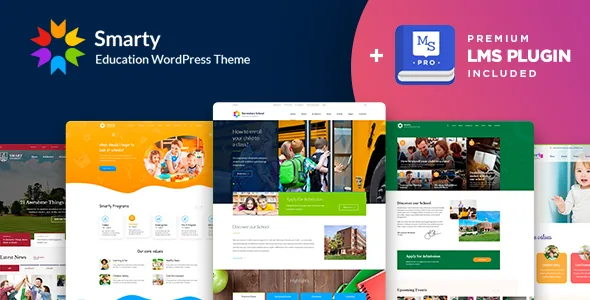
The preset choice is deliberately small: five demos split across kindergarten, school and university, four colour skins and four header layouts. Variation is expected to come from those skins and headers rather than from a large library of alternative page designs.
Editing runs through Visual Composer, with Slider Revolution included. The marketplace's compatible-with attributes also name WPBakery Page Builder — the vendor's own text uses the Visual Composer name — so if your workflow assumes one specific builder, confirm which you get before you plan around it. A real-time WordPress customizer handles theme options with a live preview, and the theme is built on Bootstrap with a responsive layout and retina-ready imagery with custom SVG icons. Gutenberg Optimized is marked No on the listing, which describes how the theme's layouts were built; it does not establish that the block editor is unavailable for other content.
Package contents, demo images and declared compatibility
The files included are listed as Layered PSD, PSD, PHP, CSS and JS. That PSD inclusion matters if a designer is producing graphics for the site rather than only editing within the browser.
The vendor also notes that some photos and images are not included in the demo import because of licence restrictions, so a freshly imported site will not look exactly like the demo until you supply your own media. Worth knowing before you judge an import as broken.
Compatibility is a vendor declaration rather than a test record. As observed on 4 November 2026, the listing names WordPress 6.1.x through 6.5.x, WooCommerce 7.x.x and 8.x.x, WPML, Gravity Forms, WPBakery and Visual Composer, and browsers from IE11 through Chrome, Firefox, Safari and Opera. Those ranges are the vendor's stated support; they do not confirm behaviour on a later WordPress branch or on your host's configuration.
Which school site this suits
Smarty earns its place when the site has to hold structured school information — a timetable, staff and class assignments, a cafeteria menu, a transport route, an events calendar and a way to take donations — and when the same site might later add courses delivered through MasterStudy.
A small institution that mainly needs a public-facing brochure with news and contact details will find the module list larger than its needs, and the small preset set of five demos and four headers offers limited visual starting points to choose between. The honest test is whether the timetable, classes and cafeteria content types match the information you already maintain; if they do, the theme's structure is doing real work. If they don't, you are paying for a page builder on top of a layout.
Questions & answers
Does Smarty include online course functionality without extra plugins?
No. The vendor attributes course building, lessons, quizzes, assignments, certificates and Google Classroom export to the MasterStudy LMS plugin, which the theme is described as integrated with. Plan for that plugin as part of your build if you want course delivery.
Can I use the block editor with Smarty?
The listing marks Gutenberg Optimized as No, which reflects how the theme's own layouts were built. That flag does not state that the WordPress block editor is switched off or unusable for your content, so check the documentation if block editing matters to your workflow.
Will the imported demo look exactly like the preview?
Not necessarily. The vendor states that some photos and images are excluded from the demo import because of licence restrictions, so placeholder or missing media is expected until you add your own.